Moon phase display
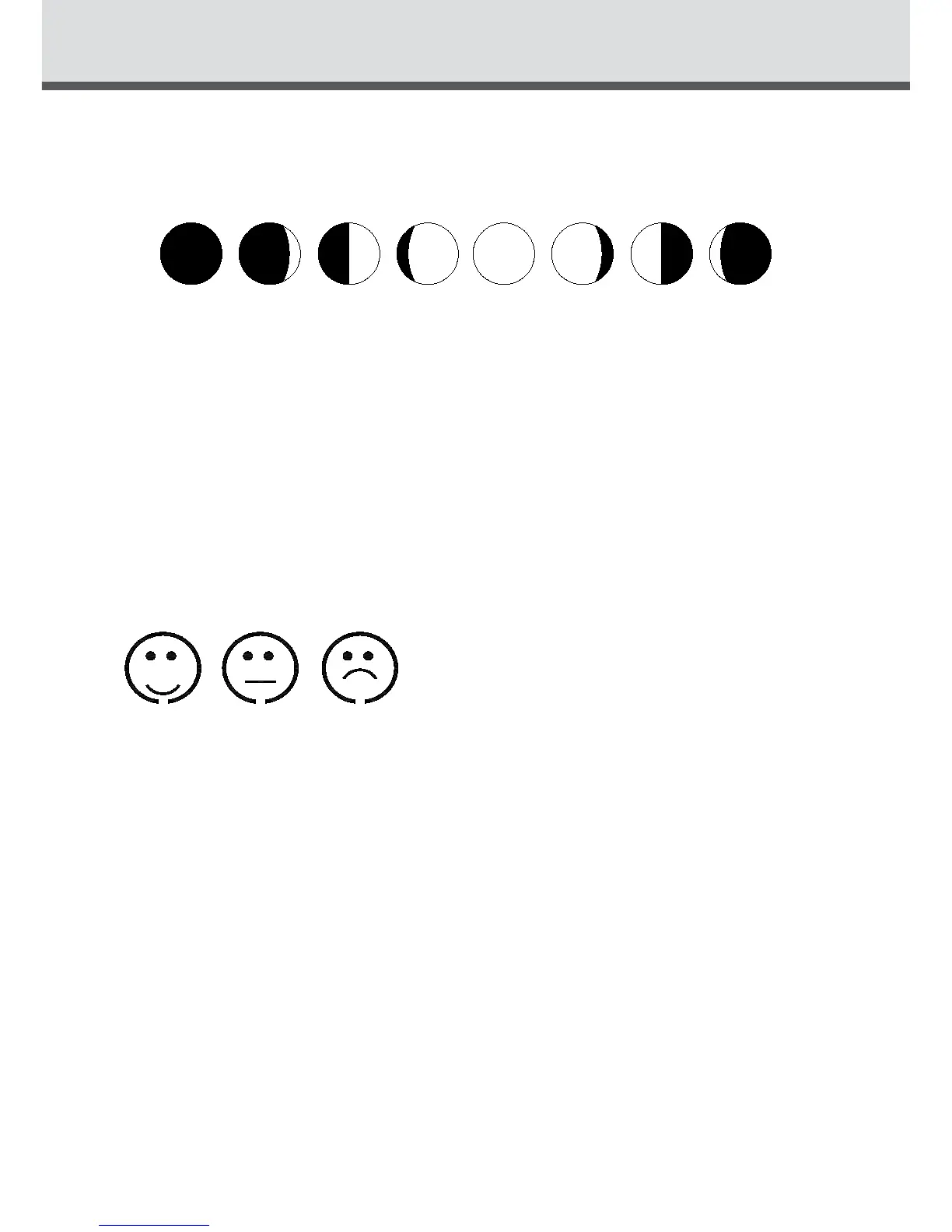
The weather station uses saved data to show the moon phase
A B C D E F G H
A:Newmoon B:Increasingcrescent C:Firsthalf
D:Increasing3/4 E:Fullmoon F:Decreasing3/4
G:Lasthalf H:Decreasingcrescent
Living space humidity
The weather station uses saved data to determine the humidity in the living
space and shows the respective symbols.
comfortable,dry, humid
Low battery condition display
The weather station displays the low battery condition symbol to remind you
thebatteriesoftheindoorreceiverneedtobeexchanged.
There will be an unhappy face displayed in between the indoor temperature
andhumidityreadings,thiswillmeanthebatteriesneedtobereplaced.
RF connection to the outdoor data collector
Pressandholdthekey“OUT“for3secondstosearchforoutdoordata
collector,theRFsignalsymbolattheoutsideareawillashingwhentrying
toconnect.RFreceptionisweakerinroomswithconcretewalls(e.g.inthe
basement)andinocebuildings,thedistancewillbeshortenifhaveinterfer-
ence.Forextremecases,pleaseputthemainunitnearawindow.
MOONPHASE/LIVINGSPACEHUMIDITY


 To Next Page