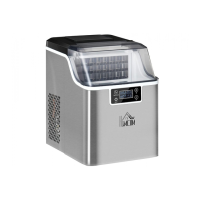
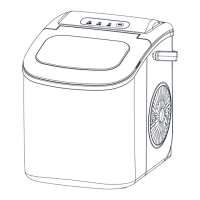
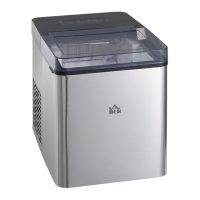
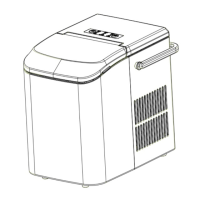
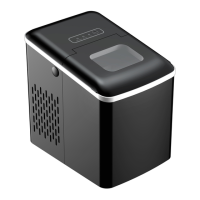
This document is a user manual for the HOMCOM Ice Maker, model 800-141, with the internal reference IN220800121V01_UK. It provides instructions for safe operation, preparation, use, and maintenance of the appliance.
Function Description
The HOMCOM Ice Maker is designed to produce ice cubes automatically and dispense both ice cubes and water. It features a control panel with an LCD display for easy operation and monitoring. The unit is intended for household use.
Important Technical Specifications
- Model: 800-141
- Protection Type: I
- Climate Type: SN/N/ST/T
- Power: 220-240V~50Hz
- Ice Making Current: 0.8A
- Ice Harvest Current: 1.0A
- Refrigerant: R600a/32g
- Net Weight: 9.5 kg
- Vesicant: C5H10
- Enclosure: Plastic
- Ice Making Cycle Duration: 6 to 12 minutes (depending on selection and ambient temperature)
- Water Dispense Time: Default 10 seconds, adjustable from 7-25 seconds
- Timer Delay Time Range: 0.5-19.5 hours (Default 1 hour)
Usage Features
The ice maker offers several user-friendly features:
Control Panel and Display:
The control panel is a touch display with visible functions, including an LCD display window (A) that shows:
- TIMER setting delay time (1)
- Ice cube size display: Small (2) and Large (3)
- Ice cube obtaining symbol (4): Indicates ice cubes are being pushed out.
- Water dispensing symbol (5): Indicates water is flowing through the tap.
- Error code (6)
- Lack of water in reservoir symbol (7): Unit stops, requires water refill.
- Ice-full symbol (8): Indicates ice storage area is full.
- ON/OFF symbol (9): Flashes when off, stays lit when on.
Buttons:
- Ice cube obtaining button (B): Dispenses ice cubes.
- Water dispenser button (C): Dispenses water.
- ON/OFF Button (D): Turns the unit on/off.
- SELECT Button (E): Selects ice cube size and adjusts delay times for ice making and water dispensing.
- TIMER Button (F): Sets the timer on or off.
Ice Making Process:
- Water Filling: Open the side door (9) and pour drinking water into the reservoir (10), ensuring it stays below the 'MAX' level mark.
- Start-up: Plug in the unit; the ON/OFF symbol will flash. Press the 'ON/OFF' button to start the ice making cycle.
- Ice Cube Size Selection: The default ice cube size is large. Press the 'SELECT' button to switch between large and small ice cubes.
- Ice Making Cycle Adjustment: If ice cubes are not the right size, the cycle time can be adjusted. Hold the 'ON/OFF' button for more than five seconds until '0' appears in the 'TIMER' delay area. Press 'SELECT' to change the setting to '1' (adds one minute) or '2' (adds extra time). Pressing 'SELECT' again reverts to '0'. The setting is remembered after five seconds.
- Water Level Monitoring: The unit will stop if there is a lack of water, indicated by the lack of water symbol and a flashing arrow. Refill the reservoir, preferably after turning the unit off and then restarting.
- Ice Full Indicator: The unit stops when the ice storage area is full, indicated by the 'ice full' symbol.
Ice and Water Dispensing:
- Ice Dispensing: Place an ice cube container on the drip tray (1). Press the 'ICE' button (B) once. The ice cube pushing spring (6) rotates, and ice cubes are dispensed. Press 'ICE' again to stop.
- Water Dispensing: Place a cup on the drip tray. Press the 'WATER' button (C) once. Water flows from the middle tap, and the water dispensing symbol lights up. The default dispense time is 10 seconds.
- Water Dispense Time Adjustment: Hold the 'WATER' button for more than five seconds. '10' will appear in the TIMER delay area. Press 'SELECT' to adjust the time from 7-25 seconds. The setting is remembered after five seconds.
Timer Function:
- Setting: Press the 'TIMER' button. The default is one hour. Press 'SELECT' to increase the time by 30 minutes. Holding 'SELECT' changes the time quickly. 'H' flashes during adjustment and stays lit when the program is complete.
- Cancellation: Press the 'TIMER' button again; the digit and 'H' will disappear.
- Modes: Set OFF TIMER when the unit is on to stop it automatically. Set ON TIMER when the unit is on standby to switch it on automatically.
Maintenance Features
Cleaning and Maintenance:
- Unplug: Always unplug the unit before cleaning or maintenance.
- Internal Cleaning: Clean the inside with diluted detergent, warm water, and a soft cloth. Rinse with water and drain by unplugging the drain cap (3).
- External Cleaning: Clean the outside regularly with a mild detergent solution and warm water.
- Drying: Dry both the inside and outside with a soft cloth.
- Draining Reservoir: When the machine is off, open the water drain cap to drain water from the reservoir.
- Water Change: Change the water in the reservoir every 24 hours to maintain good hygiene. Drain and dry the reservoir when the unit is off.
Important Safety and Setup:
- Placement: Place the ice maker on an even surface, away from direct sunlight and heat sources. Ensure at least 15 cm of space around the unit for air circulation.
- Refrigerant Settling: If the unit arrives from cold conditions, wait a few hours for it to reach room temperature before plugging it in.
- Grounding: The appliance must be properly grounded with a three-prong plug. Do not modify the plug or use an ungrounded outlet.
- Water Type: Only use drinking water to make ice cubes.
- Extension Cords: Not recommended due to overheating risk. If necessary, use a minimum size of No.0.75mm² and rated no less than 16A/250V~ with a plug.
- Disposal: Releasing refrigerant into the atmosphere is strictly forbidden. Dispose of the appliance according to European Directive 2012/19/EU for waste electrical and electronic equipment. The blowing gas inside the unit is flammable, and disposal must comply with national regulations.
Troubleshooting:
The manual provides a troubleshooting guide for common issues:
- Lack of Water: If the water symbol and arrow flash, refill water and restart.
- Too Much Ice: Remove excess ice cubes.
- No Ice Cubes Inside: Remove obstructions, clean walls, or hold 'SELECT' for over five seconds to restart the ice cycle (up to 10 cycles).
- Fault with Ambient Temperature Sensor: The unit will still work; contact customer service for replacement.
- Ice Making Box Cannot Reset: Contact customer service.
- Ice Cubes Stick Together: Ice cycle too long (select 'small ice cube' cycle), or water temperature too low (change water, optimal 7°C-32°C).
- Ice Making Cycle Normal but No Ice: Ambient or water temperature too high (ensure below 32°C, use cold water), refrigerant leakage, or blocked cooling system pipe (contact qualified technician).

 Need help?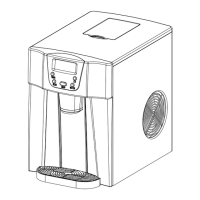

 To Next Page
 General