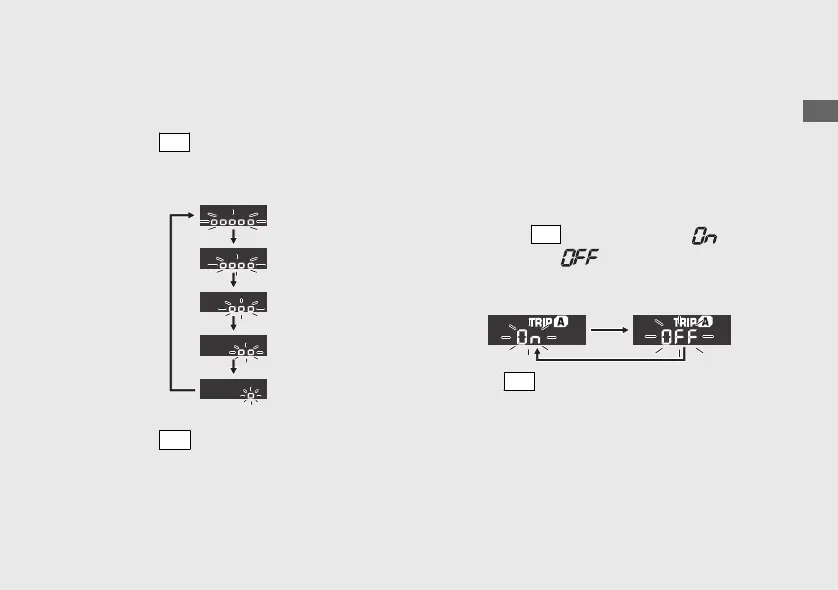
3 Backlight brightness adjustment:
You can adjust the brightness to one of five
levels.
a
Press the
SEL
button. The brightness is
switched.
b
Press the
SET
button. The brightness level is
set, and the display moves to the activating/
deactivating of tripmeter A and average fuel
mileage A automatic reset mode.
4 To activate/deactivate of tripmeter A
and average fuel mileage A automatic
reset mode:
You can activate or deactivate the automatic
reset mode by refueling after 1st (E) segment
of the fuel gauge start flashing. Activation is
initially set.
a
Press the
SEL
button to select “ ”
(activate) or “ ” (deactivate) in the
automatic reset mode.
b
Press
SET
button. The activation/
deactivation of automatic reset mode is set,
and then the display moves to changing of
speed and mileage unit..
20200227172533_31K0WA000_enu_BOOK Page 30 Thursday, February 27 2020 17:31:25 JST
Operation Guide
27
Continued











 To Next Page