EasyManua.ls Logo

Honda CB200 - Cam Chain Tensioner

Honda CB200
98 pages
Print Icon
To Next Page IconTo Next Page
To Previous Page IconTo Previous Page
Loading...
30
Ill.
ENG
IN
E
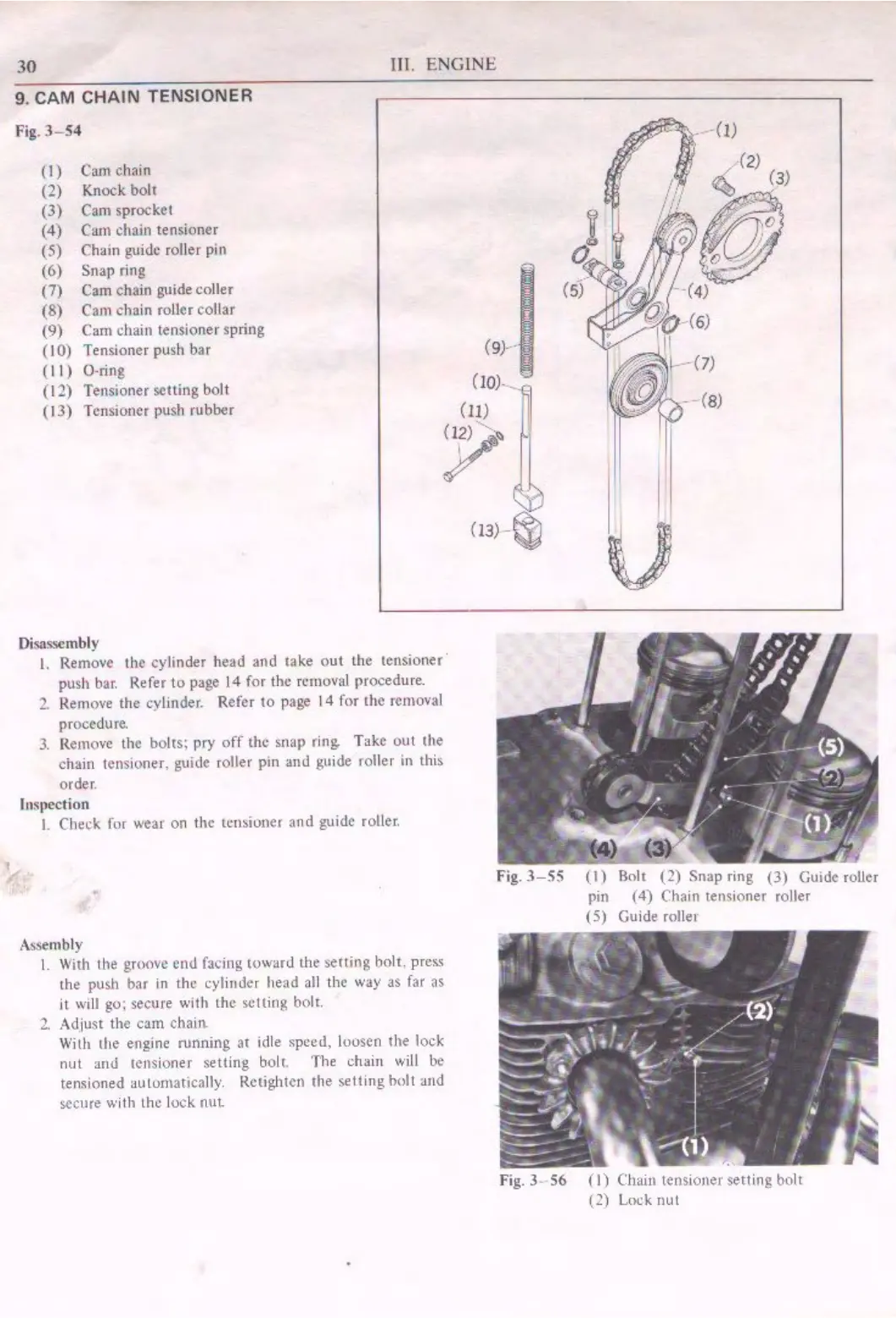
9. CAM CHAIN TENSIONER
Fig.
3-54
(I)
Cam
chain
(2)
Kn
oc
k
bolt
(3) Cam
sprocket
(4)
Cam
chain tensioner
(5)
Chain guide roll
er
pin
(6)
Snap
ring
(7)
Cam chain
guidecoller
(8) Cam
cha
in
ro
ll
er
collar
(9) Cam chain tensioner spring
(10)
Tensioner push bar
( I I ) O-ring
( I
1)
Tensioner
setting
bolt
( I
3)
T ensioncr push
rubber
(
9)
-·· -
(Io)
-_
(11)
°P~
I
u
Disassembly
I.
Remove the
cy
l
inder
head
and
iake
out
the
tensioner·
push bar. Refer to page 14 for
th
e removal procedure.
2.
Remove
the
cylinder. Refer
to
page I 4 for
the
removal
proce
du
re.
3. Remove the
bolts;
pry
off
the
snap
ring.
Take
out
the
chain tensioner,
guide
roller
pm
and
gu
ide
rolle
r
in
this
order.
tn~1,ection
I.
Check for wea,
on
th
e tensioner
and
guide roller.
Assembly
I.
With the gr
oove
end
facing
toward
the
setting
holt, press
the
push
bar
in
the
cylinder
head
all
th
e way
as
far
as
it will
go
: secure with
the
selling
bolr.
2.
Adjust
the
cam
chain
With
the
engine
running
at
idle
speed,
loosen
the
lock
nut
and
tensioner
sett
ing
bolt
.
The
chain
will
be
tensioned automatically. Rctighten
the
selling
bolt
and
secure
with
lh
c lock
nut.
(13) - ~
Fig.
3-55
(1)
Bolt
(2)
Snap
ring
(3)
Guide roller
pin
(4)
Chain tensioner roller
(5)
Guide roller
Fig.
J .
56
(I)
Chain tensioner
setting
bolt
(2)
Lock
nut