V.
ELECTRICAL
Hom
hutton
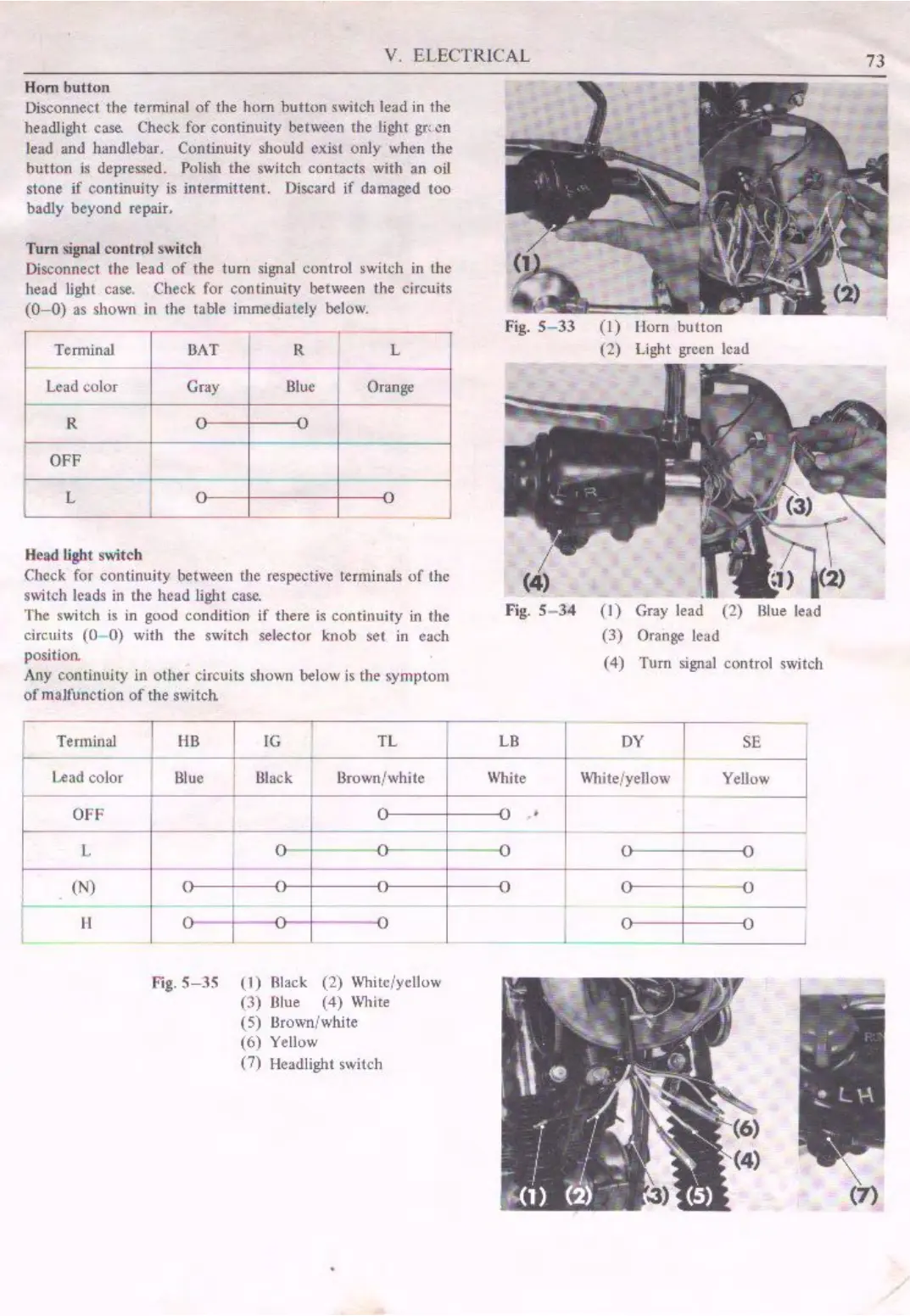
Disconnect the terminal
of
the
hom
hutton
switch lead
in
the
headlight
case.
Check for continuity between
tl1e
light
gr,
en
lead and handlebar. Continuity should exist only when
the
button is depressed. Polish the switch contacts with
an
oil
stone
if continuity is intermittent. Discard if damaged too
badly beyond repair.
Tum
signal contn,l switch
Disconnect the lead
of
the
turn
sib'llal
control switch in lhe
head light case. Check for continuity between the circuits
(0-0)
as shown
in
the table immediately below.
Terminal
OAT R L
-
Lead
color Gray
Blue
Orange
R
C
•
OFF
L
-
-
- -
-
Head light switch
Check for continuity between the respective terminals
of
the
switch leads in
the head light
case.
The switch is
in
good condition
if
there
is
continuity
in
the
circuits (0-
0)
with the switch selector knob
set
in each
position.
Any continuity
in
other circuits shown below
is
the symptom
of
malrunction
of
the switch
I
Terminal
Le
ad
color
OFF
L
(N)
f-
H
'
t!B
JG
TL
Blue
Black llrown/white
C
0--
-
-
-
..
-
--
--
.,
+-
- - -
- - -
-
~
Fig.
5-35
(1)
Black (2) White/yellow
(3) lllue
(4)
\\11ite
( 5) Brown/white
(6
) Yellow
(7) Headlight switch
Fig.
5- 33
(I)
llom
bu
!ton
(2) Light green lead
Fig.
5-
34
(I)
Gray
lead (2) Blue lead
(3)
Orange lead
(
4)
l\1rn signal control switch
l
LB
DY
SE
White
Wh
it
e/yellow Yellow
-
•
-
,,
-
I.,
v
-
J7
-
I.,
-
I.,
J
I


 To Next Page
 Loading...