EasyManua.ls Logo

Honda CB200 - Charging System Testing

Honda CB200
98 pages
Print Icon
To Next Page IconTo Next Page
To Previous Page IconTo Previous Page
Loading...
72
V.
ELfCTRlCAL
5.
ELECTRICAL
EQUIPMENT
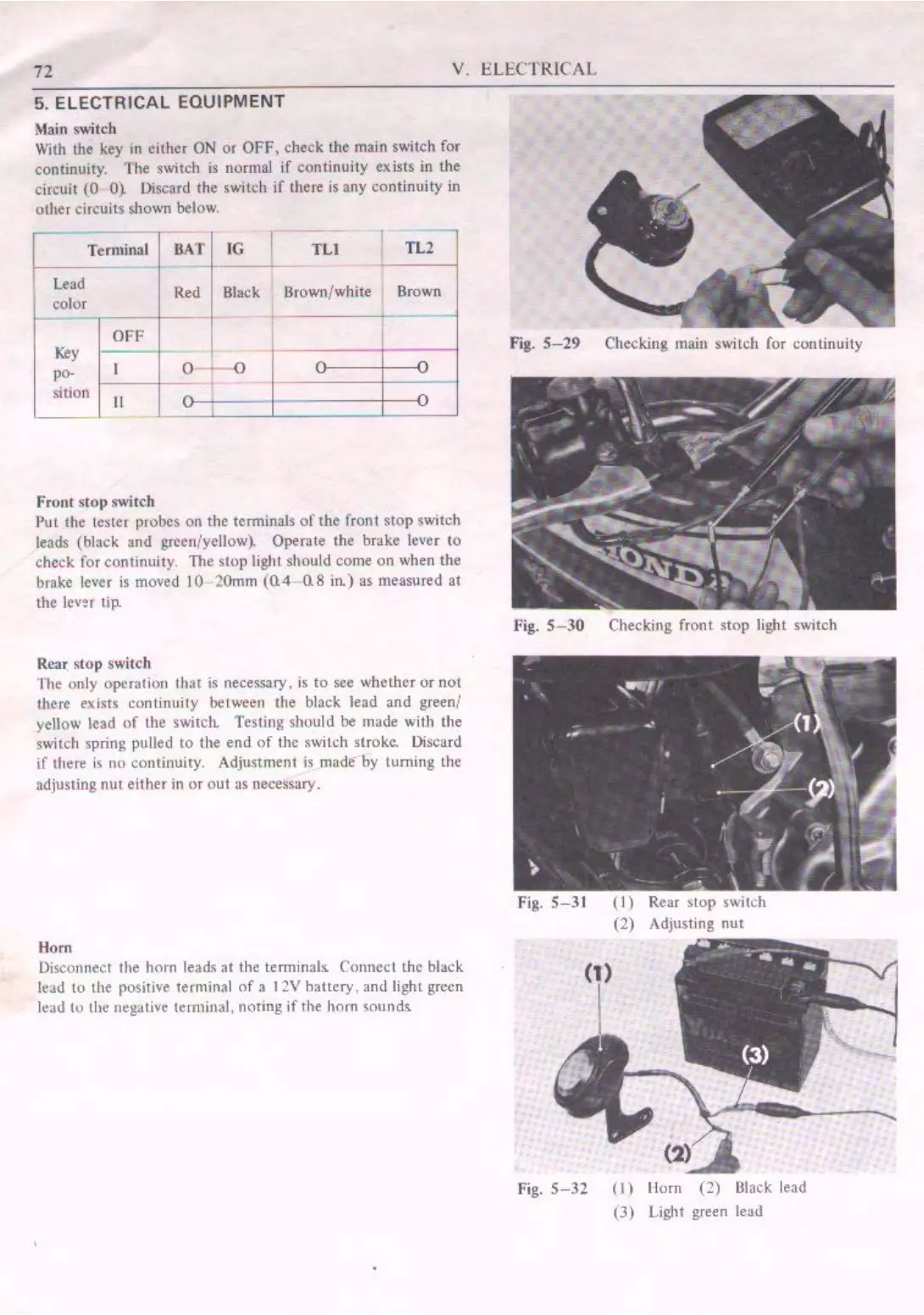
Main switch
With the key m
either
ON
or
OFF,
check
the
main switch for
continuity.
The
switch is normal
if
continuity exists in the
circuit
(0
0). Uiscard
the
switch if thete is
any
continuity
in
other
circuits
sho\.\.rn
below.
l ~
minal
~
color
Key
po-
sition
OFF
II
Front
stop
s"itch
BAT
JG
TLI TL2
Red
Black Brown/white
Brown
0
-0
Put
the
tester probes on
the
terminals
of
the
front
stop
switch
leads (black
and
green/yellow). Operate
the
brake lever
to
check for continuity.
The
stop
light
shou
ld come
on
when
the
brake
IO'
er
is moved
JO
2
0mm
(0.4
0.8
ite) as measured at
the levor tip.
Re-.~
stop
switch
fhe
only operation that is oece.ssary. is to see whet.her
or
not
there exists continuity between
the
black
lead
and
green/
yellow lead
of
the swi1cl1 Testing
should
be
made with
the
switch spring pulled
to
the
end
of
the
switch stroke. Discard
if
there
is
no continuicy.
Adjustment
is
made
by
Luming
Lhc
adjusting
nut
either
in
or
out
a, necessary.
Horn
Disconnect
the
horn leads
at
the terminal~ Connect
the
black
lead
10
the positive terminal
of
a I ~V
battery.
and
light green
!tac.I
to lhe
negati"e
terminal, notmg
if
the
horn
soundt
Fig.
S-29
Checking
main
switch for conlinuily
Fig.
S-30
Checking
front
stop
light switch
Fig.
S-31
(l)
Rear
stop
switch
(2)
Adjusting
nut
fig.
S-32
(
I)
limn
(2)
Olack
lead
(J)
Light green lead

Related product manuals