compatible smartphone.
your USB cable to the USB port.
1Playing Pandora®
*
Pandora®, the Pandora logo, and the Pandora trade
dress are trademarks or registered trademarks of
Pandora Media, Inc., used with permission. Pandora
is currently available exclusively in the United States.
To find out if your phone is compatible with this
feature, visit www.handsfreelink.honda.com, or call
1-888-528-7876.
To use this service in your vehicle, the Pandora® app
must first be installed on your phone. Visit
www.pandora.com. for more information.
Pandora® is free, personalized radio that plays music
and comedy you’ll love. Just start with the name of
one of your favorite artists, songs, comedians or
composers and Pandora® will create a custom station
that plays similar tracks. Pandora® also features
hundreds of genre stations ranging from Dubstep to
Smooth Jazz to Power Workout.
If you cannot operate Pandora® through the audio
system, it may be streaming through Bluetooth®
Audio. Make sure Pandora® mode on your audio
system is selected.
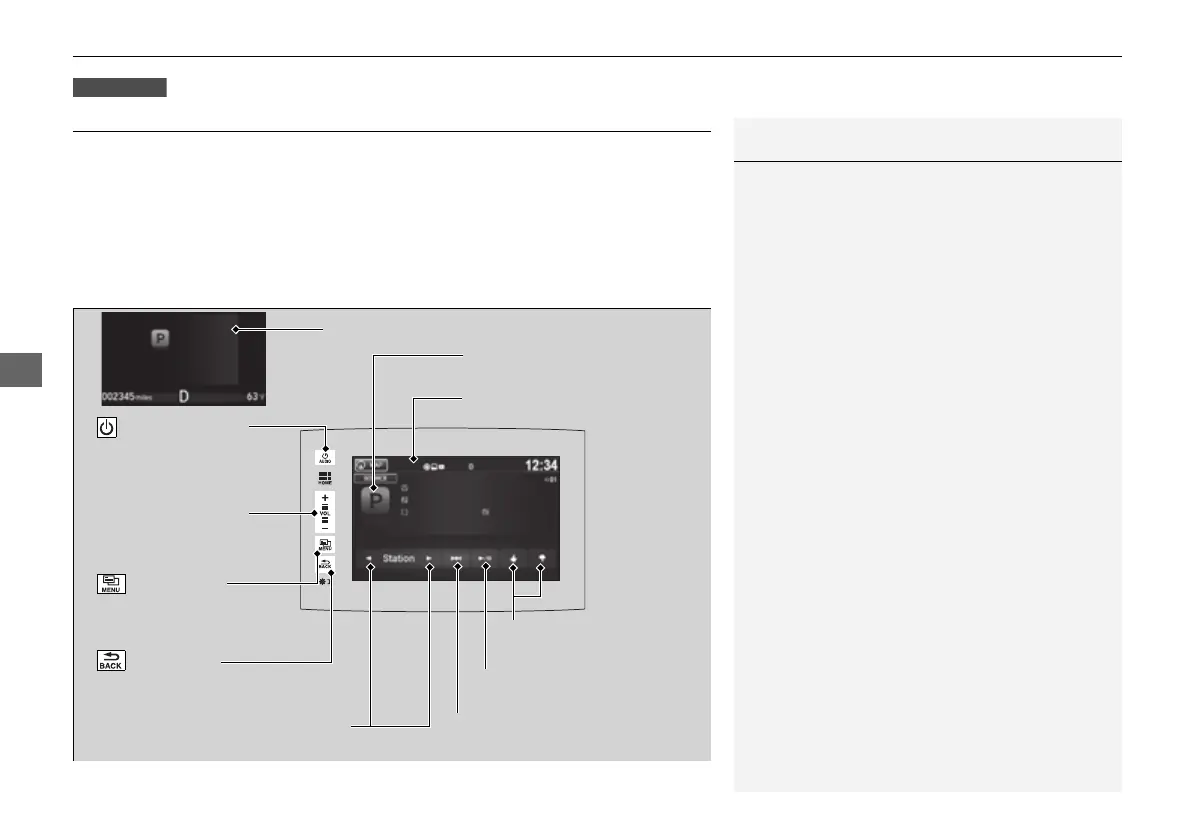
Audio/Information Screen
Cover Art
VOL (Volume) Icons
Select to adjust the
volume.
(Back) Icon
Select to go back to the
previous display.
/AUDIO (Power/
Audio) Icon
Select to turn the audio
system on and off.
(Menu) Icon
Select to display
the menu items.
Play/Pause Icon
Select to resume or play a song.
Station Up/Down Icons
Select to change a station.
Skip Icon
Select to skip a song.
Like/Dislike Icons
Select to evaluate a song.
Multi-Information Display


 To Next Page
 Loading...












