102
uuIndicatorsuDriver Information Interface Warning and Information Messages
Message Condition Explanation
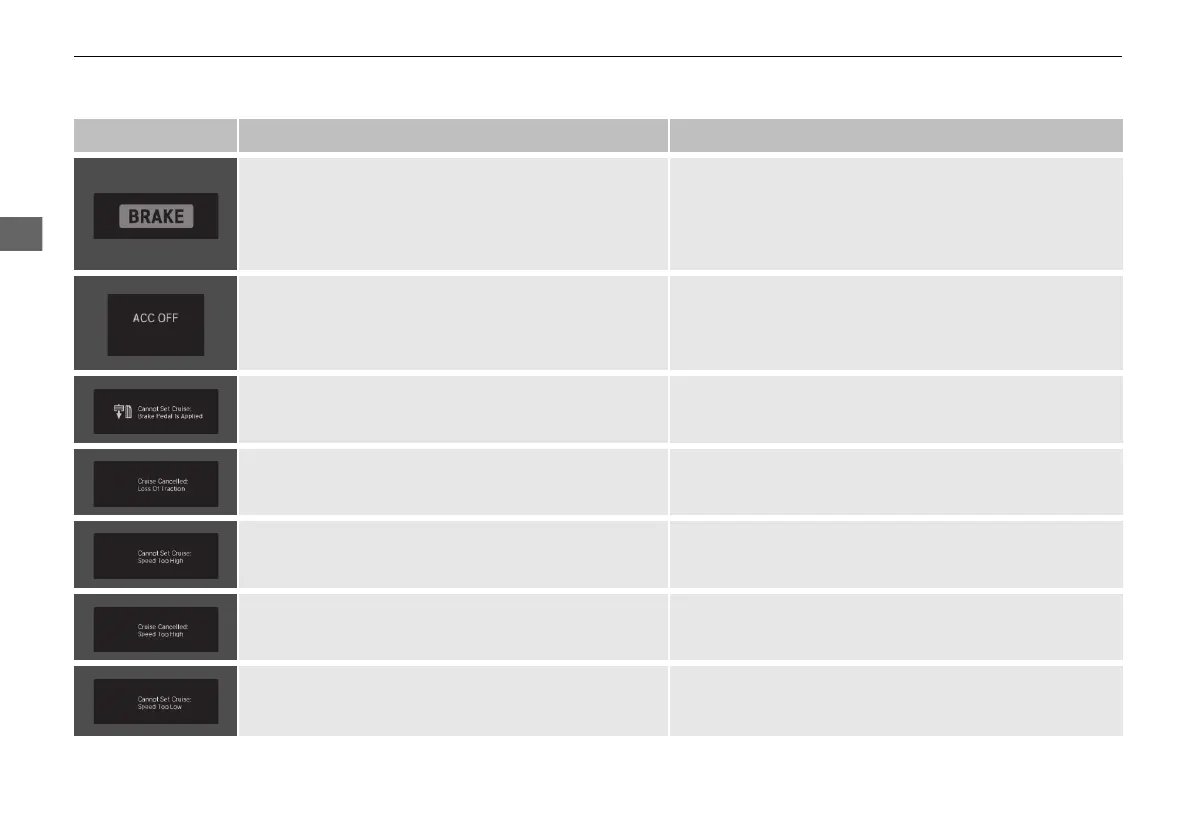
• Flashes when the system senses a likely collision with
a vehicle in front of you.
• Take the appropriate means to prevent a collision (apply
the brakes, change lanes, etc.)
2 Collision Mitigation Braking System
TM
(CMBS
TM
)
P. 564
2 Adaptive Cruise Control (ACC) P. 576
• Appears when ACC has been automatically
canceled.
• You can resume the set speed after the condition that
caused ACC to cancel improves. Press the RES/+
button.
2 Adaptive Cruise Control (ACC) P. 576
• Appears when pressing the –/SET button while the
vehicle is moving and the brake pedal is depressed.
• ACC cannot be set.
2 Adaptive Cruise Control (ACC) P. 576
• Appears if the VSA® or traction control function
operates while ACC is in operation.
• ACC has been automatically canceled.
2 Adaptive Cruise Control (ACC) P. 576
• Appears when the speed of the vehicle is too high
for you to set ACC.
• Reduce the speed, then set ACC.
2 Adaptive Cruise Control (ACC) P. 576
• Appears when ACC is canceled due to excessive
vehicle speed.
• Reduce the speed, then reset ACC.
2 Adaptive Cruise Control (ACC) P. 576
• Appears when the speed of the vehicle is too low for
you to set ACC.
• Raise the speed, then set ACC.
2 Adaptive Cruise Control (ACC) P. 576
21 PILOT-31TG76500.book 102 ページ 2020年3月18日 水曜日 午後4時38分



 To Next Page