Continued
137
uuClockuAdjusting the Clock
■
Using the Settings menu on the audio/
information screen
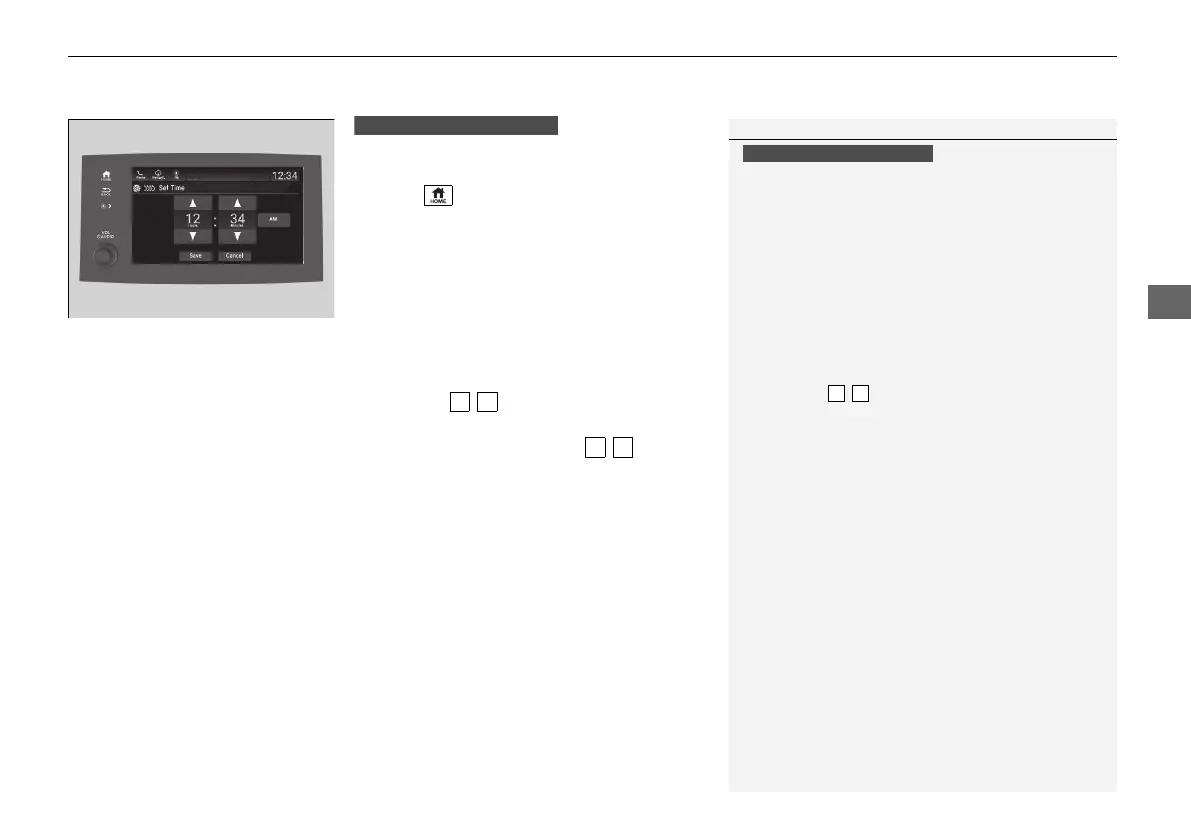
1. Select , then select Settings.
2. Select System.
3. Select Date & Time.
4. Select Set Date & Time.
5. Select Automatic Date & Time, then
select OFF.
To adjust time:
6. Select Set Time.
7. Selecting / .
u AM/PM icon can be switched to each
other either by selecting / , or by
directly touching the icon.
u When you customize the clock display to
24 hour clock, AM/PM icon is not
displayed.
2 Customized Features P. 430
8. Select Save to set the time.
1Using the Settings menu on the audio/information screen
You can also adjust the clock by touching the clock
displayed on the upper right corner of the display or
the Clock icon on the home screen.
1. Touch the clock on the display.
The clock screen of the select face-type appears.
2. Select Settings.
3. Select Date & Time Settings.
4. Select Set Date & Time.
5. Select Automatic Date & Time, then select OFF.
6. Select Set Date or Set Time.
7. Adjusting the dates, hours and minutes by
selecting / .
8. Select Save to set the time.
You can customize the clock display to show the 12
hour clock or 24 hour clock.
2 Customized Features P. 430
Models with Display Audio
Models with Display Audio
21 PILOT-31TG76500.book 137 ページ 2020年3月18日 水曜日 午後4時38分



 To Next Page