uuInterior Lights/Interior Convenience ItemsuInterior Convenience Items
220
■
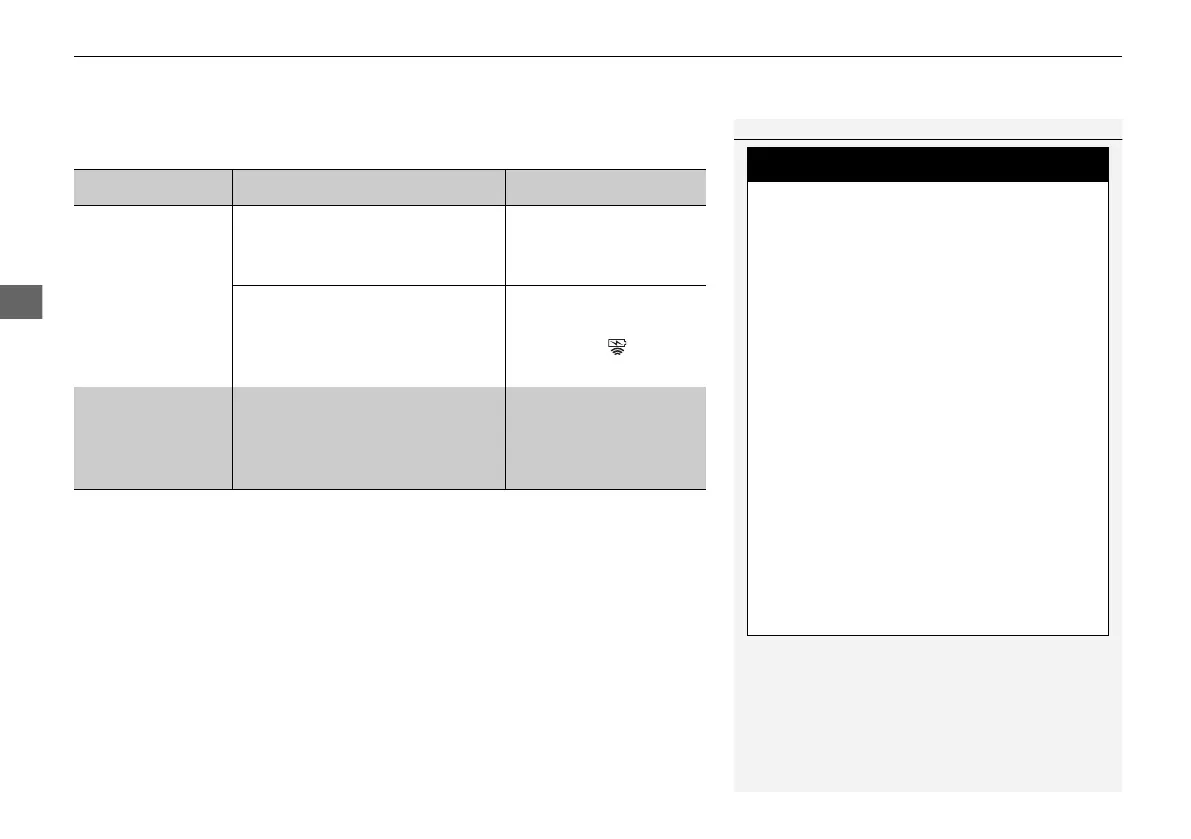
When charging does not start
Perform one of the solutions in the following table.
Indicator Cause Solution
Slow Blink
There is an obstacle(s) between
the charging area and the
device.
Remove the
obstacle(s).
The device is not within the
charging area.
Move the device to the
center of the charging
area where is
located.
Fast Blink The wireless charger is faulty.
Turn the vehicle off
and back on. If the
indicator still blinks,
contact a dealer.
1Wireless Charger
*
Using the audio/information screen, you can disable
the wireless charger function.
2 Customized Features P. 430
Metal objects between the charge pad
and the device to be charged will get
hot and can burn you.
• Always remove foreign objects from
the charge pad before charging the
device.
• Be sure the surface is clear of dust and
other debris before charging.
• Do not spill liquids (i. e. water, drinks,
etc.) on the charger and the device.
• Do not use oil, grease, alcohol,
benzine or thinner for cleaning the
charge pad.
• Do not cover the system with towels,
clothing, or other objects while
charging etc.
• Avoid spraying aerosols which may
come in contact with the charge pad
surface.
* Not available on all models
21 PILOT-31TG76500.book 220 ページ 2020年3月18日 水曜日 午後4時38分



 To Next Page