Continued
219
uuInterior Lights/Interior Convenience ItemsuInterior Convenience Items
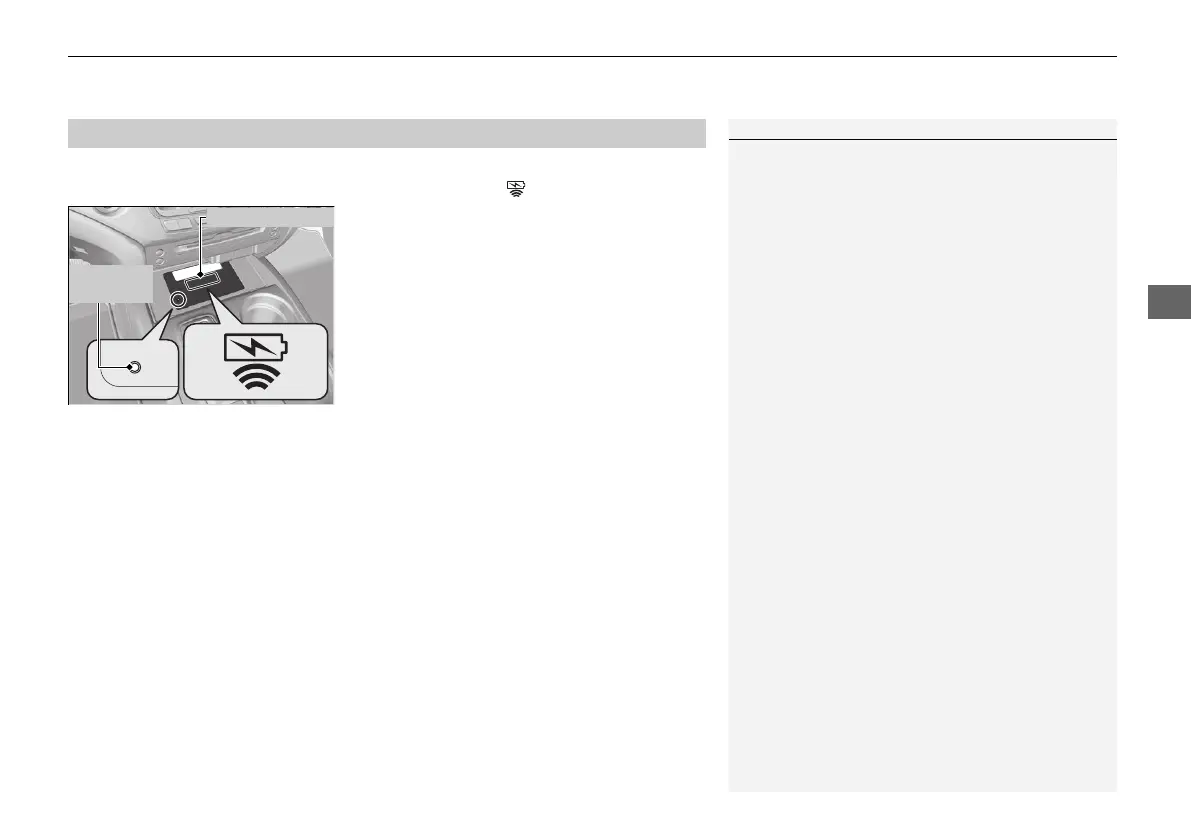
To use the wireless charger, the power mode must be in ACCESSORY or ON.
Charge a compatible device on the area indicated by the mark as follows:
1. Place the device you want to charge on the
charging area.
u The system will automatically start
charging the device, and the green
indicator light will come on.
u Make sure that the device is compatible
with the system and placed with the
chargeable side in the center of the
charging area.
2. When charging is completed, the green
indicator light will go off.
u If the device is not located on the charge
area correctly, the green indicator light
will blink.
■
Wireless Charger
*
1Wireless Charger
*
FCC statement
This product complies with the appropriate
requirements or the required standards of FCC
(Federal Communication Commission), described
below:
This device complies with Part 18 of the FCC rules.
This equipment generates, uses, and can radiate
radio frequency energy and, if not installed and used
per the instructions, may cause harmful interference
to radio communications.
In order to use safely:
• Remove any metal objects from the charge pad
before charging a device.
• Do not open the charger case.
• Do not use the charger if it malfunctions.
Contact your dealer.
Green
Indicator
Charging Area
* Not available on all models
21 PILOT-31TG76500.book 219 ページ 2020年3月18日 水曜日 午後4時38分



 To Next Page