EasyManua.ls Logo

Honda PILOT 2021 - Page 327

Honda PILOT 2021
739 pages
Print Icon
To Next Page IconTo Next Page
To Previous Page IconTo Previous Page
Loading...
325
uuAudio System Basic OperationuPlaying Bluetooth® Audio
Continued
Features
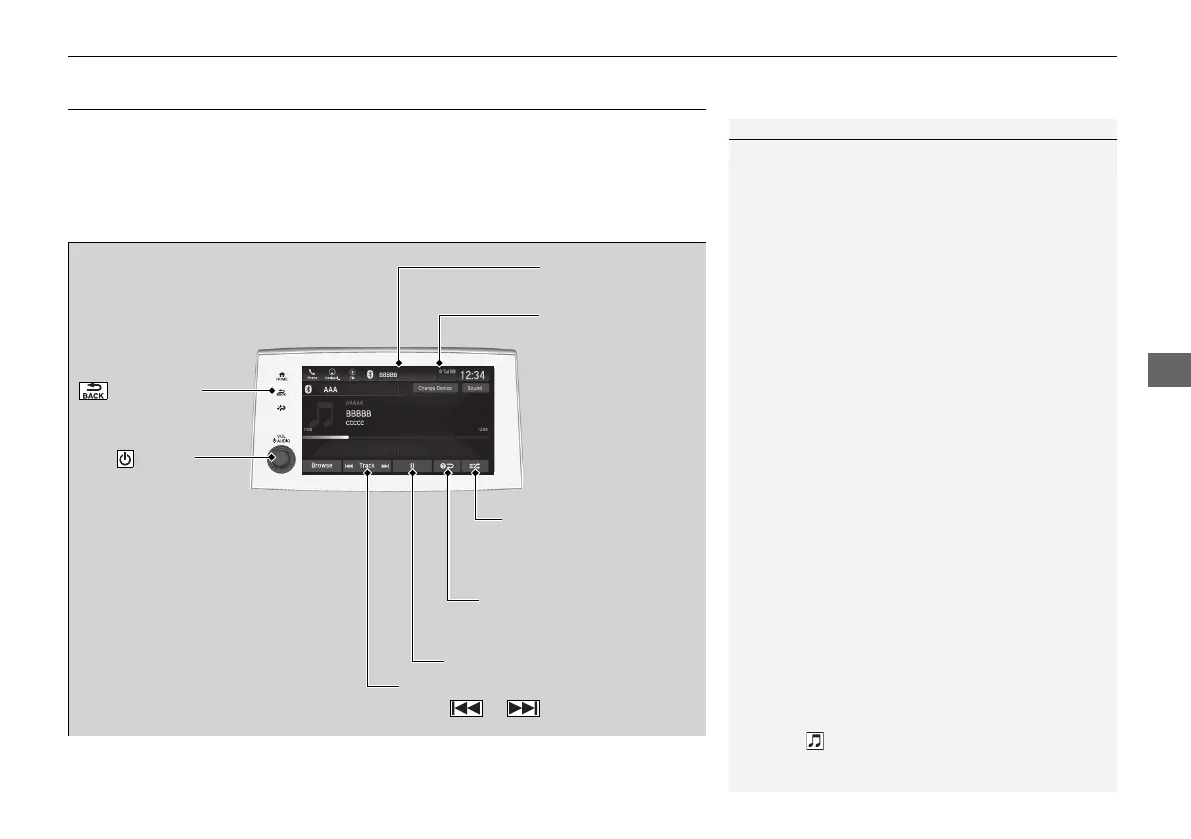
Playing Bluetooth® Audio
Your audio system allows you to listen to music from your Bluetooth-compatible
phone.
This function is available when the phone is paired and connected to the vehicle’s
Bluetooth® HandsFreeLink® (HFL) system.
2 Phone Setup P. 482
*1: Depending on the
Bluetooth® device you connect, this function may not be displayed.
1Playing Bluetooth® Audio
Not all Bluetooth-enabled phones with streaming
audio capabilities are compatible with the system.
For a list of compatible phones:
U.S.: Visit automobiles.honda.com/handsfreelink/,
or call 1-888-528-7876.
Canada: For more information on smartphone
compatibility, call 1-855-490-7351.
It may be illegal to perform some data device
functions while driving.
Only one phone can be used with HFL at a time.
When there are more than two paired phones in the
vehicle, the first paired phone the system finds is
automatically connected.
If more than one phone is paired to the HFL system,
there may be a delay before the system begins to
play.
In some cases, the name of the artist, album, or track
may not appear correctly.
Some functions may not be available on some
devices.
If a phone is currently connected via Apple CarPlay or
Android Auto, Bluetooth® Audio from that phone
will be unavailable. However, you can have a second
previously paired phone stream Bluetooth® Audio by
selecting from the Bluetooth® device list.
2 Phone Setup P. 482

Audio/Information
Screen
(Back) Icon
Select to g
o back to
the previous display.
VOL/ AUDIO
(Volume/Power)
Knob
Push to turn the
audio system on
and off.
Turn to adjust
the volume.
Repeat Icon
*1
Select to repeat the current
file.
Random Icon
*1
Select to play all files in
the current category in
random order.
Play/Pause Icon
Bluetooth Indicator
Appears when your
phone is connected
to HFL.
Track Icons
Select or to change tracks.
21 PILOT-31TG76500.book 325 ペー 2020年3月18日 水曜日 午後4時38

Table of Contents

Related product manuals