Continued
497
uuBluetooth® HandsFreeLink®uHFL Menus
■
Read or Stop reading a message
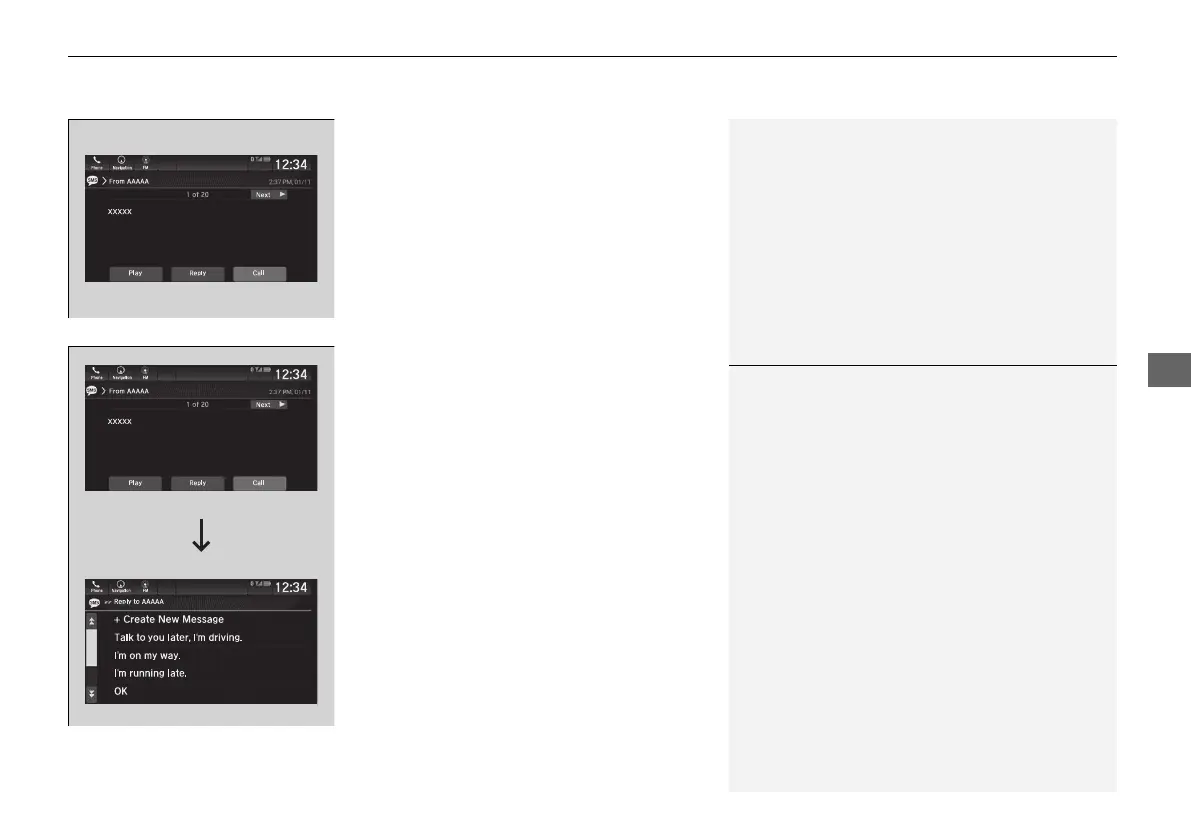
1. Go to the text message screen.
2. Select Play.
u The system starts reading the message
aloud.
3. Select Pause to stop reading.
Select Play again to start reading the
message.
■
Reply to a message
1. Go to the text message screen.
2. Select Reply.
3. Select the reply message.
u The pop-up menu appears on the screen.
4. Select Send to send the message.
u Message sent appears on the screen
when the reply message was successfully
sent.
1Reply to a message
The available fixed reply messages are as follows:
• Talk to you later, I’m driving.
• I’m on my way.
• I’m running late.
• OK
• Yes
• No
You can add a reply message by selecting + Create
New Message.
2 To edit a reply message P. 498
Only certain phones receive and send messages when
paired and connected. For a list of compatible
phones:
• U.S.: Visit automobiles.honda.com/handsfreelink/,
or call 1-888-528-7876.
• Canada: For more information on smartphone
compatibility, call 1-855-490-7351.
21 PILOT-31TG76500.book 497 ページ 2020年3月18日 水曜日 午後4時38分



 To Next Page