(1)
(3)(2)
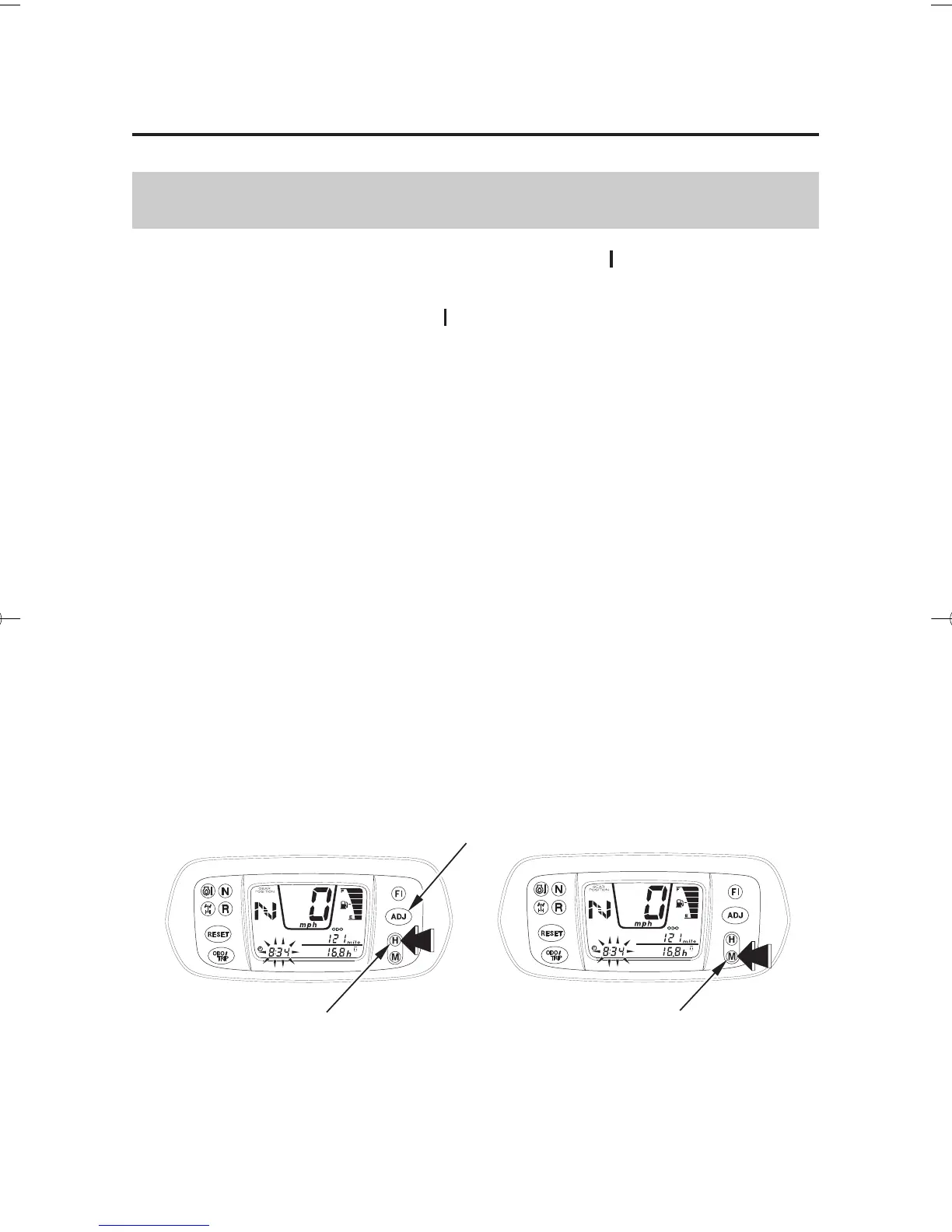
(3) minute select button(1) ADJ button
(2) hour select button
26
Digital Clock
Indicators & Displays
Instruments & Controls
Shows hour and minute while the ignition is ON ( ).
To adjust the time, proceed as follows:
Turn the ignition switch ON ( ).
To select the adjust mode, push the ADJ button ( ) once.
To advance the hour display one unit at a time, press and release the
hour select button ( ).
To advance the hour display automatically, press and hold the hour
select button. After 2 seconds, the hour display will begin advancing.
Release the button when the display reaches the desired hour.
To advance the minute display one unit at a time, press and release the
minute select button ( ).
To advance the minute display automatically, press and hold the
minute select button. After 2 seconds, the minute display will begin
advancing. Release the button when the display reaches the desired
minute.
To zero the minute display, press and hold both the hour and minute
select buttons simultaneously for 2 seconds.
Press the ADJ button when the display reaches the desired minute.
The display will stop flashing.
1.
2.
3.
4.
5.
1
2
3
10/04/19 13:04:57 31HN8680 0035










 To Next Page