Installation
1.
Attach the side collar to the wheel.
2.
Position the wheel between the fork legs
and insert the front axle shaft from the
right side, through the right fork leg and
wheel hub.
3.
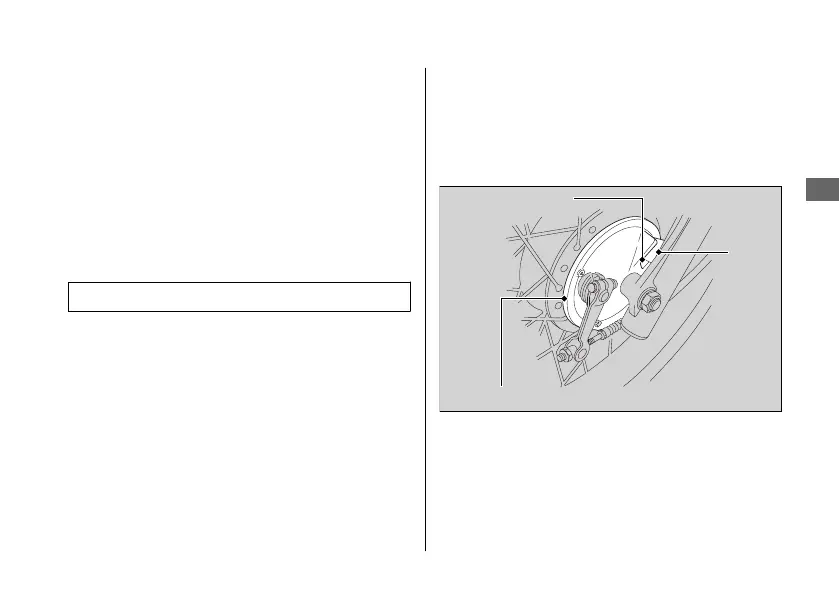
Make sure that the lug on the left fork leg
is located in the slot of the brake panel.
4.
Tighten the front axle nut.
Torque:
59 N·m (6.0 kgf·m, 44 lbf·ft)
5.
Install the speedometer cable securely.
6.
Install the front brake cable and front
brake adjusting nut.
7.
Adjust the front brake lever freeplay.
2 P. 62
8.
After installing the wheel, apply the brake
lever several times and then check if the
wheel rotates freely. Recheck the wheel if
the brake drags or if the wheel does not
rotate freely.
If a torque wrench was not used for
installation, see your dealer as soon as
possible to verify proper assembly.
Improper assembly may lead to loss of
braking capacity.
20181207113539_32KVMC000_eng_BOOK Page 82 Friday, December 07 2018 11:40:26 JST
Tyre Puncture u Removing Wheels
Troubleshooting
79
Continued
Lug
Slot
Brake panel



 To Next Page