Program Schedule
You can program four time periods each day, with different settings for
weekdays and weekends. We recommend the pre-sets (shown in the table
below), since they can reduce your heating/cooling expenses.
Wake - Set to the time you wake up and
the temperature you want during the
morning, until you leave for the day.
Away - Set to the time you leave home
and the temperature you want while
you are away (usually an energy-saving
level).
Home - Set to the time you return home
and the temperature you want during
the evening, until bedtime.
Sleep - Set to the time you go to bed
and the temperature you want overnight
(usually an energy-saving level).
System operation settings
1 Press the Mode button to cycle to the next
available System mode.
2 Cycle through the modes until the
required System mode is displayed and
leave it to activate.
NOTE: Available System modes vary by model
and system settings.
System modes:
‒ Auto
‒ Heat
‒ Cool
‒ Em Heat
‒ Off
Set the time and date
1 Press Menu on your thermostat.
2 Press or to go to TIME. Press Select.
3 Press or to choose between 12 or 24
hour. Press Select.
4 Use or to adjust the hour. Press
Select.
5 Use or to adjust the minutes. Press
Select to exit Time menu.
6 Press the to go to DATE.
7 Press Select and use the or to change
the flashing segment.
8 Press Select to advance to the next setting.
Press Home when done.
Fan operation settings
1 Press the Fan button to cycle to the next
available Fan mode.
2 Cycle through the modes until the
required Fan mode is displayed and leave
it to activate.
NOTE: Available Fan modes vary with system
settings.
Fan modes:
‒ Auto: Fan runs only when the heating or cooling
system is on.
‒ On: Fan is always on.
To adjust program schedules
1 Press Menu on your thermostat.
2 PROG is displayed. Press Select. Then ON
is displayed. (If you do not want to use a
schedule, press or to display OFF.
Press Select.) Press Select.
3 Press or to select day or set of days
to edit. Press Select.
4 Press or to select a schedule period
to edit (Wake, Away, Home, and Sleep).
Press Select.
5 For each program period you can adjust
the time, temperature setting, or whether
that program period is being used (on or
off). Press or to change a setting. Or
press Select to leave the setting as is and
advance to the next setting.
6 Once you have set all the program time
and temperature settings for each day,
press Home to save the changes.
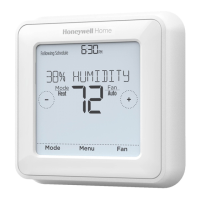
T4 Pro Programmable Thermostat
Product Information
TH4110U2005 & TH4210U2002,
Read before installing
You can search online for Resideo 33-00188EFS for the User Guide.
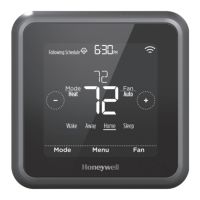
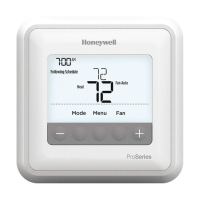
Thermostat controls
System status
information
Cool On/Heat
On/Em Heat
On, Recovery,
Compressor
Protection
Actual time
Schedule
information
Following time
based schedule
Mode
Select system mode
Heat/Off/Cool/
Auto/EM Heat
(emergency heat)
Menu
Press to display
options. Start here
to set a program
schedule
Indoor
temperature
setpoint
Press + or – to
change temperature
setting
Actual indoor
temperature
Temperature/
Navigation
buttons
Press to increase
or decrease
temperature
setpoint and to
navigate menus
and menu options
Fan
Select Fan mode
Auto/On
Wake
(6:00 am)
70
°
78
°
Away
(8:00 am)
62
°
85
°
Home
(6:00 pm)
70
°
78
°
Sleep
62
°
82
°


 To Next Page