®U.S. Registered Trademark
Copyright © 1997 Honeywell Inc. • All Rights Reserved
X-XX UL
INSTALLATION INSTRUCTIONS
SV9540; SV9640
SmartValve™ System Controls
APPLICATION
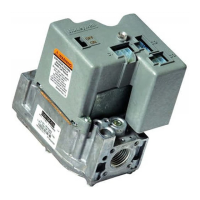
The SV9540; SV9640 SmartValve™ System Controls
combine gas flow control and electronic intermittent pilot
sequencing functions into a single unit. The low voltage
igniter, flame sensor and pilot burner are supplied by the
Q3450 or Q3480 Pilot Hardware. Provides all gas ignition
safety functions by controlling gas flow, ignition source,
and a 120 Vac or 240 Vac combustion air blower. The
control also monitors the appliance airflow proving switch
and limit string to assure proper appliance operation.
Provides prepurge, postpurge, timed trial for pilot igniton,
with 100 percent shutoff and continuous retry. Diagnostic
LED indicates system status.
This control communicates directly with the ST9160
Electronic Fan Timer (EFT) in typical forced warm air
furnace applications. It also interfaces with the 208907
Terminal Board, providing compatibility with power stealing
thermostats. Or, it directly interfaces with the appropriate
power supplies and a system thermostat for additional
appliance applications. When controlled directly by a
thermostat, the control does not provide a postpurge
function, as power to the control is removed when the
thermostat call for heat ends.
The SV9540; SV9640 system is suitable for a wide range
of fan assisted combustion gas-fired appliances including
furnaces, rooftop furnaces, boilers, unit heaters, infrared
heaters, water heaters and commercial cooking appli-
ances. The specific application of the SmartValve System
is the responsibility of the appliance manufacturer. See
Table 1 for temperature ranges and regulator types.
SPECIFICATIONS
CAUTION
The SV9540; SV9640 provide direct replacement
only. Use the Y8610 to convert standing pilot
systems to electronic ignition systems.
Table 1. Model Number Suffix Letter Designation.
Model No.
Suffix
Letter
Ambient
Temperature Range
Pressure
Regulator Type
H0°F to 175°F
(-18°C to +79°C)
Slow-opening
M-40°F to +175°F
(-40°C to +79°C)
Standard
P-40°F to +175°F
(-40°C to +79°C)
Step-opening
Body Pattern:
SV9540: Straight through with 1/2 in. inlet and 1/2 in.
outlet; or 1/2 in. NPT inlet and 1/2 in. inverted flare
outlet.
SV9640: Straight through with 1/2 in. inlet and 1/2 in.
outlet, 1/2 in. inlet and 3/4 in. outlet, or 3/4 in. inlet
and 3/4 in. outlet.
Electrical Ratings:
System Transformer:
SV9540: 40 VA minimum NEMA rated.
SV9640: 40 VA minimum NEMA rated.
NOTE: Larger system transformer may be
required for specific applications.
Voltage and Frequency:
24 Vac, 60 Hz; 50 Hz models available.
Output Ratings:
Igniter Load: 1.5A maximum.
Induced Draft Motor Load: 2.5A Full Load, 10A
Locked Rotor at 120 Vac; 1.75A Full Load, 5A
Locked Rotor at 240 Vac.
Current at 24 Vac:
24V Thermostat: See Table 2.
Table 2. Thermostat Current (Run Mode); with
control connected directly to thermostat.
Prepurge Time (Factory-set):
3, 15, 30 or 45 seconds, depending on model.
Trial for Ignition:
90 seconds.
Postpurge Time (Factory-set):
5 seconds; this is not available when the SmartValve
System Control is connected directly to the thermostat.
Retry Delay:
5 minutes.
Flame Failure Response Time:
1.6 seconds maximum at 2 µA.
Capacity:
See Table 3.
Conversion:
Use conversion factors in Table 4 to convert capacities for
other gases.
69-1059
Model 24 Vac, 60 Hz
SV9540 0.25A
SV9640 0.25A


 To Next Page
 General