EasyManua.ls Logo

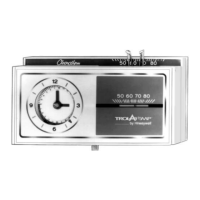
Honeywell Trol-A-Temp T8090T - User Manual

Honeywell Trol-A-Temp T8090T
24 pages
Print Icon
To Next Page IconTo Next Page
Loading...
69-0432-1
Zone Thermostat
Heating/Cooling Thermostat and
Subbase or Wallplate
Model T8090T
OWNER’S MANUAL

Questions and Answers

  • W
    wramirezAug 15, 2025
    Why is my Honeywell Trol-A-Temp T8090T Thermostat not cooling?
    • A
      Andrew WilsonAug 16, 2025
      Your Honeywell Thermostat might not be cooling because the system switch is in the OFF or HEAT position. Move the switch to the COOL position. Also, check the fuse or circuit breaker; if blown or tripped, replace or reset it. Ensure the condenser switch (located outdoors) is in the ON position. Verify that the thermostat connections are correct by turning off the power and checking the terminal hookups, repairing any frayed or broken wires, and firmly tightening all terminal screws. If there's no airflow at the register, a zone damper may be closed, in which case you should contact a qualified service technician.
  • J
    John CookAug 18, 2025
    Why is my Honeywell Thermostat not heating?
    • S
      smithstefanieAug 18, 2025
      Your Honeywell Thermostat might not be heating because the system switch is in the OFF or COOL position. To fix this, move the system switch to the HEAT position. Additionally, check the fuse or circuit breaker; if it's blown or tripped, replace the fuse or reset the breaker. Ensure that the furnace power switch is in the ON position. Also, check the thermostat connections: turn off the power, check for correct terminal hookups, repair any frayed or broken wires, and firmly tighten all terminal screws.
  • S
    Shannon LunaAug 21, 2025
    What to do if room temperatures are not correct on my Honeywell Trol-A-Temp T8090T?
    • K
      karensanchezAug 22, 2025
      If the room temperatures are not correct, reset the positions of the thermostat setpoint levers to the desired temperatures. Also, check the position of the subbase system switch and move it to the desired operating position.
  • M
    Martin McdonaldAug 25, 2025
    What to do if my Honeywell Trol-A-Temp T8090T setting and thermometer reading disagree?
    • D
      Desiree RussellAug 25, 2025
      First, ensure the thermostat is level by reinstalling the thermostat wallplate or subbase using a spirit level. Also, check the area around the thermostat for drafts or radiant heat; the thermostat should be about 5 ft [1.5m] above the floor on an inside wall. For calibration of the thermometer, see instructions on page 22.
  • J
    Joseph HardingAug 28, 2025
    What to do if temperature change occurs at the wrong time on my Honeywell Trol-A-Temp T8090T?
    • K
      Kimberly WaltonAug 28, 2025
      If the temperature change occurs at the wrong time, check the program pins for correct time locations and relocate the pins to the desired settings.
  • D
    Daniel LoweAug 30, 2025
    What to do if rooms do not warm up at programmed time on my Honeywell Trol-A-Temp T8090T?
    • L
      Lisa NelsonAug 30, 2025
      If rooms do not warm up at the programmed time, move the red pin one-half hour earlier on the program dial, as the timer program for the heating system may need more time to warm up the rooms.
  • T
    Travis MillerSep 2, 2025
    Why is the energy saving temperature program 12 hours off on my Honeywell Trol-A-Temp T8090T Thermostat?
    • A
      Alicia MillerSep 2, 2025
      The energy saving temperature program may be 12 hours off because of the program dial. Turn the clock ahead 12 hours, moving the minute hand clockwise only, to correct the day or night phase.
  • R
    Ronnie BakerSep 6, 2025
    What causes 0 Vac voltage at Clock Terminals on Honeywell Trol-A-Temp T8090T Thermostat?
    • C
      Christopher LongSep 6, 2025
      A voltage of 0 Vac at the clock terminals may be due to the system power being off. Restore power to resolve this. It could also be caused by a short in the clock power supply wiring, in which case you should replace the wiring. Another potential cause is limit switch contacts stuck open; free or replace the limit switch. Finally, the transformer supplying power may be burned out, requiring you to replace the transformer.
  • K
    Kim KeithSep 8, 2025
    What causes Up to 15 Vac voltage at Clock Terminals on Honeywell Trol-A-Temp T8090T Thermostat?
    • M
      Mr. William SawyerSep 8, 2025
      A voltage up to 15 Vac at the clock terminals can be caused by the system transformer used to power the clock being inadequate. Use an additional (separate) transformer to resolve this. Alternatively, if an additional transformer is already in use, it may have inadequate voltage, requiring you to install a transformer with proper secondary voltage.
  • S
    Shannon DavisSep 12, 2025
    What causes 15 to 30 Vac voltage at Clock Terminals on Honeywell Thermostat?
    • S
      Stephanie PetersSep 12, 2025
      A voltage of 15 to 30 Vac at the clock terminals may be due to the spring fingers on the thermostat not making proper contact with the subbase terminals. Rebend the spring fingers to a 45-degree angle to assure proper contact.

Summary

Features of Your Thermostat

Setting The Temperature

For Heating

Set heating temperatures for comfort and energy saving periods using red and blue levers.

For Cooling

Set cooling temperatures for comfort and energy saving periods using red and blue levers.

Inserting Clock Batteries

Setting the Clock

Daylight Savings Time

Instructions for adjusting the thermostat's clock for daylight saving time changes.

Programming

Setting the Heating Program

Guide to setting program pins for heating comfort and energy saving periods.

Setting the Cooling Program

Guide to setting program pins for cooling comfort and energy saving periods.

Manual Program Advance Button

How to use the manual button for temporary schedule changes.

Troubleshooting

Voltage at Clock Terminals

Diagnosing and resolving issues related to clock terminal voltage.

Servicing the Thermostat

Heat Anticipator Setting

Adjusting the heat anticipator to 0.1A for optimal heating system performance.

Thermometer Adjustment

Procedure to recalibrate the thermostat's thermometer for accurate readings.

Honeywell Trol-A-Temp T8090T Specifications

General IconGeneral
TypeDigital
DisplayLCD
MountingWall-mounted
BacklightYes
Power Source24 VAC
ProgrammableYes
Terminal DesignationsR, W, Y, G

Related product manuals