The Charging Station installation
Choose a suitable position for the charging station
Note:
After the layout of boundary wire, it is needed that connect the charging station to
the boundary wire. And after testing drive, auto-charge successfully indicates that a
suitable position for charging is found. Now drive fixing pegs into ground fully.
The mower will only automatically return to the charging station counter-clockwise.
The mower receives direct sunlight for a prolonged period of time and the battery will
get too hot and not function co
rrectly.
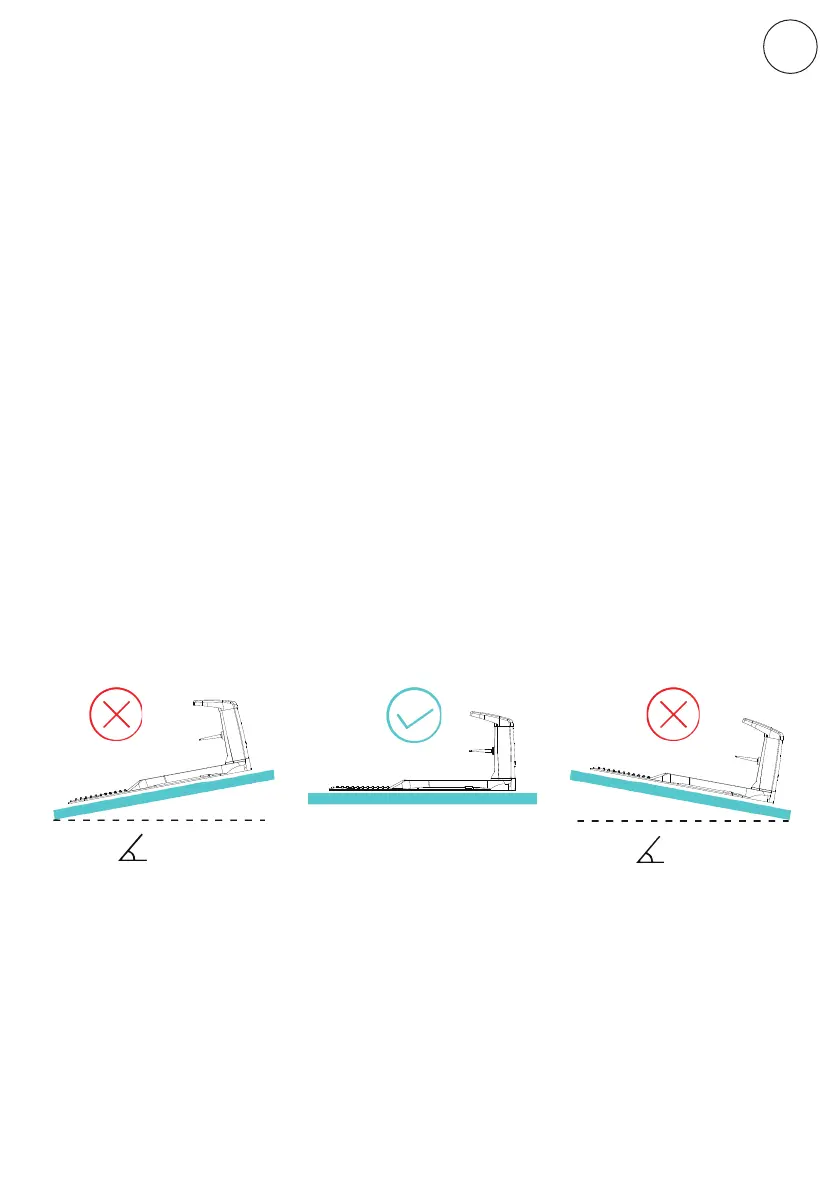
Install the charging station on a soft and flat surface. Do not place the charging
station too close to a slope, such as at the top of a hill or the bottom of a furrow.
Avoid left and right inclination in excess of 5 degrees. Once the position of the charging
station is confirmed and mains electrical connection is laid out, please do not connect
to main power yet. Finish all boundary layout work before connecting the charging
station to the power supply.
1.Via Bluetooth
2.Via
WiFi/4G
Make sure your phone's Bluetooth is on, and keep the mower within 10m.
Make sure the WiFi/4G that your phone connected is WiFi/4G instead of 5GHz.
Make sure the WiFi/4G signal is
available in the garden. It is necessary to connect
the Bluetooth icon before setting up the WiFi/4G connection. Connect both the
mower and your mobile to your WiFi/4G network.
> 5°
> 5°
9
EN
Original instructions



 To Next Page