Operation
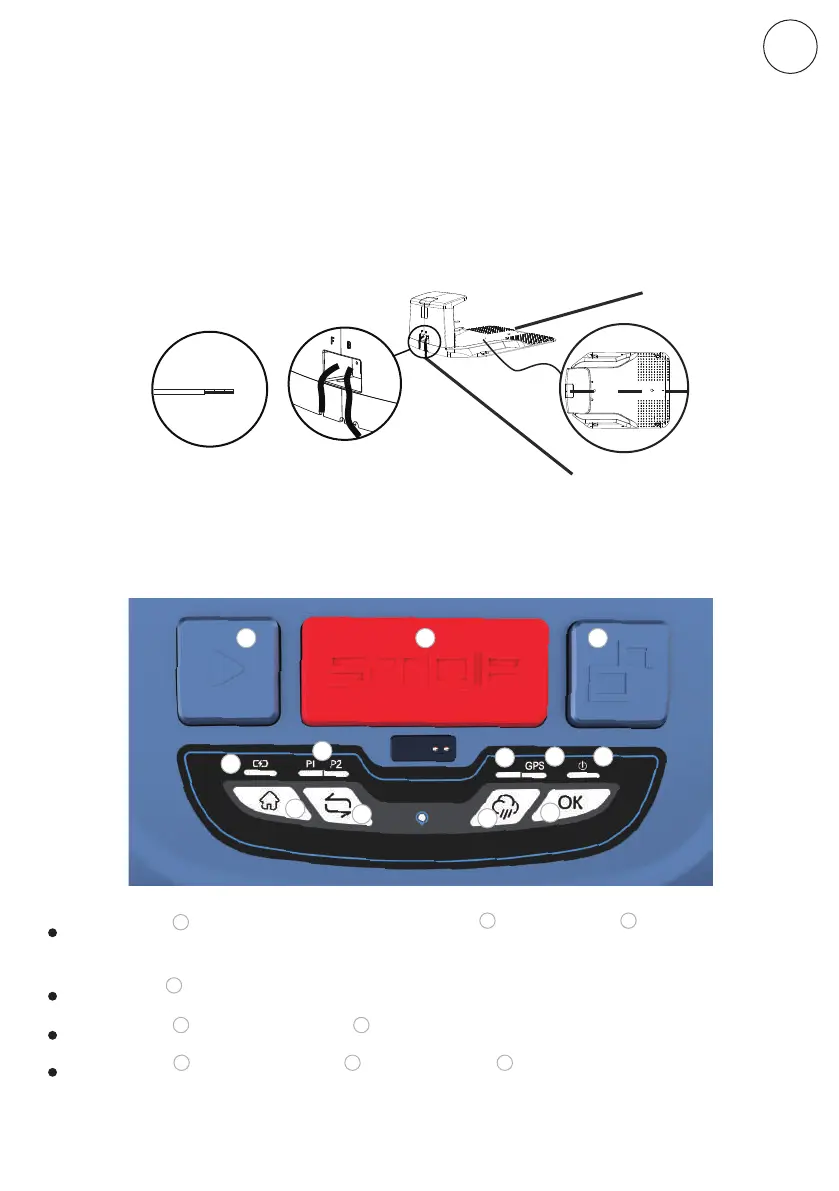
Connect the charging station to the Boundary Wire
Place the docking station at the end of the boundary wire so that the wire runs
lengthwise below the middle of the docking station. Connect that end to the left
(black) connector marked "F" (front). Connect the other end to the right (red)
connector marked "B" (back). Once the P1 or P2 LED confirms ,it means the
connection is successful
Once the relevant preparations have been made, learn how to control your mower!
F
B
10-15mm
13
STOP button Press this button, the mower will stop immediately.
2
1 2 3
4
8
9
10
11 12
5
6
7
Unlock button Interlock with STOP button, press this button will unlock the stop model.
23
START button Start the mower (First START button , then OK button : Abnormal removal,
continue to work)
1
1 7
HOME button First HOME button , then OK button : the mower will return to charging
station.
4 4 7
ENEN
Original instructions


 To Next Page