SteeringModeFunction
2
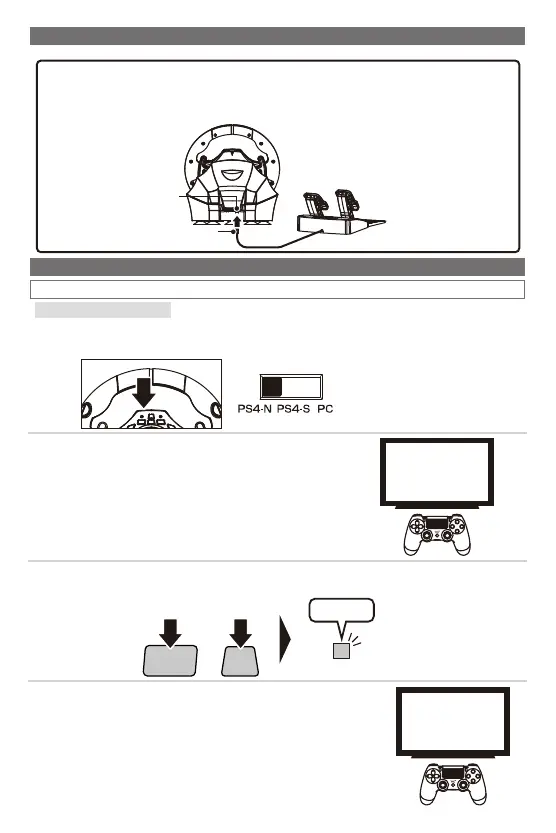
■HowtoConnect
■HowtoSync
PS4™
SHARE
PS
+
Pressfor5seconds
ProgramLED(Left)
Flashing
③
WhilepressingdownontheSharebuttononthisproduct,pressthePSbutton
(approx.5sec.).TheLEDindicatorwillflashandtheproductwillenterpairingmode.
①
Pleasemakesurethattheplatformtoggleswitchissetto"PS4-N"/"PS4-S"when
connectingtothePS4™systemorsetto"PC"whenconnectingtothePC*.
SelectSettings
↓
Devices
↓
Bluetoothdevices
②
UsetheWirelessController(DUALSHOCKⓇ4)to
navigatefromthePS4™systemHomescreen.Select
Settings>Devices>Bluetoothdevices.
HORIWirelessRacingWheel
④
Select"HORIWirelessRacingWheel"fromthelistto
completethepairing.Ifyouwanttousethepaired
controlleragain,pressthePSbuttonontheWireless
RacingWheelApex.
ModularPlug
ModularPlugConnectionPort
Beforesyncing,connectthefootpedalsmodularplugtothesteeringwheelmodular
connectionport.
・Makesurethatdirectionofmodularplugiscorrectbeforeconnecting.
・Thisproductcanbeusedwithoutthefootpedals.
*PCcompatibilitynottestednorendorsedbySonyInteractiveEntertainmentEurope.














 To Next Page