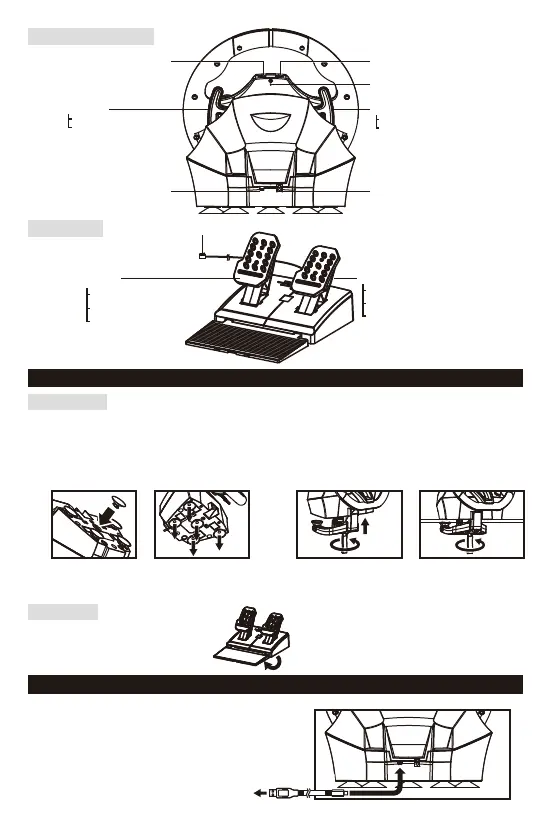
SteeringUnit
■HowtoMount
5
FootPedals
Placefootpedalsontoaflatsurface.
PlatformToggleSwitch
ControlToggleSwitch
ModularPlugConnectionPort
RPaddle
PS4™:R1Button
PC:XButton
LPaddle
PS4™:L1Button
PC:AButton
ResetButton
USBPort
(Micro-B)
ModularPlug
LPedal
"PS4-N":L2Button
"PS4-S":Brake
PC:LTButton
RPedal
"PS4-N":R2Button
"PS4-S":Accelerator
PC:RTButton
FootPedals
SteeringUnit
(
BackView
)
Option1:SuctionCup
①Removealldustanddirtfromyourtabletop
beforesecuringthecontrollerusingthefive
suctioncups.
②Attachsuctioncupstosteeringunitwhen
settingup.
① ②
Option2:Clamp
①Tightentheclampscrewintothesteeringwheel
base.
②Usetheclamptosecurethesteeringunittoaflat,
hardsurface(i.e.table).
① ②
・Donotcombinebothsecuringmethodsasitmaydamagethesuctioncups.
・Donotaffixtofurnituremadefromglassorotherfragilematerials.
・Detachfromfurniturecarefullytopreventdamagetofurnitureorproduct.
■HowtoCharge
InserttheUSBconnectorofthecontroller
intoaUSBportofyourPS4™system.
YoucanchargewithUSBcablebyconnectingitto
thisproductandtoaUSBterminalonthePS4™
console.Whencharging,theLEDindicatorflashes
orangeandturnsoffwhenthechargeiscomplete.














 To Next Page