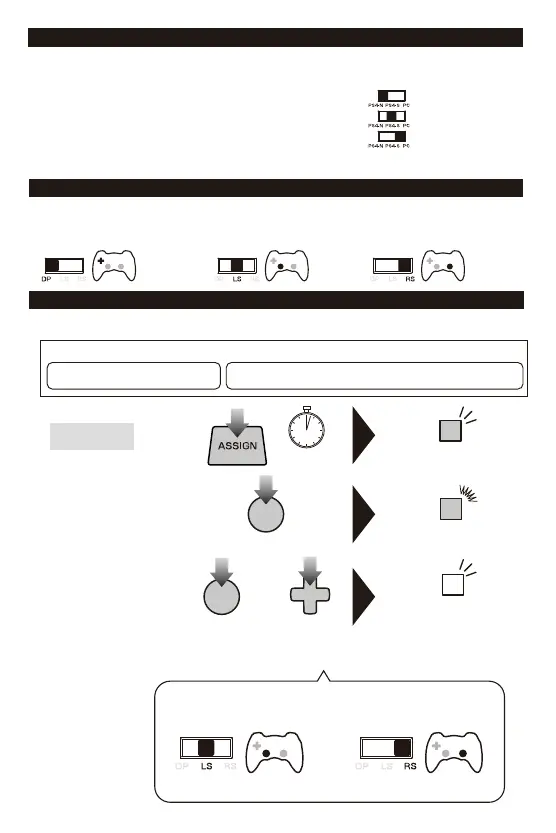
■PlatformToggleSwitch
ThePlatformToggleSwitchtogglestheWirelessRACINGWHEELAPEXbetweenPS4™
NormalMode(PS4-N),PS4™SteeringMode(PS4-S),andPCcompatibilitymode(PC).
Note:Pleasesetthetoggleswitchtothedesiredplatformbeforeconnecting.
6
■ControlToggleSwitch
Directionalpadcontrolscanbetoggledtodirectionalpad,leftstickorrightstickcontrols.
Thisproduct'sdirectionalpadtogglefunctionisnotguaranteedtoworkwithallsoftware.
・Pleaserefertosoftware'sinstructionbook.ThisproductdoesnotworkwithAnalogmode.
Directionalpad
Leftstick Rightstick
ProgramLED(Right)
willflash(quickly).
①
②
③
ProgramLED(Right)
willturnon.
ProgrammableButtons AssignableFunctions
HowtoAdjust
or
Leftstick/
Rightstick
・Pressthedirection
(Right,Down,LeftorUp)to
assignthedesiredfunction.
■AssignMode
Youcanremapthefunctionofbuttonsusingthisfeature.
ProgramLED(Right)
willflash(slowly).
3 sec
L2/R2/LPaddle/RPaddle/LPedal/RPedal
L2/R2/LPaddle/RPaddle/
LPedal/RPedal
○/×/△/□/L1/L2/L3/R1/R2/R3/LPaddle/RPaddle/LPedal/RPedal
Leftstick(Right/Down/Left/Up)/Rightstick(Right/Down/Left/Up)
○/×/△/□/
L1/L2/L3/
R1/R2/R3/
LPaddle/RPaddle/
LPedal/RPedal
or
"LS"forLeftstick "RS"forRightstick
・Forstep3,toassignaspecificdirectioninputoftheLeftAnalogSticktoabutton,
settheDirectionalPadControlToggleSwitch(DP/LS/RS)to[LS]andpresstheD-Pad
inthedirectionyouwanttoassign.ForRightAnalogStick,setto[RS].
ConnectingtothePS4™system:Normal.
ConnectingtothePS4™system:SteeringModeFunction.
ConnectingtothePC.















 To Next Page