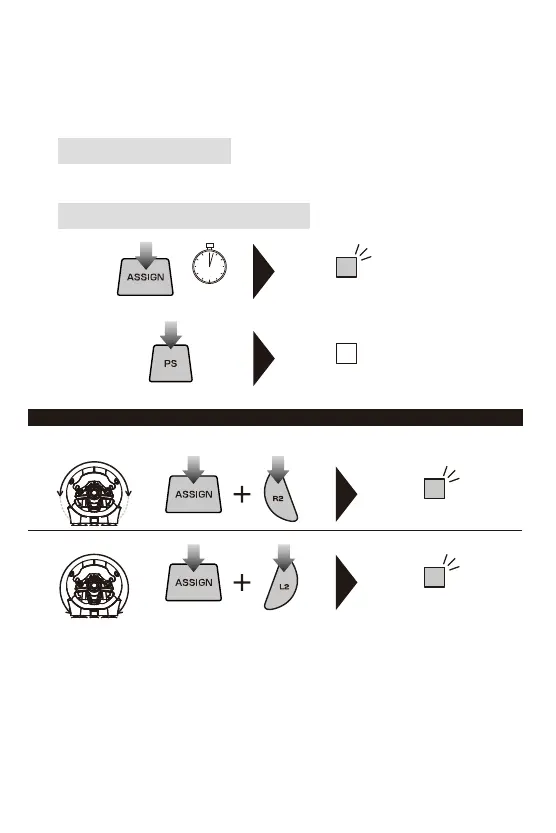
■PilotMode
Experiencequickerhandlingbyswitchingthemaxsteeringoutputfrom270degreesto180degrees.
ProgramLED(Left)willlight
bluefor3seconds.
ProgramLED(Left)willlight
greenfor3seconds.
7
Howtoresetindividualbuttons
UsetheStep3abovetoindividuallyresetbuttonstodefault.
・After4secondsofinactivitybetweensteps,ProgramLED(Right)willturnoffandprogrammodewillstop.
・Duringsteps2,buttoninputfromthecontrollertothePS4™willbedisabled.
・WhentheProgramLED(Left)turnson,itindicatesthatabuttonisremappedandwillnotturnoff
untilbuttonfunctionisresettodefault.
・Ifyouwanttodisablebuttonfunction,pressandholdfor3secondsthesamebuttonyoupressedinstep2
atthetimeofstep3.
・Ifyoupressedmultiplebuttonsduringstep3,thelastbuttonyoupressedwillbeassigned.
・ControllersettingsarestoredeveniftheUSBisdisconnected.
②
ProgramLED(Right)willturnoffandallbutton
assignmentswillresettoitsdefaultsettings.
Howtoresetallbuttons/functionstodefault
①
ProgramLED(Right)
willflash(slowly).
3 sec
270°
180°














 To Next Page