36
TR10A108-B RE / 02.2013
When used at the same time, GSM 900 mobile phones ō
can affect the range.
Description of the hand transmitter8.1
See Figure
▶
20
Inserting / changing the battery8.2
See Figure
▶
20
ATTENTION
Destruction of the hand transmitter by leaking batteries
Batteries can leak and destroy the hand transmitter.
Remove the battery from the hand transmitter if it is not
▶
used for a long period of time.
Hand transmitter operation8.3
Each hand transmitter button is assigned to a radio code.
Press the button of the hand transmitter whose radio code
you want to transmit.
The radio code is transmitted and the LED is –
illuminated blue for 2 seconds.
NOTE:
If the battery is almost empty, the LED flashes red twice
before transmitting the radio code.a.
The battery
▶
should be replaced soon.
and the radio code is not transmitted.b.
The battery
▶
must be replaced immediately.
8.4 Inheriting / transmitting a radio code
Press the button of the hand transmitter whose radio 1.
code you want to inherit/transmit and keep it pressed.
The radio code is transmitted and the LED is –
illuminated blue for 2 seconds then goes out.
After 5 seconds, the LED alternates flashing in red –
and blue; the radio code is transmitted.
If the radio code is transmitted and accepted, release 2.
the hand transmitter button.
The LED goes out.–
NOTE:
You have 15 seconds to inherit / transmit the code. The
process must be repeated if the radio code is not successfully
inherited / transmitted within this time.
Querying the door position8.5
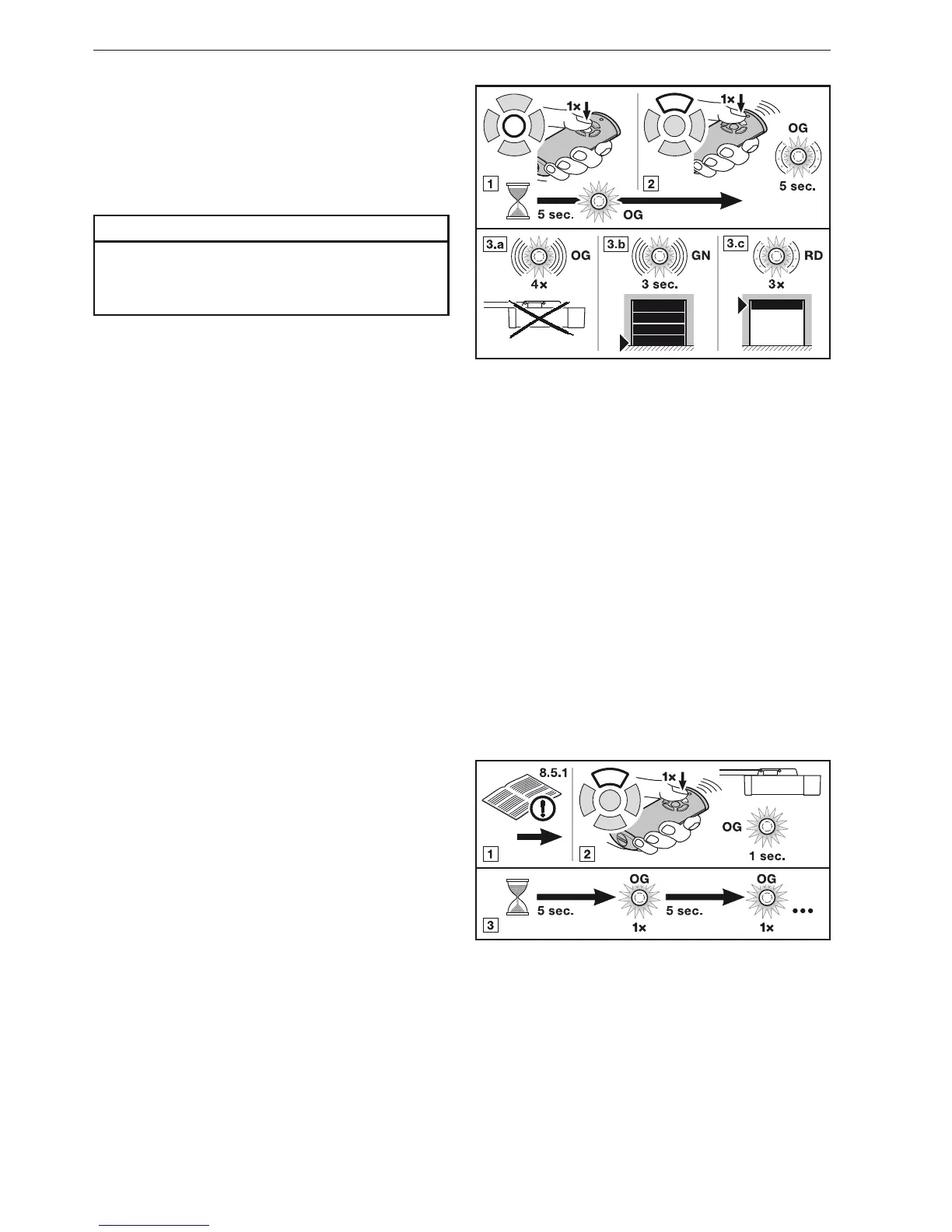
8.5.1 Manual door position query
A query of the current door position (Open / Close) is possible
with this hand transmitter. For this purpose, the operator must
be equipped with a bi-directional radio module and be within
the range of the hand transmitter.
NOTE:
If a hand transmission button is pressed that does not actuate
a bi-directional radio module, the door position query is
aborted.
Press the door position query button.1.
The LED is illuminated orange for 5 seconds.–
2. Within this period of time, press the hand transmitter
button of the door system whose position you want to
query.
The LED slowly flashes in orange for up to 5 seconds.–
Depending on the position of the door, the respective 3.
feedback will be sent.
The LED flashes rapidly 4 times in orange.a.
The operator is out of reach.–
The LED flashes rapidly in green for 3 seconds.b.
Position: Door is closed–
The LED flashes slowly 3 times in red.c.
Position: Door is not closed.–
A new door position query is only possible after the LED stops
flashing.
Automatic feedback of the door position after 8.5.2
manual query
If the same hand transmitter button is pressed again within
5 seconds after the manual door position query, you will
receive automatic feedback on the door position as soon as
the door has reached an end-of-travel position.
Perform a manual door position query, see section 1. 8.5.1.
Press the hand transmitter button 2. again as described in
section 8.5.1, 2..
The radio code is transmitted and the LED is –
illuminated briefly in orange.
The position of the door will be queried every 5 seconds; 3.
the LED is illuminated briefly in orange.
NOTE:
Pressing the hand transmitter button again activates door
travel if the door is not in motion.
ENGLISH



 To Next Page
 Loading...