MAN0974-14-EN_XL7_XL7P_UM
July 6, 2022 Page 63 | 199
CHAPTER 7: CSCAPE CONFIGURATION
7.1 Overview
XL7/XL7 PRIME OCS hardware is programmed with a Windows based PC application called Cscape. This
application can be used to program, configure, monitor and debug all aspects of the XL7/XL7 PRIME OCS
unit. Please see the on-line help provided with Cscape for additional details.
7.2 Cscape Status Bar
When the XL7/XL7 PRIME OCS is connected to a PC using Cscape software a Status Bar appears at the
bottom of the screen. The Cscape Status Bar can be used to determine if communications have been
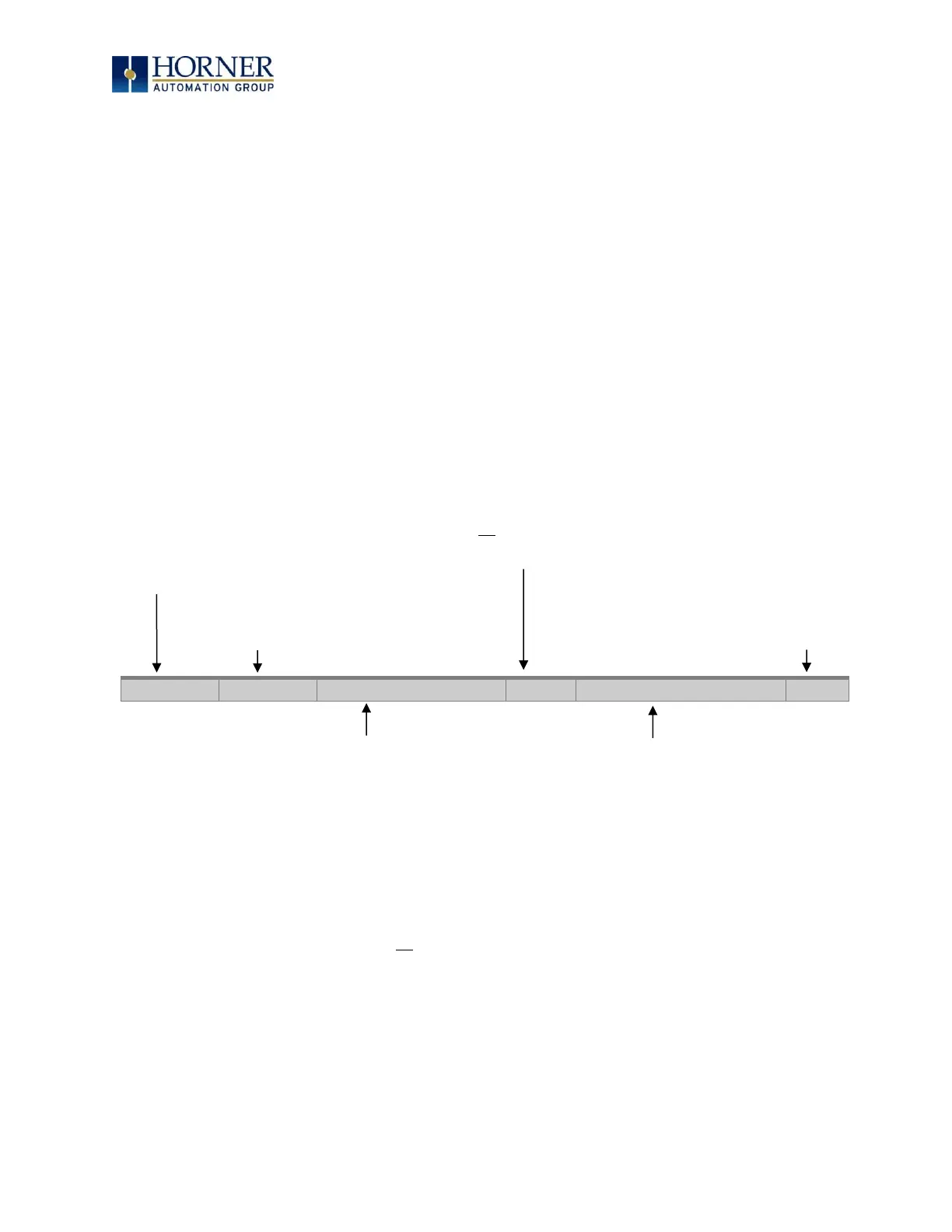
established between the XL7/XL7 PRIME OCS and the Cscape program. Components of the Cscape
Status Bar are explained below.
Local :1 Target :2(R) [no forces]
Figure 7.1 - Cscape Status Bar
Equal Indicator – indicates whether the current program in Cscape is equal to the program stored in the
Target Controller.
• If Equal, the program in Cscape is the same as the program stored in the Target Controller.
• If Not Equal, the program in Cscape is not the same as the program stored in the Target Controller.
• If Unknown, there may have been a change since the last time the program in Cscape was compared
to the Target Controller.
Communications Status - indicates the current status of the
“pass through” Connector.
• Local: xx – indicates the Network ID of the OCS to which the
Cscape program is physically connected through its serial port. It
can serve as a pass through device to other nodes on the
network.
• Target: yy(R) – indicates the Network ID of the device with which
the Cscape program is exchanging data.
NOTE: The Local unit and Target unit can be the same unit,
or they can be separate units.
The following are status indicators:
(R) – Running
(D) - Do I/O
(I) – Idle
(?) – Cscape is not communicating with the remote unit.
[no forces] – indicates no I/O has been forced.
Message Line -
The contents of
these messages are
context sensitive.
The Message line
can be empty.
Current User -
indicates who is logged (for
security purposes).
Controller Model - Network (Model Confirmation)
• Controller Model indicates the controller model for which
the program in Cscape is configured.
• Network indicates the type of network that the program in
Cscape expects to use (e.g., CsCAN).
• (Model Confirmation) provides the following indications:
• (Model=) - the actual Target Controller matches the
configured Controller Model and Network.
• (Model Not=) – the actual Target Controller does not match
the configured Controller Model and Network.
• (Model ?) – there may have been a change since the last
time the Target Controller was compared to the configured
Controller Model and Network.
File Modified Indicator - indicates that the
file in the selected window has been
modified but has not been saved.


 To Next Page