MAN0974-14-EN_XL7_XL7P_UM
July 6, 2022 Page 71 | 199
7.3.2 Communicating via On Board Ethernet Port
From Cscape go to Controller → Hardware Configure and do auto configuration for the connected
controller, Click on Config of Ethernet and select Module Setup.
The IP address, Net Mask, and Gateway of the controller may be temporarily set from the System Menu
under the Set Networks menu item. Once running or power cycled the configuration will come from the
Cscape configuration stored in the unit.
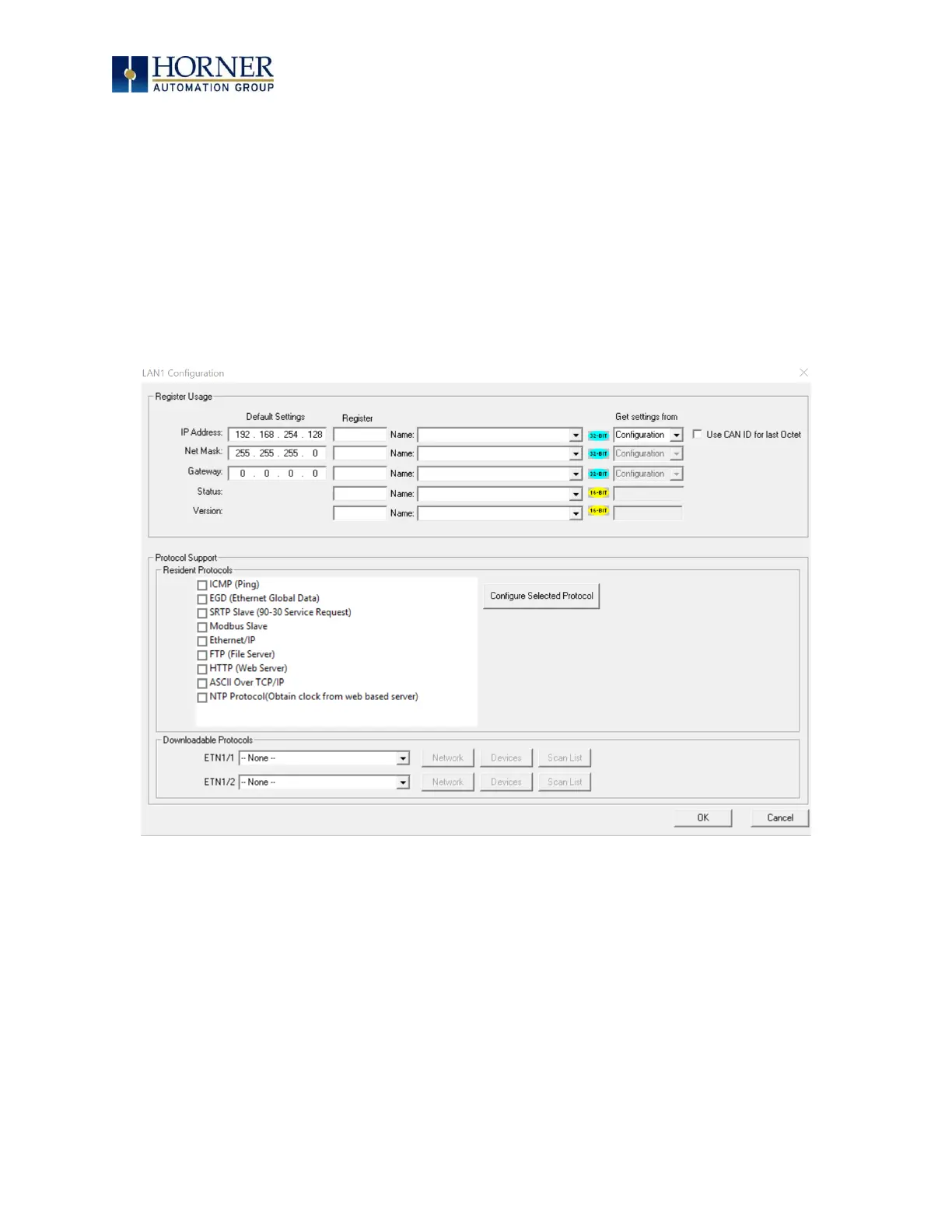
In Module Configuration dialog go to IP Address field enter unused IP Address and configure unused
registers in Register field & then click OK. Screen shot for the same as follows:
Figure 7.6 – LAN1 Configuration Dialog
Download the configuration in to Controller. Connect LAN cable to the Controller in default LAN Port.
From Cscape go to Tools → Editor Options → Communication Port → Hardware Configuration. Select
Ethernet and enter IP address which is configured in the file. Select mode as XL Series mode from drop
down list.
The controller should get connected to Cscape. If communications are successful, the target indicator
should show the mode of the controller Target: yy(R) as shown in the status section above.


 To Next Page