EasyManua.ls Logo

Hotpoint RVM1535 - Operating Instructions

Hotpoint RVM1535
40 pages
Print Icon
To Next Page IconTo Next Page
To Previous Page IconTo Previous Page
Loading...
Operating Instructions
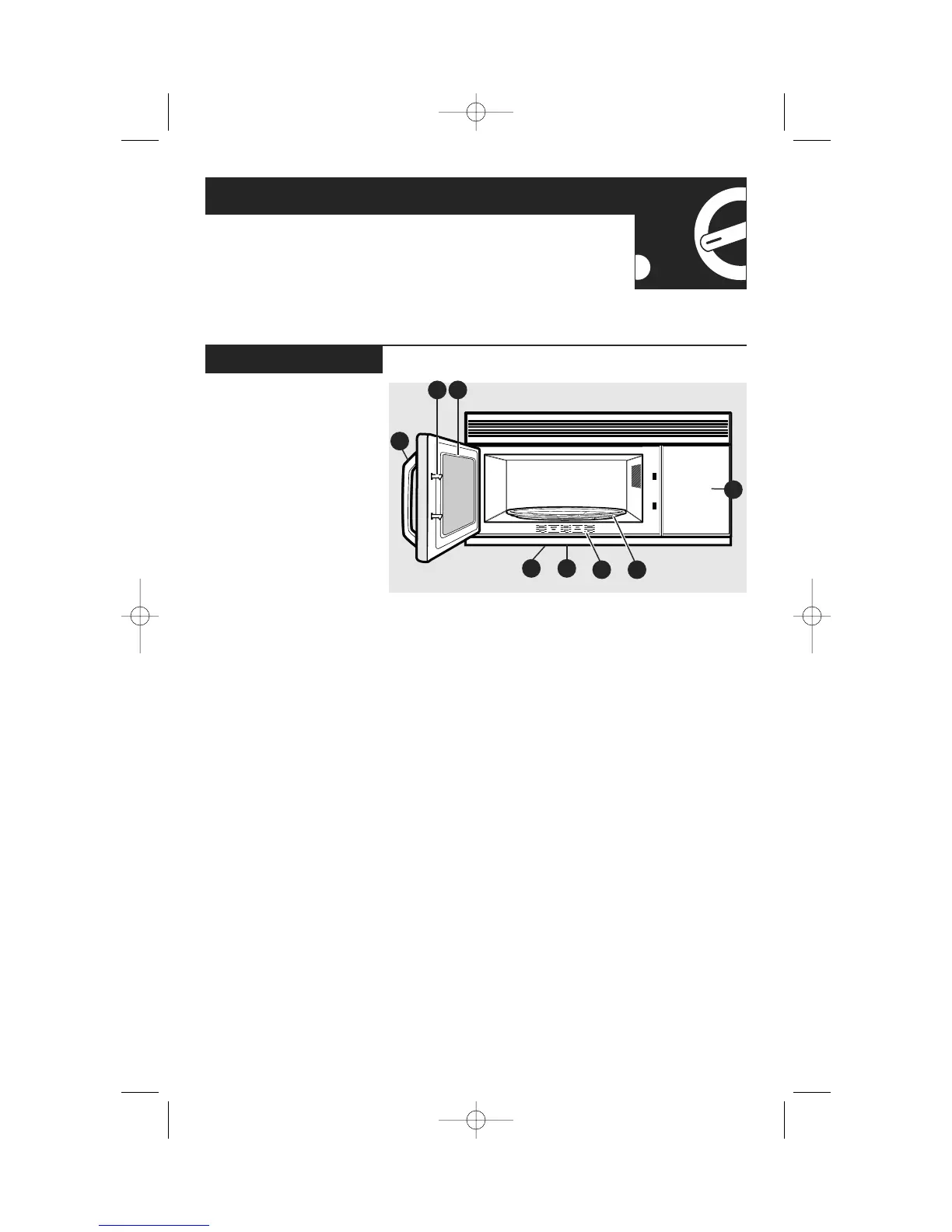
Features of Your Microwave
(Throughout this manual, features and appearance
may vary from your model.)
10
1 Door Handle.
Pull to open
the door. The door must
be securely latched for
the microwave to
operate.
2 Door Latches.
3 Window with Metal
Shield.
Screen allows
cooking to be viewed
while keeping
microwaves confined in
the oven.
4 Touch Control Panel.
5 Cooktop Light.
6 Grease Filter.
7 Removable Turntable.
Turntable and support
must be in place when
using the oven. The
turntable may be
removed for cleaning.
8 Convenience Guide.
NOTE:
The rating plate and
oven vent are located on
the inside walls of the
microwave oven.
The interior light is
located on the top of the
cavity.
Features
32
5
8
7
6
1
4
DTP_EN-EN_350A4502P668:39-40541 ENv01 9/22/2008 9:21 AM Page 10

Related product manuals