Need help?
Do you have a question about the Hover-1 BLAST and is the answer not in the manual?
Instructions for powering the hoverboard on and off.
Explains the function and placement of the foot mat sensors.
Describes the LED indicators for battery charge status.
Explains the LED indicator for the system's running state or errors.
A list of checks to perform before each ride for safety and functionality.
Step-by-step guide on how to mount and operate the hoverboard.
Details on battery type, charge time, voltage, and capacity.
Guidelines for maintaining the lithium-ion battery and safe disposal.
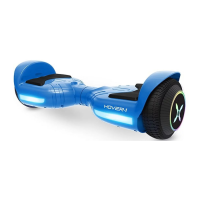
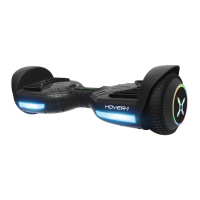
The Hover-1 Blast Electric Scooter is a personal transporter designed for individual use. It utilizes digital electronic gyroscopes and acceleration sensors to control balance and motion, responding to the user's center of gravity. A built-in inertia dynamic stabilization system assists with balance when moving forward and backward, though not during turns. To enhance stability during turns, especially at higher speeds, riders must shift their weight to counteract centrifugal force.
The Hover-1 Blast is an intuitive device that senses even slight movements to propel the rider. Your center of gravity dictates movement, acceleration, deceleration, and stopping. To move, tilt your center of gravity in the desired direction. For turning, focus on the intended direction while remaining relaxed. The device is equipped with foot mats that detect pressure, allowing for control. The battery indicator light provides information on the battery's charge status: green for fully charged, red flashing with beeping for low battery, and yellow for charging. A running indicator light turns red and emits a beep when a system error or improper operation occurs, signaling the need for caution and cessation of operation.
Before riding, it is crucial to thoroughly read the operation manual and familiarize yourself with all the scooter's elements and mechanisms. Practice at slower speeds in a flat, open area before riding in public. A pre-ride checklist includes ensuring the battery is fully charged, screws on the tires are firmly locked, and all appropriate safety and protective gear is worn. Comfortable clothes and flat, closed-toe shoes are recommended.
To operate, stand directly behind the Blast and place one foot on a foot mat, keeping weight on the foot still on the ground. Then, quickly and evenly step on with the second foot. It may take 3-5 minutes to get comfortable and maintain balance. A spotter can provide additional security. The Blast may vibrate or spin if weight and pressure are applied to only one foot mat, which is normal.
Dismounting involves lifting one leg and setting the foot back down on the ground (stepping back) from a stopped position, then stepping off completely. It's important to lift feet completely off the foot mat to avoid sending the Blast into a tailspin.
The Blast is intended for use by a single individual and should not be operated with two or more people. It is recommended for riders aged 8 and older. When riding on bumpy or uneven pavement, bend your knees to absorb shock and maintain balance. If unsure about safe terrain, dismount and carry the Blast. Avoid riding over bumps or objects greater than ½ inch. Pay attention to road conditions, people, places, property, and objects. Operate with caution indoors, especially in crowded or narrow spaces. Do not operate while talking, texting, or looking at your phone. Do not ride where prohibited, near motor vehicles, on public roads, or up/down steep hills. Avoid carrying anything while riding. Individuals with a lack of balance or pregnant women should not operate the Blast. At higher speeds, allow for longer stopping distances. Do not step forward off, jump on or off, or attempt stunts or tricks with the Blast. Avoid riding in dark, poorly lit areas, off-road, near potholes, cracks, or uneven surfaces. Be mindful of your increased height (4.35 inches/11.05 cm) when passing through doorways. Do not turn sharply, especially at high speeds, or step on the fenders. Avoid driving near flammable gas, steam, liquid, dust, or fiber, which could cause fire or explosion. Do not operate near swimming pools or other bodies of water.
The Blast is not equipped with reflectors, so riding in low-visibility conditions (fog, dusk, night) is not recommended. If riding in poor lighting, keep the headlight on and wear bright, reflective clothing.
Safety alerts will be triggered by unsafe riding surfaces (uneven, too steep), platform tilt exceeding 10 degrees, low battery voltage, charging status, excess speed, overheating, or continuous rocking for over 30 seconds. If the system enters protection mode, the alarm indicator will light up, and the board will vibrate, typically when the battery is low. If the platform tilts more than 10 degrees, the Blast will power off suddenly. If tires are blocked, the Blast will stop after 5 seconds. When the battery level is below protection mode, stop using the Blast within 15 seconds. Sustaining a high discharge current (e.g., driving up a steep slope) will also trigger an alert, and the Blast will stop within 15 seconds. If the Blast turns off during a safety alert, all operation systems will halt. Do not continue riding; turn the Blast off, then on again, and check calibration.
Battery Care: The Hover-1 Blast uses a rechargeable lithium-ion battery built into the scooter. Do not attempt to disassemble or remove the battery. Only use the supplied charger and charging cable. Using other chargers or cables can cause damage, overheating, fire risk, and voids the warranty. Do not connect the Blast or battery to a power supply plug or car's cigarette lighter. Keep the Blast and batteries away from fire or direct sunlight, as excessive heat can cause heating, breaking, or ignition. If the battery does not recharge within the specified time, do not continue charging, as it may become hot, rupture, or ignite. Do not modify, change, or replace the battery. If the battery emits odor, overheats, or leaks, do not use the Blast. Do not touch leaking materials or breathe fumes. Keep children and animals away from the battery. The battery contains dangerous substances; do not open or insert anything into it. If the battery discharges or emits substances, immediately distance yourself due to fire or explosion risk. Lithium-ion batteries are hazardous materials; follow all local, state, and federal laws for recycling, handling, and disposal.
General Care: Avoid exposing the Blast to liquid, moisture, or humidity to prevent damage to internal circuitry. Do not use abrasive cleaning solvents. Avoid extremely high or low temperatures, as this shortens component life, damages the battery, and distorts plastic parts. Do not dispose of the Blast in fire. Avoid contact with sharp objects to prevent scratches and damage. Do not allow the Blast to fall from high places, as this can damage internal circuitry. Do not attempt to disassemble the Blast without permission, as this will void the warranty. Only use the charger provided by Hover-1.
Charging: Ensure the charging port is clean and dry, free of dust or debris. Plug the charger into a grounded wall outlet; the charger's indicator light will be green. Connect the 3-pin charging cable to the Blast's charging port. Do not force the charger, as this can break the prongs or permanently damage the port. Once connected, the charger's indicator light will turn red, indicating charging. When it turns green, the Blast is fully charged. A full charge takes up to 5 hours. While charging, a yellow flashing light will appear on the scooter. Do not charge for more than 7.5 hours. After charging, unplug the charger from both the Blast and the power outlet.
Calibration: If the Blast is unbalanced, vibrating, or not turning properly, it may need calibration. Place the Blast on a flat, horizontal surface, ensuring the foot mats are even and not tilted. Make sure the charger is unplugged, and the board is off. Press and hold the ON/OFF button for 5 seconds; the scooter will turn on, and the battery indicator will light up. After the light flashes 5 times consecutively, release the button. Turn the board off, then back on to complete calibration.
 General
| Max Speed | 7 mph |
|---|---|
| Max Range | 3 miles |
| Max Weight Capacity | 160 lbs |
| Tire Size | 6.5 inches |
| Bluetooth | Yes |
| LED Lights | Yes |
| Charging Time | 5 hours |

 To Next Page