EasyManua.ls Logo

Hover-1 RIVAL - User Manual

Hover-1 RIVAL
26 pages
Print Icon
To Next Page IconTo Next Page
Loading...
RIVAL
EU-H1-RVL
Original Instruction
Read Operator’s Manual
Question and Answer IconNeed help?

Do you have a question about the Hover-1 RIVAL and is the answer not in the manual?

Summary

Helmet Safety

Correct Fitting

Ensure helmet covers forehead for proper protection.

Incorrect Fitting

Exposed forehead increases risk of serious injury.

Safety Instructions

Operating Principles

Controls and Display

Before Riding

Safety Precautions

Safety Checklist

Riding Your Rival

Operating Your Rival

Guide on mounting and operating the scooter safely.

Operating Range

Balance and Calibration

Safety Alerts

Charging Your Rival

Battery Care and Maintenance

General Care and Maintenance

Troubleshooting

Summary

Helmet Safety

Correct Fitting

Ensure helmet covers forehead for proper protection.

Incorrect Fitting

Exposed forehead increases risk of serious injury.

Safety Instructions

Operating Principles

Controls and Display

Before Riding

Safety Precautions

Safety Checklist

Riding Your Rival

Operating Your Rival

Guide on mounting and operating the scooter safely.

Operating Range

Balance and Calibration

Safety Alerts

Charging Your Rival

Battery Care and Maintenance

General Care and Maintenance

Troubleshooting

Overview

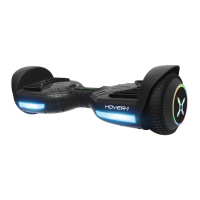
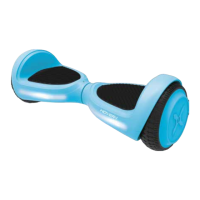
The Hover-1 Rival Electric Scooter is a personal transporter designed for safe and efficient travel. It utilizes digital electronic gyroscopes and acceleration sensors to control balance and motion, responding to the user's center of gravity. The Rival features a control system that drives motors located within the wheels, and a built-in inertia dynamic stabilization system assists with balance when moving forward and backward. To enhance stability, especially during turns at higher speeds, users should shift their weight to counteract centrifugal force.

Function Description:

The Hover-1 Rival is designed for personal transportation on flat, even paved surfaces. It allows users to move, accelerate, decelerate, and stop by subtly shifting their center of gravity. The device is powered by a rechargeable lithium-ion battery and is operated by stepping onto foot mats equipped with sensors. The scooter's system provides visual and auditory alerts for various operational states and potential errors, ensuring user awareness during rides.

Usage Features:

Before riding, it is crucial to familiarize oneself with the Rival's operating procedures and ensure the battery is fully charged. The scooter is turned on by pressing the power button once, and the LED indicator in the center will light up, confirming it's powered on. To turn it off, press the power button again.

When riding, users must ensure both feet are placed firmly on the foot mats. Stepping on only one foot mat may cause the Rival to vibrate or spin in one direction. To mount the scooter, stand directly behind it, place one foot on a foot mat while keeping weight on the other foot on the ground. Once ready, quickly and evenly step on with the second foot. It is recommended to stay relaxed and focus on finding your center of gravity. Maintaining proper balance typically takes 3-5 minutes, and having a spotter can be helpful initially.

The direction of movement, acceleration, and deceleration are controlled by tilting your center of gravity in the desired direction. To turn, focus on the intended direction and remain relaxed. Sharp turns or high speeds on slopes should be avoided to prevent injury. When encountering bumps or uneven surfaces, bend your knees to absorb shock or dismount and carry the Rival to a safer surface.

Dismounting involves lifting one leg, setting the foot back down on the ground (stepping back), and then stepping off completely. It is important to lift feet entirely off the foot mats to avoid the Rival going into a tailspin.

The Rival provides several indicators for operational status:

  • Battery Indicator: A green LED light signifies a full charge. A red flashing LED light accompanied by beeping indicates a low battery, prompting a recharge. A yellow light indicates the board is currently charging.
  • Running Indicator: This LED lights up when the foot mats are triggered, signifying the system is in a running state. If the system encounters an error, this light will turn red, alerting the user to a safety alert.

Safety alerts are crucial for preventing accidents. The Rival will beep and the Running Indicator Light will turn RED if there's a system error or improper operation. Common scenarios for safety alerts include riding on unsafe surfaces (uneven, too steep), the platform being tilted more than 10 degrees forward or backward upon stepping on, low battery voltage, the Rival still charging, excessive speed causing the platform to tilt, overheating, continuous rocking for over 30 seconds, the system entering protection mode (due to low battery), or blocked tires. If the Rival powers off during a safety alert, all operation systems will halt, and it should be turned off and back on to unlock it from a safety lock.

Maintenance Features:

Proper care and maintenance are essential for the longevity and safe operation of the Hover-1 Rival.

  • Charging: Ensure the charging port is clean and dry before plugging in the charger. Use only the supplied charger and charging cable. The charging indicator light on the charger will be green when plugged into a grounded wall outlet. Once connected to the Rival, the charger's light will turn RED, indicating charging. A full charge can take up to 6 hours, and the scooter will display a yellow flashing light during this time. Do not charge for more than 7.5 hours. Once the charger's light turns GREEN, the Rival is fully charged. Always unplug the charger from both the Rival and the power outlet after charging, and power off the Rival while it charges.
  • Battery Care: The Rival contains a built-in lithium-ion battery that should not be disassembled or removed. Only use the Hover-1 supplied charger and cable to avoid damage, overheating, or fire. Do not connect the Rival or battery to a car's cigarette lighter or place them near fire or direct sunlight, as this can cause heating, breaking, or ignition. If the battery does not recharge within the specified time, discontinue charging to prevent overheating, rupture, or ignition. If the battery emits odor, overheats, or leaks, do not use the Rival and avoid touching or breathing emitted fumes. Keep children and animals away from the battery. Lithium-ion batteries are hazardous materials and should be recycled or disposed of according to local, state, and federal laws. Do not attempt to modify, change, or replace the battery. If exposed to any substance emitted from the battery, seek immediate medical assistance.
  • General Maintenance: Avoid exposing the Rival to liquid, moisture, or humidity to protect its internal circuitry. Do not use abrasive cleaning solvents. Protect the Rival from extremely high or low temperatures, which can shorten component life, damage the battery, or distort plastic parts. Do not dispose of the Rival in fire. Prevent contact with sharp objects to avoid scratches and damage. Do not allow the Rival to fall from high places, as this can damage internal circuitry. Do not attempt to disassemble the Rival, as this will void the warranty. When cleaning, avoid using water or other liquids directly on the Rival, as this can cause permanent damage to internal components.
  • Calibration: If the Rival becomes unbalanced, vibrates, or does not turn properly, it can be calibrated. Place the Rival on a flat, horizontal surface, ensuring the foot mats are even. Make sure the charger is unplugged and the board is turned off. Press and hold the ON/OFF button for 15 seconds; the scooter's battery indicator will light up. After the light flashes 5 times consecutively, release the button. Turn the board off and then back on to complete the calibration.

Hover-1 RIVAL Specifications

General IconGeneral
Top Speed7 mph
Range6 miles
Weight Limit220 lbs
Wheel Size6.5 inches
Bluetooth SpeakersYes
LED LightsYes
Weight22 lbs

Related product manuals