Setting Up the TV
Setting Up the TV 15
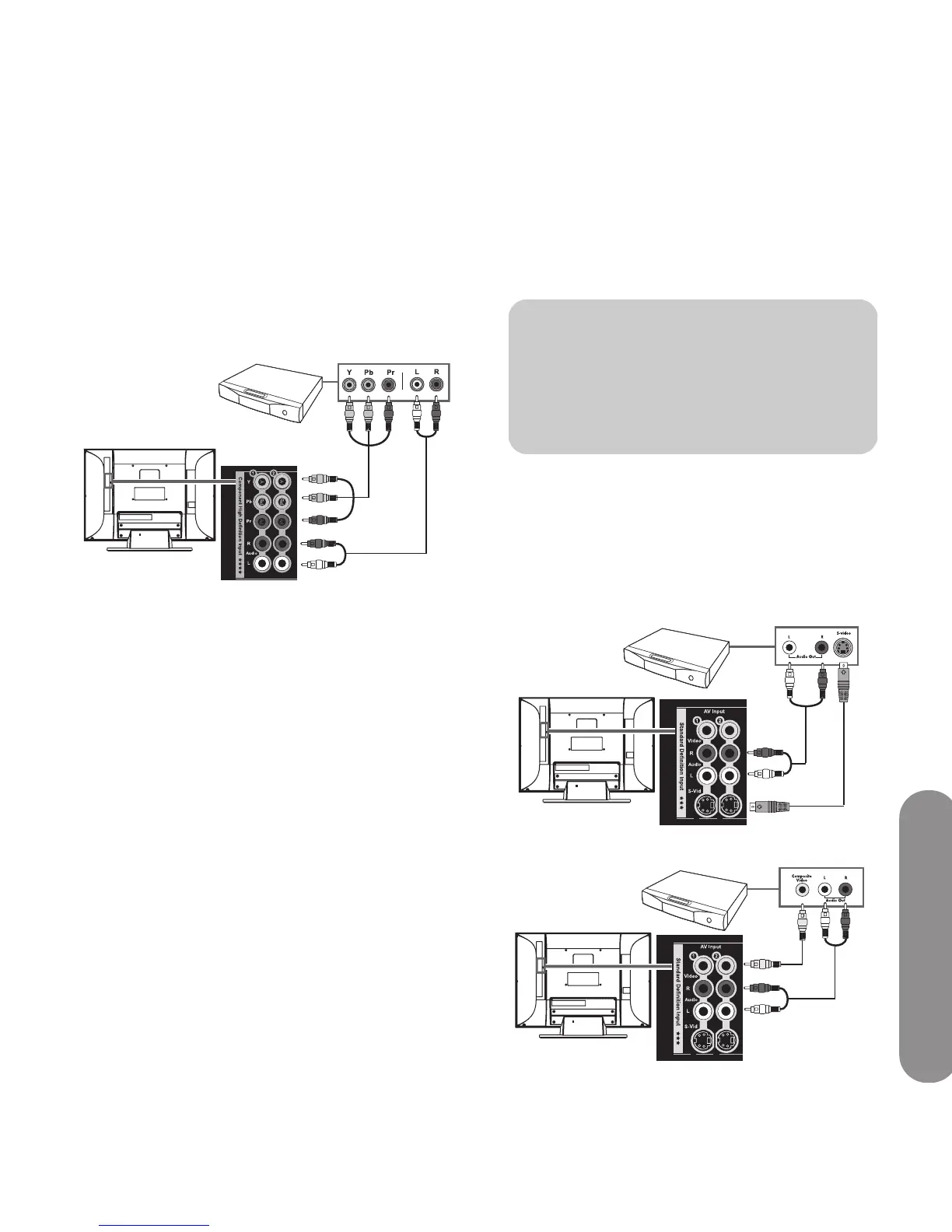
Connecting high-definition equipment
using component cables
There are two sets of high-definition Component
connectors you can use:
■ 1: Y, Pb, and Pr, and Audio L and R
■ 2: Y, Pb, and Pr, and Audio L and R
1 Connect component video cables and left-right
audio cables to the Component connectors on the
rear of the TV.
2 Connect the cables to the DVD player.
3 Turn on the DVD player, and start play.
4 Connect power to the TV; see “Connecting power
to the TV” on page 21.
5 Turn on the TV; see “Turning the TV On and Off”
on page 23.
6 Select the input source to view, as well as the
Aspect, and other options; see “Operating the TV”
on page 29.
Connecting standard-definition
equipment by using S-Video or Video
cables
Connect a standard-definition DVD player, VCR, game
console, camcorder, or other AV equipment by using
S-Vid or Video (composite video) connectors. These
connectors do not pass high-definition signals.
1 Connect an S-Video cable, or a composite video
cable, by using the AV Input connector sets on the
rear of the TV:
■ 1: S-Vid or Video, and Audio L and R
■ 2: S-Vid or Video, and Audio L and R
S-Vid connection
Video connection
!
The S-Vid and Video connectors share the
audio connectors in the set. Do not connect
video cables to both the S-Vid and Video
connectors in a set.



 To Next Page
 Loading...

