EasyManua.ls Logo

HP 1080p - Identifying Remote Control Buttons; Remote Control Button Functions

HP 1080p
356 pages
Print Icon
To Next Page IconTo Next Page
To Previous Page IconTo Previous Page
Loading...
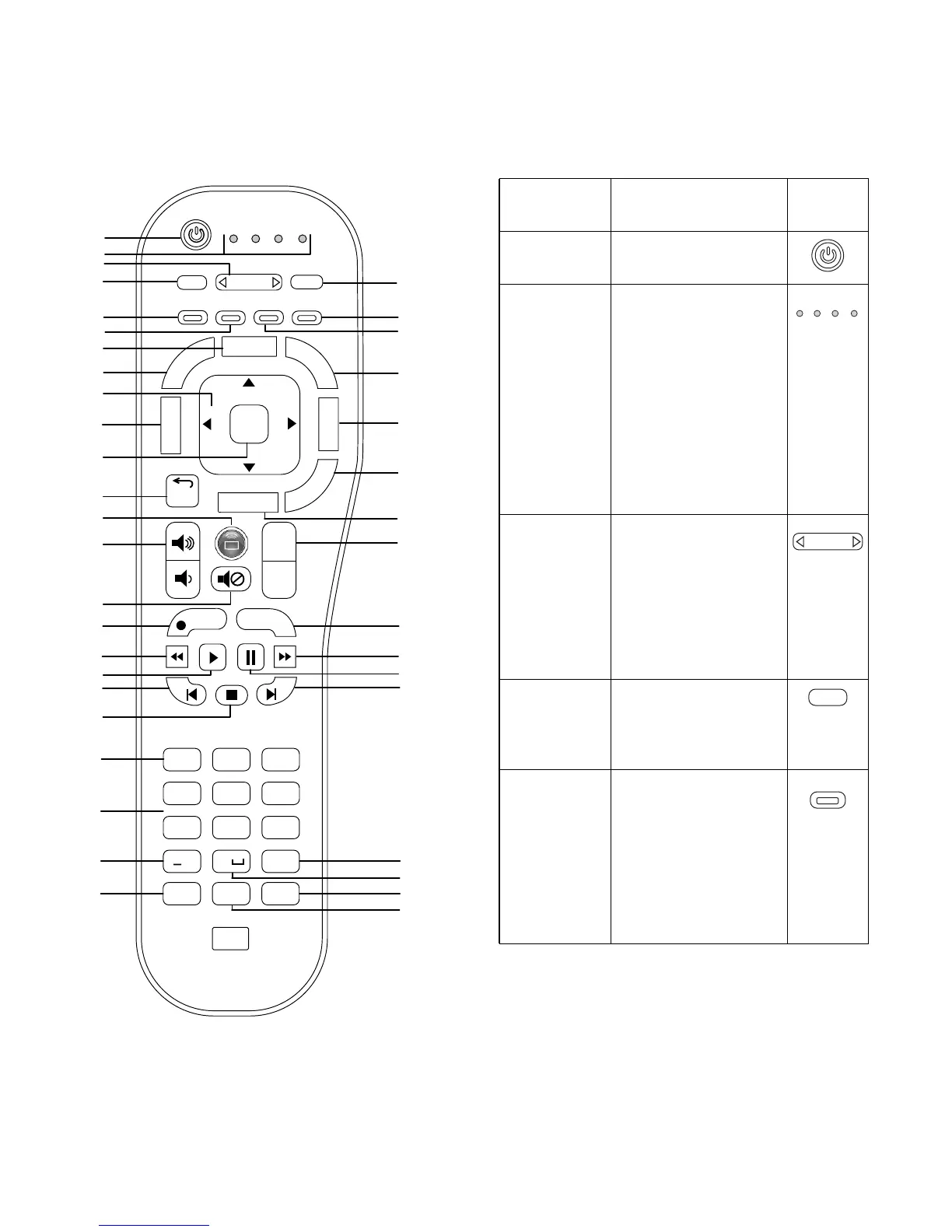
30 HP MediaSmart HDTV User Guide
Identifying the remote control buttons
A
J
B
E
K
L
N
O
M
I
H
F
AA
Z
D
C
G
AC
AB
Y
AD
AE
AF
AG
AH
AI
AJ
AK
AL
Q
P
S
V
W
T
R
TV AUD STB AUX
CC
Aspect
SAP
Device
Sleep
Media
Info
Menu
Guide
Source
Last Source
Recorded TV
back
Ch
+
Ch
Live TV
Rec
1 @!/
2 abc 3 def
4 ghi 5 jkl 6 mno
7pqrs 8 tuv 9
wxyz
0
#
On/Off
OK
*
AM
AN
X
Enter
LastClear
Screen
Fav
U
Name
Description
Icon
APower Press Power to turn
the TV on or off.
BIndicators Show the device that
is controlled by the
remote control: TV,
audio system (AUD),
set-top box (STB), or
auxiliary (AUX) such
as a DVD player or
other device.
Press the Device
button (C) to select the
device.
C Device Press Device as
needed to select the
device that is
controlled by the
remote control; an
indicator (B) lights to
show the current
device.
D Sleep Press Sleep to set the
timer in this order:
Off, 15, 30, 60,
120, or 150 minutes.
ECC or
Red
(context)
Press CC to select a
closed caption mode:
Off, On, On Mute.
In the digital media
menus, press Red
(context) to cause an
action specific to the
current menu or item.
TV AUD STB AU
X
Device
Sleep
CC

Table of Contents

Related product manuals