EasyManua.ls Logo

HP 6235A - Section II Installation; Initial Inspection; Installation Data

HP 6235A
12 pages
Print Icon
To Next Page IconTo Next Page
To Previous Page IconTo Previous Page
Loading...
SECTION
II
INSTALLATION
2-1
INITIAL
INSPECTION
2-2
Before
shipment,
this
instrument
was
inspected
and
found
to
be
free
of
mechanical
and
electrical
defects.
As
soon
as
the
instrument
is
unpacked,
inspect
for
any
damage
that
may
have
occurred
in
transit.
Save
all
packing
materials
until
the
inspection
is
completed.
If
damage
is
found,
file
claim
with
carrier
immediately.
The
Hewlett-Packard
Sales
and
Service
office
should
be
notified
as
soon
as
possible.
2-3
Mechanical
Check
2-4
This
check
should
confirm
that
there
are
no
broken
knobs
or
connectors,
that
the
cabinet
and
panel
surfaces
are
free
of
dents
and
scratches,
and
that
the
meter
is
not
scratched
or
cracked.
2-5
Electrical
Check
2-6
The
instrument
should
be
checked
against
its
elec¬
trical
specifications.
Section
V
includes
an
"in-cabinet"
performance
check
to
verify
proper
instrument
operation.
2-7
INSTALLATION
DATA
2-8
The
instrument
is
shipped
ready
for
bench
opera¬
tion.
Before
applying
power
to
the
instrument,
see
the
CAUTION
notice
in
paragraph
3-11.
2-9
Location
2-10
This
instrument
is
air
cooled.
Sufficient
space
should
be
allotted
so
that
a
free
flow
of
cooling
air
can
reach
the
rear
of
the
instrument
when
it
is
in
operation.
It
should
be
used
in
an
area
where
the
ambient
temperature
does
not
exceed
40°C
(up
to
55°C
with
derating).
2-11
Outline
Diagram
2-12
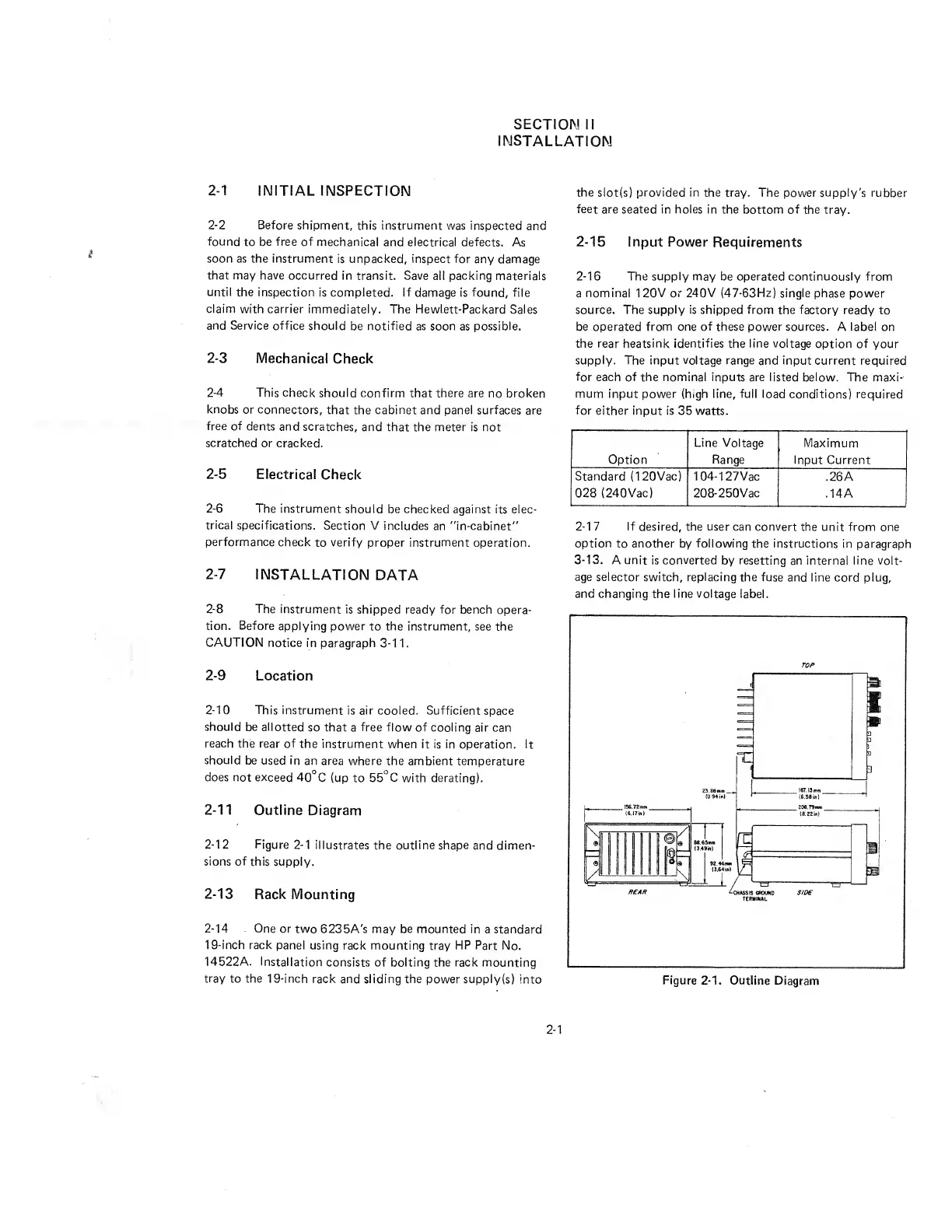
Figure
2-1
illustrates
the
outline
shape
and
dimen¬
sions
of
this
supply.
2-13
Rack
Mounting
2-14
One
or
two
6235A's
may
be
mounted
in
a
standard
19-inch
rack
panel
using
rack
mounting
tray
HP
Part
No.
14522A.
Installation
consists
of
bolting
the
rack
mounting
tray
to
the
19-inch
rack
and
sliding
the
power
supply(s)
Into
the
slot(s)
provided
in
the
tray.
The
power
supply's
rubber
feet
are
seated
in
holes
in
the
bottom
of
the
tray.
2-15
Input
Power
Requirements
2-16
The
supply
may
be
operated
continuously
from
a
nominal
1
20V
or
240V
(47-63Hz)
single
phase
power
source.
The
supply
is
shipped
from
the
factory
ready
to
be
operated
from
one
of
these
power
sources.
A
label
on
the
rear
heatsink
identifies
the
line
voltage
option
of
your
supply.
The
input
voltage
range
and
input
current
required
for
each
of
the
nominal
inputs
are
listed
below.
The
maxi¬
mum
input
power
(high
line,
full
load
conditions)
required
for
either
input
is
35
watts.
Line
Voltage
Maximum
Option
Range
Input
Current
Standard
(1
20Vac)
104-127Vac
.26A
028
(240Vac)
208-250Vac
.14A
_
2-
1
7
If
desired,
the
user
can
convert
the
unit
from
one
option
to
another
by
following
the
instructions
in
paragraph
3-
1
3
.
A
unit
is
converted
by
resetting
an
internal
line
volt¬
age
selector
switch,
replacing
the
fuse
and
line
cord
plug,
and
changing
the
line
voltage
label.
TOP
TERMINAL
Figure
2-1.
Outline
Diagram
2-1

Related product manuals