EasyManua.ls Logo

HP 6235A - Repackaging for Shipment

HP 6235A
12 pages
Print Icon
To Next Page IconTo Next Page
To Previous Page IconTo Previous Page
Loading...
2-18
Power
Cable
2-22
REPACKAGING
FOR
SHIPMENT
2-19
To
protect
operating
personnel,
the
National
Electrical
Manufacturers
Association
(NEMA)
recommends
that
the
instrument
panel
and
cabinet
be
grounded.
This
instrument
is
equipped
with
a
three
conductor
power
cable.
The
third
conductor
is
the
ground
conductor
and
when
the
cable
is
plugged
into
an
appropriate
receptacle,
the
instru¬
ment
is
grounded.
The
offset
pin
on
the
power
cable
three-
prong
connector
is
the
ground
connection.
In
no
event
shall
this
instrument
be
operated
without
an
adequate
cabi¬
net
ground
connection.
2-20
To
preserve
the
protection
feature
when
operating
the
instrument
from
a
two-contact
outlet,
use
a
three-prong
to
two-prong
adapter
(if
permitted
by
local
regulations)
and
connect
the
green
lead
on
the
adapter
to
ground.
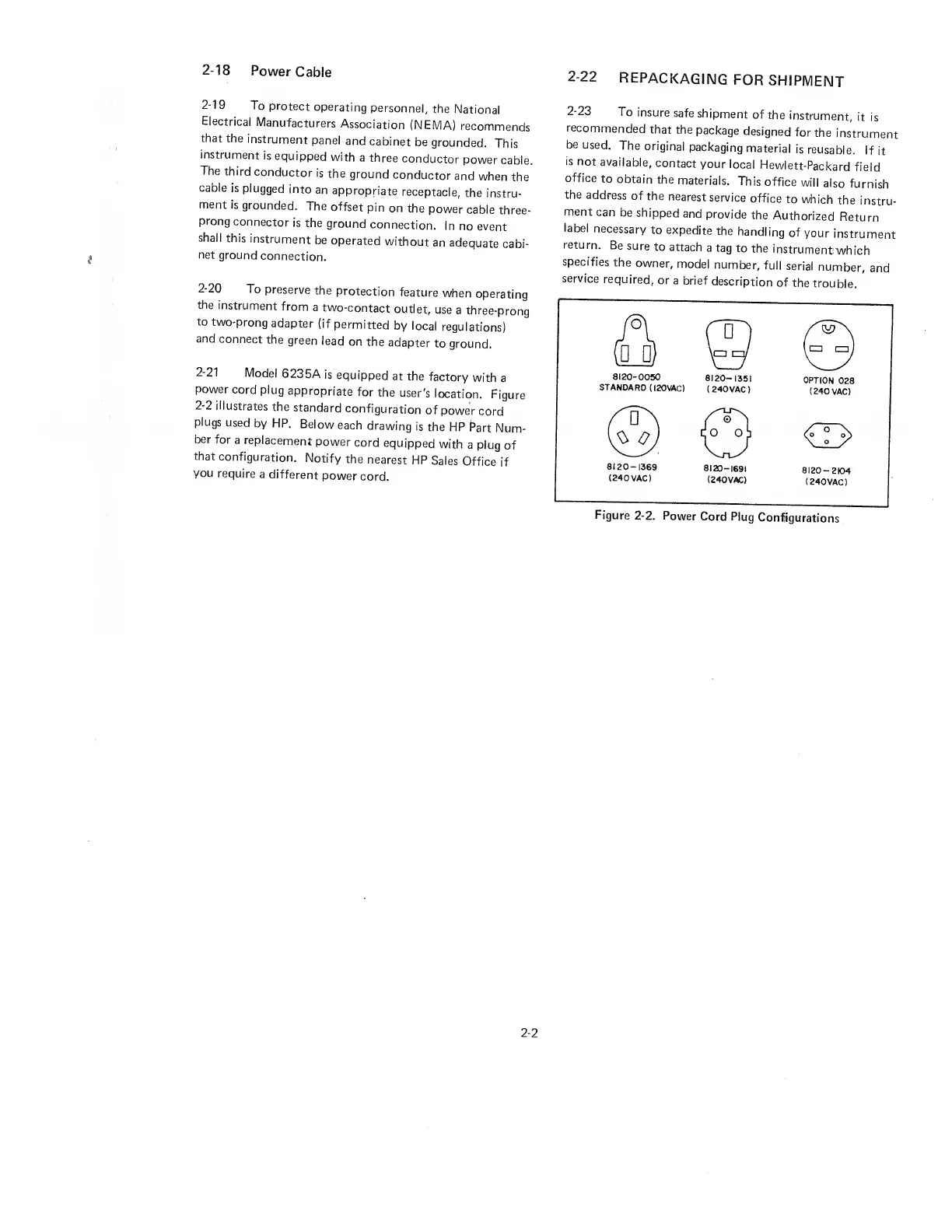
2-21
Model
6235A
is
equipped
at
the
factory
with
a
power
cord
plug
appropriate
for
the
user's
location.
Figure
2-2
illustrates
the
standard
configuration
of
power
cord
plugs
used
by
HP.
Below
each
drawing
is
the
HP
Part
Num¬
ber
for
a
replacement
power
cord
equipped
with
a
plug
of
that
configuration.
Notify
the
nearest
HP
Sales
Office
if
you
require
a
different
power
cord.
2-23
To
insure
safe
shipment
of
the
instrument,
it
is
recommended
that
the
package
designed
for
the
instrument
be
used.
The
original
packaging
material
is
reusable.
If
it
is
not
available,
contact
your
local
Hewlett-Packard
field
office
to
obtain
the
materials.
This
office
will
also
furnish
the
address
of
the
nearest
service
office
to
which
the
instru¬
ment
can
be
shipped
and
provide
the
Authorized
Return
label
necessary
to
expedite
the
handling
of
your
instrument
return.
Be
sure
to
attach
a
tag
to
the
instrumenfwhich
specifies
the
owner,
model
number,
full
serial
number,
and
service
required,
or
a
brief
description
of
the
trouble.
Figure
2-2.
Power
Cord
Plug
Configurations
2-2

Related product manuals