EasyManua.ls Logo

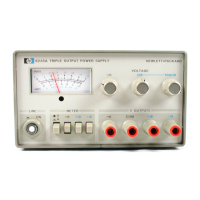
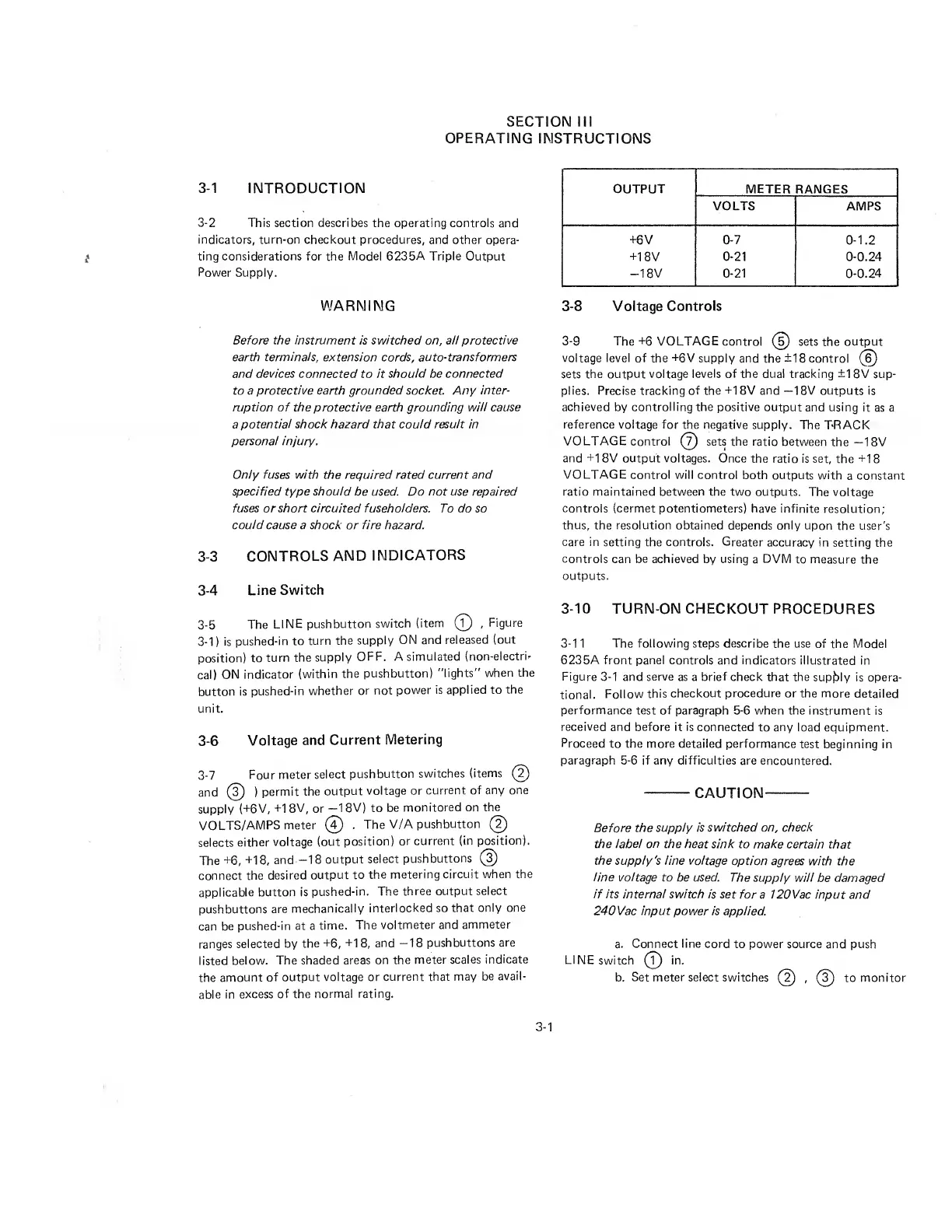
HP 6235A - Section III Operating Instructions; Controls and Indicators

HP 6235A
12 pages
Print Icon
To Next Page IconTo Next Page
To Previous Page IconTo Previous Page
Loading...
SECTION
III
OPERATING
INSTRUCTIONS
3-1
INTRODUCTION
3-2
This
section
describes
the
operating
controls
and
indicators,
turn-on
checkout
procedures,
and
other
opera¬
ting
considerations
for
the
Model
6235A
Triple
Output
Power
Supply.
WARNING
Before
the
instrument
is
switched
on,
all
protective
earth
terminals,
extension
cords,
auto-transformers
and
devices
connected
to
it
should
be
connected
to
a
protective
earth
grounded
socket
Any
inter¬
ruption
of
the
protective
earth
grounding
will
cause
a
potential
shock
hazard
that
could
result
in
personal
injury.
Only
fuses
with
the
required
rated
current
and
specified
type
should
be
used.
Do
not
use
repaired
fuses
or
short
circuited
fuseholders.
To
do
so
could
cause
a
shock
or
fire
hazard.
3-3
CONTROLS
AND
INDICATORS
3-4
Line
Switch
3-5
The
LINE
pushbutton
switch
(item
(?)
,
Figure
3-1)
is
pushed-in
to
turn
the
supply
ON
and
released
(out
position)
to
turn
the
supply
OFF.
A
simulated
(non-electri¬
cal)
ON
indicator
(within
the
pushbutton)
"lights"
when
the
button
is
pushed-in
whether
or
not
power
is
applied
to
the
unit.
3-6
Voltage
and
Current
Metering
3-7
Four
meter
select
pushbutton
switches
(items
(5)
and
(3)
)
permit
the
output
voltage
or
current
of
any
one
supply
(+6V,
+1
8V,
or
—18V)
to
be
monitored
on
the
VOLTS/AMPS
meter
(?)
.
The
V/A
pushbutton
(2)
selects
either
voltage
(out
position)
or
current
(in
position).
The
+6,
+18,
and
-18
output
select
pushbuttons
(s)
connect
the
desired
output
to
the
metering
circuit
when
the
applicable
button
is
pushed-in.
The
three
output
select
pushbuttons
are
mechanically
interlocked
so
that
only
one
can
be
pushed-in
at
a
time.
The
voltmeter
and
ammeter
ranges
selected
by
the
+6,
+18,
and
-18
pushbuttons
are
listed
below.
The
shaded
areas
on
the
meter
scales
indicate
the
amount
of
output
voltage
or
current
that
may
be
avail¬
able
in
excess
of
the
normal
rating.
OUTPUT
METER
RANGES
VOLTS
AMPS
+6V
0-7
0
-1.2
+18V
0-21
0-0.24
-18V
0-21
0-0.24
3-8
Voltage
Controls
3-9
The+6
VOLTAGE
control
(
5
)
sets
the
output
voltage
level
of
the
+6V
supply
and
the
±18
control
(6)
sets
the
output
voltage
levels
of
the
dual
tracking
±1
8V
sup¬
plies.
Precise
tracking
of
the
+18V
and
—18V
outputs
is
achieved
by
controlling
the
positive
output
and
using
it
as
a
reference
voltage
for
the
negative
supply.
The
TRACK
VOLTAGE
control
(?)
sets
the
ratio
between
the
—18V
and
+18V
output
voltages.
Once
the
ratio
is
set,
the
+18
VOLTAGE
control
will
control
both
outputs
with
a
constant
ratio
maintained
between
the
two
outputs.
The
voltage
controls
(cermet
potentiometers)
have
infinite
resolution;
thus,
the
resolution
obtained
depends
only
upon
the
user's
care
in
setting
the
controls.
Greater
accuracy
in
setting
the
controls
can
be
achieved
by
using
a
DVM
to
measure
the
outputs.
3-10
TURN-ON
CHECKOUT
PROCEDURES
3-11
The
following
steps
describe
the
use
of
the
Mode!
6235A
front
panel
controls
and
indicators
illustrated
in
Figure
3-1
and
serve
as
a
brief
check
that
the
supply
is
opera¬
tional.
Follow
this
checkout
procedure
or
the
more
detailed
performance
test
of
paragraph
5-6
when
the
instrument
is
received
and
before
it
is
connected
to
any
load
equipment.
Proceed
to
the
more
detailed
performance
test
beginning
in
paragraph
5-6
if
any
difficulties
are
encountered.
——
CAUTION-
Before
the
supply
is
switched
on,
check
the
label
on
the
heat
sink
to
make
certain
that
the
supply's
line
voltage
option
agrees
with
the
line
voltage
to
be
used.
The
supply
will
be
damaged
if
its
internal
switch
is
set
for
a
120Vac
input
and
240
Vac
input
power
is
applied.
a.
Connect
line
cord
to
power
source
and
push
LINE
switch
(?)
in.
b.
Set
meter
select
switches
(2)
,
(3)
to
monitor
3-1

Related product manuals