EasyManua.ls Logo

HP ENVY Touch 23 All-in-One - User Manual

HP ENVY Touch 23 All-in-One
5 pages
Print Icon
To Next Page IconTo Next Page
Loading...
EL-MF877-00 Page 1
Template Revision B
PSG instructions for this template are available at EL-MF877-01
Product End-of-Life Disassembly Instructions
Product Category: Personal Computers
Marketing Name / Model
[List multiple models if applicable.]
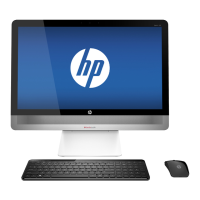
HP ENVY Touch 23 All-in-One PC
Purpose: The document is intended for use by end-of-life recyclers or treatment facilities. It provides the basic instructions
for the disassembly of HP products to remove components and materials requiring selective treatment, as defined by EU
directive 2002/96/EC, Waste Electrical and Electronic Equipment (WEEE).
1.0 Items Requiring Selective Treatment
1.1 Items listed below are classified as requiring selective treatment.
1.2 Enter the quantity of items contained within the product which require selective treatment in the right column, as
applicable.
Item Description
Notes
Quantity
of items
included
in product
Printed Circuit Boards (PCB) or Printed Circuit
Assemblies (PCA)
With a surface greater than 10 sq cm
Mother Board, USB Board, Power Board, Touchpad
Module, TP Board, WLAN Card, RAM Module (x2)
8
Batteries
All types including standard alkaline and lithium coin
or button style batteries RTC Battery
1
Mercury-containing components
For example, mercury in lamps, display backlights,
scanner lamps, switches, batteries
0
Liquid Crystal Displays (LCD) with a surface greater
than 100 sq cm
Includes background illuminated displays with gas
discharge lamps Touch LCD display
1
Cathode Ray Tubes (CRT)
0
Capacitors / condensers (Containing PCB/PCT)
0
Electrolytic Capacitors / Condensers measuring
greater than 2.5 cm in diameter or height
0
External electrical cables and cords
1
Gas Discharge Lamps
0
Plastics containing Brominated Flame Retardants
weighing > 25 grams (not including PCBs or PCAs
already listed as a separate item above)
0
Components and parts containing toner and ink,
including liquids, semi-liquids (gel/paste) and toner
Include the cartridges, print heads, tubes, vent
chambers, and service stations.
0
Components and waste containing asbestos
0
Components, parts and materials containing
0
Question and Answer IconNeed help?

Do you have a question about the HP ENVY Touch 23 All-in-One and is the answer not in the manual?

Summary

Items Requiring Selective Treatment

Tools Required

Product Disassembly Process

Disassembly Ram Door

Instructions for disassembling the Ram Door component.

Disassembly HDD & Dongle

Instructions for disassembling HDD and Dongle components.

Disassembly Ram Shielding

Instructions for disassembling the Ram Shielding component.

Disassembly DDR Ram*2

Instructions for disassembling DDR Ram modules.

Disassembly Rear cover sub assay

Instructions for disassembling the rear cover sub-assembly.

Disassembly Camera Module, PCB modules

Instructions for disassembling camera module and PCB modules.

Disassembly Thermal module Fan

Instructions for disassembling the thermal module fan.

Disassembly Mother board shielding

Instructions for disassembling the motherboard shielding.

Disassembly WLAN Card

Instructions for disassembling the WLAN Card.

Disassembly Thermal module

Instructions for disassembling the thermal module.

Disassembly CPU

Instructions for disassembling the CPU.

Disassembly Hinge Cap L&R

Instructions for disassembling the hinge caps.

Disassembly Stand unit

Instructions for disassembling the stand unit.

Disassembly Support bridge

Instructions for disassembling the support bridge.

Disassembly Mother Board + USB 3.0 PCB and RTC battery

Instructions for disassembling Mother Board, USB 3.0 PCB and RTC battery.

Disassembly Separate the USB 3.0 PCB from M;B

Instructions for separating the USB 3.0 PCB from the Mother Board.

Disassembly Speaker left & right side

Instructions for disassembling left and right speaker components.

Disassembly Base Pan sub assay

Instructions for disassembling the base pan sub-assembly.

Disassembly Loosen FPC

Instructions for loosening the Flexible Printed Circuit (FPC).

Disassembly LCD Panel

Instructions for disassembling the LCD Panel.

Overview

This document outlines the disassembly instructions for the HP ENVY Touch 23 All-in-One PC, a personal computer designed for end-of-life recyclers and treatment facilities. The primary function of this document is to guide the selective removal of components and materials that require special treatment, as mandated by the EU directive 2002/96/EC on Waste Electrical and Electronic Equipment (WEEE). This ensures proper recycling and disposal, minimizing environmental impact.

Function Description:

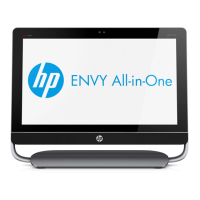
The HP ENVY Touch 23 All-in-One PC is a fully integrated desktop computer system, meaning the computer components are built directly into the display unit. This design offers a streamlined aesthetic and reduces cable clutter, making it suitable for various home and office environments. As an "All-in-One PC," it combines the functionality of a monitor, CPU, and other peripherals into a single, compact device. The "Touch" designation indicates that the display likely features touch-screen capabilities, enhancing user interaction through direct manipulation on the screen. The "ENVY" branding typically denotes a premium line of HP products, suggesting a focus on design, performance, and user experience.

Important Technical Specifications (Derived from Disassembly Information):

While specific performance metrics like processor speed or memory capacity are not detailed, the disassembly instructions reveal several key internal components and their quantities, providing insight into the device's architecture:

  • Printed Circuit Boards (PCBs) / Printed Circuit Assemblies (PCAs): The device contains a significant number of PCBs, with a total of 8 items identified as having a surface area greater than 10 sq cm. These include:
    • Mother Board: The central PCB that connects all other components.
    • USB Board: Likely handles USB connectivity.
    • Power Board: Manages power distribution within the system.
    • Touchpad Module / TP Board: Suggests an integrated touchpad, possibly for an external keyboard or as an alternative input method.
    • WLAN Card: Provides wireless network connectivity (Wi-Fi).
    • RAM Module (x2): Indicates the presence of two Random Access Memory modules, allowing for memory upgrades or dual-channel memory configurations.
    • Converter PCB: Implies conversion of electrical signals, possibly for display or power.
    • HDMI PCB: Suggests an HDMI output for connecting external displays or input for video signals.
    • USB 3.0 PCB: Indicates support for high-speed USB 3.0 connectivity.
  • Batteries: The device includes 1 RTC Battery, a small coin or button-style battery typically used to power the Real-Time Clock (RTC) and CMOS memory, maintaining system time and BIOS settings even when the main power is off.
  • Liquid Crystal Display (LCD): Features 1 Touch LCD display with a surface area greater than 100 sq cm. The "Touch" aspect confirms its interactive capabilities, and the "background illuminated displays with gas discharge lamps" note, while stating 0 mercury-containing components, implies the backlight technology used.
  • Storage: The presence of an HDD (Hard Disk Drive) and an SSD card (Solid State Drive) is mentioned during disassembly, indicating a potential hybrid storage solution or options for different storage types.
  • Connectivity: Includes a WLAN Card for wireless networking and USB 3.0 PCB for high-speed wired peripheral connections.
  • Cooling: A Thermal module Fan and a Thermal module are present, indicating an active cooling system to manage heat generated by the CPU and other components.
  • Audio: Speaker left & right side components are listed, confirming integrated stereo audio output.
  • Camera: A Camera Module is included, suggesting an integrated webcam for video conferencing or other applications.
  • CPU: A CPU (Central Processing Unit) is a core component, though its specific model or performance is not detailed.

Usage Features (Inferred from Components):

The HP ENVY Touch 23 All-in-One PC, based on its components, offers a range of features typical of a modern desktop computer:

  • Touchscreen Interaction: The "Touch LCD display" allows for intuitive interaction with the operating system and applications through touch gestures, making it user-friendly for various tasks, including browsing, gaming, and creative work.
  • Integrated Design: As an All-in-One, it provides a clean and minimalist setup, ideal for spaces where traditional desktop towers and separate monitors might be cumbersome.
  • Wireless Connectivity: The WLAN card enables internet access and network communication without the need for Ethernet cables, offering flexibility in placement.
  • High-Speed Data Transfer: USB 3.0 ports facilitate rapid data transfer with compatible external devices, such as external hard drives or flash drives.
  • Integrated Webcam: The camera module supports video calls and online meetings, a standard feature for modern personal computers.
  • Stereo Audio: Built-in speakers provide audio output for multimedia consumption, video conferencing, and system sounds.
  • Expandable Memory: The presence of two RAM modules suggests the possibility of upgrading or configuring memory for improved performance.
  • Flexible Storage Options: The mention of both HDD and SSD indicates that the system may offer a balance of high capacity (HDD) and high speed (SSD) storage, or provide options for users to choose their preferred storage type.

Maintenance Features (Inferred from Disassembly Process):

The disassembly instructions primarily focus on end-of-life recycling, but the detailed steps also provide insights into potential maintenance or upgrade possibilities:

  • Modular Design: The breakdown of components into distinct modules (e.g., Ram Door, HDD & Dongle, Camera Module, WLAN Card, Thermal module) suggests a modular design, which can simplify the replacement of individual parts.
  • Access to RAM: The "Disassembly Ram Door" and "Disassembly DDR Ram*2" steps indicate that RAM modules are relatively accessible, allowing for potential upgrades or replacements.
  • Storage Access: The "Disassembly HDD & Dongle" and "Disassembly Wlan card (1Pcs M2.0 screw) + SSD card (1Pcs M2.0 screw)" steps suggest that storage devices (HDD and SSD) can be accessed and potentially replaced or upgraded.
  • Cooling System Maintenance: The "Disassembly Thermal module Fan" and "Disassembly Thermal module" steps imply that the cooling system can be accessed for cleaning or replacement, which is crucial for maintaining optimal performance and preventing overheating.
  • Tool Requirements: The specification of a TORX T8 screwdriver as the primary tool indicates that specialized tools, beyond standard Phillips head screwdrivers, are required for disassembly. This might be a consideration for users attempting self-maintenance.
  • Component Separation: The instructions detail how to separate various PCBs (e.g., USB 3.0 PCB from Mother board), which is essential for component-level repair or replacement.
  • RTC Battery Replacement: The explicit mention of "Disassembly Mother Board + USB 3.0 PCB and RTC battery" confirms that the RTC battery, a common component requiring eventual replacement, is accessible.

In summary, the HP ENVY Touch 23 All-in-One PC is a sophisticated, integrated computing solution with a focus on user experience through its touchscreen and streamlined design. Its internal architecture, as revealed by the disassembly guide, supports a range of modern features and, while designed for end-of-life processing, also hints at a degree of modularity that could facilitate certain maintenance or upgrade tasks.
HP ENVY Touch 23 All-in-One Specifications

General IconGeneral
BrandHP
ModelENVY Touch 23 All-in-One
CategoryDesktop
LanguageEnglish

Related product manuals