
 Need help?
Do you have a question about the HP Envy TouchSmart 23 All-in-One and is the answer not in the manual?
Instructions for disassembling the RAM door, including unlocking the latch on both sides.
Instructions for disassembling the Hard Disk Drive (HDD) and Dongle.
Procedure for removing the RAM shielding from the computer.
Instructions for removing two DDR RAM modules.
Steps to disassemble the rear cover assembly.
Instructions for disassembling camera modules and other PCB modules.
Procedure for removing the thermal module fan.
Steps for removing the motherboard shielding.
Instructions for removing the Wireless Local Area Network (WLAN) card.
Procedure for disassembling the thermal module.
Instructions for removing the Central Processing Unit (CPU).
Procedure for disassembling the left and right hinge caps.
Instructions for disassembling the stand unit.
Steps to disassemble the support bridge.
Instructions for removing the motherboard, USB 3.0 PCB, and RTC battery.
Procedure to separate the USB 3.0 PCB from the Motherboard.
Instructions for disassembling the left and right speakers.
Steps for disassembling the base pan sub-assembly.
Procedure for loosening the Flexible Printed Circuit (FPC).
Instructions for disassembling the Liquid Crystal Display (LCD) panel.
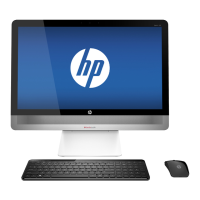
This document outlines the disassembly procedures for the HP Envy TouchSmart 23 All-in-One PC, primarily for end-of-life recyclers and treatment facilities. Its core function is to provide a structured guide for the selective removal of components and materials that require special handling according to the EU directive 2002/96/EC on Waste Electrical and Electronic Equipment (WEEE). The instructions are designed to ensure that hazardous or valuable materials are properly segregated and processed, minimizing environmental impact and facilitating resource recovery.
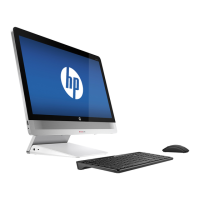
The device itself, an All-in-One PC, integrates the computer's internal components directly into the display, offering a compact and streamlined desktop solution. This design typically includes a large touchscreen display, which is a key feature for user interaction. The "TouchSmart" designation indicates its capability for touch input, enhancing usability for various applications, from casual browsing to more interactive tasks. The "Envy" branding suggests a focus on premium design and performance, often incorporating higher-quality materials and more powerful internal specifications compared to standard models. As an All-in-One, it aims to reduce cable clutter and save space, making it suitable for environments where a traditional tower setup might be cumbersome.
From a usage perspective, the HP Envy TouchSmart 23 is designed for a broad range of applications, including home entertainment, productivity, and creative work. Its large display is conducive to media consumption, offering an immersive viewing experience for movies, photos, and games. The touch functionality allows for intuitive navigation and interaction with software, making it accessible for users who prefer a more direct interface than a mouse and keyboard alone. For productivity, the integrated design and powerful components support multitasking and running demanding applications. The inclusion of a webcam and microphone, typical for All-in-One PCs, facilitates video conferencing and online communication. The device's connectivity options, such as USB ports and Wi-Fi, ensure seamless integration with peripherals and networks. The "23" in its name likely refers to the screen size, indicating a substantial display area for comfortable viewing and interaction.
Maintenance features, as implied by the disassembly instructions, are primarily geared towards end-of-life processing rather than routine user maintenance. The detailed steps for removing various internal components highlight the complexity of the device's construction. For instance, the instructions cover the disassembly of the RAM door, HDD and dongle, RAM shielding, DDR RAM, rear cover sub-assembly, camera module, PCB modules, thermal module fan, motherboard shielding, WLAN card, thermal module, CPU, hinge cap, stand unit, support bridge, motherboard, USB 3.0 PCB, RTC battery, speakers, base pan sub-assembly, FPC, and LCD panel. This comprehensive breakdown suggests that while the device is designed for integrated performance, its internal architecture is modular enough to allow for component-level recycling and repair by trained technicians. The emphasis on selective treatment of specific items like printed circuit boards, batteries, mercury-containing components, LCDs, and plastics containing brominated flame retardants underscores the device's adherence to environmental regulations. The requirement for specific tools, such as a TORX T8 screwdriver, indicates that specialized equipment is needed for proper disassembly, further reinforcing that these procedures are not intended for the average end-user. The detailed graphical illustrations accompanying each disassembly step serve as a visual guide, ensuring accuracy and efficiency in the removal process, which is crucial for both recycling and potential component reuse. This level of detail is essential for ensuring that all materials requiring selective treatment are identified and handled correctly, contributing to a more sustainable product lifecycle.
 General
| Resolution | 1920 x 1080 (Full HD) |
|---|---|
| Bluetooth | Bluetooth 4.0 |
| RAM | 8 GB |
| Storage | 1 TB HDD |
| Display | 23-inch Touchscreen |
| Graphics | Intel HD Graphics |
| Ports | USB 3.0, USB 2.0, HDMI |
| Audio | Integrated speakers |
| Wireless | 802.11 b/g/n |
| Webcam | Integrated HD Webcam |







 To Next Page