
 Need help?
Do you have a question about the HP Pavilion 23 TouchSmart and is the answer not in the manual?
Remove screws to detach the rear cover of the product.
Remove screws to detach the stand from the product.
Remove screws to detach the Motherboard (MB) shielding.
Remove screws and cables to detach the Hard Disk Drive (HDD) and Optical Disk Drive (ODD).
Remove screws and cables to detach the speakers.
Remove screws and cable to detach the cooling fan module.
Remove cables and screws to detach the converter board.
Remove cable and screw to detach the webcam module.
Remove cables and screw to detach the wireless network card.
Disconnect and remove various cables connected to the Motherboard and Base Pan.
Remove FFC cables and screws to detach the DSP board.
Remove screws to detach the Motherboard (MB) and its battery.
Release clips to remove the DDR memory module.
Remove screws to separate the base pan from the front bezel and panel.
Remove backlight, LVDS, and FFC cables, and the LCD bracket.
Remove mouse, keyboard, battery, and Motherboard (MB).
Cut and separate the power supply unit.
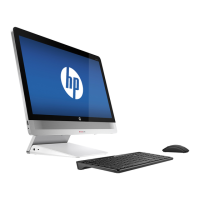
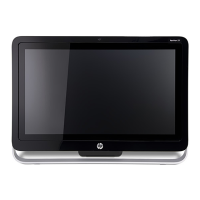
This document outlines the end-of-life disassembly instructions for the HP Pavilion 23 TouchSmart All-in-One PC, a personal computer designed for various computing tasks. As an all-in-one unit, it integrates the computer components and display into a single enclosure, offering a streamlined and space-saving solution for users. The device is intended for general computing purposes, including productivity, entertainment, and communication, making it suitable for home and office environments. Its touch-enabled display enhances user interaction, allowing for intuitive navigation and control through direct touch input, which can be particularly useful for applications designed for touch interfaces.
The primary function of this device is to provide a complete computing experience within a compact form factor. It supports a range of software applications, from basic web browsing and document editing to more demanding tasks like multimedia consumption and light content creation. The integrated design simplifies setup, as it eliminates the need for separate towers and monitors, reducing cable clutter and enhancing the aesthetic appeal of the workspace. The inclusion of a webcam further facilitates video conferencing and online communication, making it a versatile tool for staying connected.
From a usage perspective, the HP Pavilion 23 TouchSmart All-in-One PC is designed for ease of use. The touch screen functionality allows for a more direct and engaging interaction with the operating system and applications, complementing traditional mouse and keyboard inputs. This hybrid input method caters to a wide range of user preferences and accessibility needs. The device is typically equipped with various ports for connecting peripherals such as external drives, printers, and other accessories, expanding its functionality and adaptability to different user requirements. Its all-in-one nature means that most essential components are pre-integrated, reducing the complexity of initial setup and configuration for the end-user. The large display size, indicated by the 23-inch screen in its model name, provides ample screen real estate for multitasking and immersive viewing experiences, whether for work or entertainment.
Maintenance features, particularly those related to end-of-life considerations, are a key focus of this document. While general user maintenance might involve software updates, cleaning the screen, and ensuring proper ventilation, the provided instructions are specifically tailored for professional recyclers and treatment facilities. These instructions detail the steps required to safely disassemble the product and remove components that necessitate selective treatment according to environmental directives like EU directive 2002/96/EC (WEEE). This ensures that hazardous materials are handled appropriately and valuable resources can be recovered.
The disassembly process is meticulously outlined, starting with the removal of the rear cover and stand, which are typically the initial steps for accessing internal components. Subsequent steps involve disassembling various modules such as the MB shielding, hard disk drive (HDD), optical disk drive (ODD), speakers, fan module, converter board, webcam, and wireless card. Each step is designed to systematically expose and allow for the removal of specific parts. For instance, the instructions detail how to remove printed circuit boards (PCBs) or printed circuit assemblies (PCAs) larger than 10 sq cm, which are critical for selective treatment due to their material composition. Batteries, including standard alkaline and lithium coin or button style batteries, are also identified for removal, highlighting their importance in environmental compliance.
Further steps in the maintenance and end-of-life process include the disconnection of various internal cables, such as HDD/ODD cables, converter cables, LVDS cables, and TS USB cables, which connect different modules within the system. The removal of the DSP board, MB, and MB battery is also specified, along with the CPU and DDR memory modules. These components often contain materials that require special handling during recycling. The instructions also cover the separation of the base pan and front bezel from the panel, which is crucial for accessing the display components. The removal of backlight, LVDS, and FFC cables, along with the LCD bracket, is detailed to facilitate the proper disposal or recycling of the liquid crystal display (LCD) panel, especially those larger than 100 sq cm.
The document also addresses the removal of the mouse/keyboard battery and the power supply, emphasizing that these items, particularly the power supply, need to be carefully disassembled to remove the PCBA (Printed Circuit Board Assembly) within them. This level of detail ensures that all components requiring selective treatment are identified and removed, minimizing environmental impact. The tools required for these disassembly tasks are simple, primarily screw drivers of specific sizes (2# X10 and 1# X10), indicating that the process is designed to be straightforward for trained personnel.
In summary, the HP Pavilion 23 TouchSmart All-in-One PC functions as a versatile and user-friendly personal computer with a touch-enabled display. Its usage features emphasize a streamlined experience and intuitive interaction. The detailed maintenance instructions, specifically for end-of-life disassembly, underscore a commitment to environmental responsibility by guiding recyclers through the process of selectively treating components in accordance with regulatory standards.
 General
| Product Type | All-in-One Desktop |
|---|---|
| Display Size | 23 inches |
| Display Resolution | 1920 x 1080 |
| Graphics | Integrated |
| Touchscreen | Yes |
| Wireless | 802.11 b/g/n |
| Processor | Intel Core i3/i5 (varies by model) |
| CPU | Intel Core i3/i5/i7 (varies by model) |
| RAM | Up to 16 GB DDR3 |
| Storage | Up to 2 TB HDD |
| Hard Drive | Up to 2 TB HDD |
| Operating System | Windows 8 |
| Graphics Card | Intel HD Graphics |
| Optical Drive | DVD Writer |
| Ports | USB 3.0, USB 2.0, HDMI, Ethernet |
| Weight | 15.4 lbs |




 To Next Page