2 Notebook Essentials
Chapter 1: What’s next
After you set up your device, you can connect to a wireless or wired network so that you can
connect to the Internet and send and receive e-mail. Refer to Chapter 2, “Connecting to the
Internet,” for more information.
After you have connected to the Internet, manage your device’s defenses with Windows
Security Center. HP also recommends that you install antivirus software. Antivirus software
helps protect your device from damage caused by viruses. Refer to Chapter 4, “Keeping your
device safe,” for more information.
✎
This guide contains the latest information about the device.
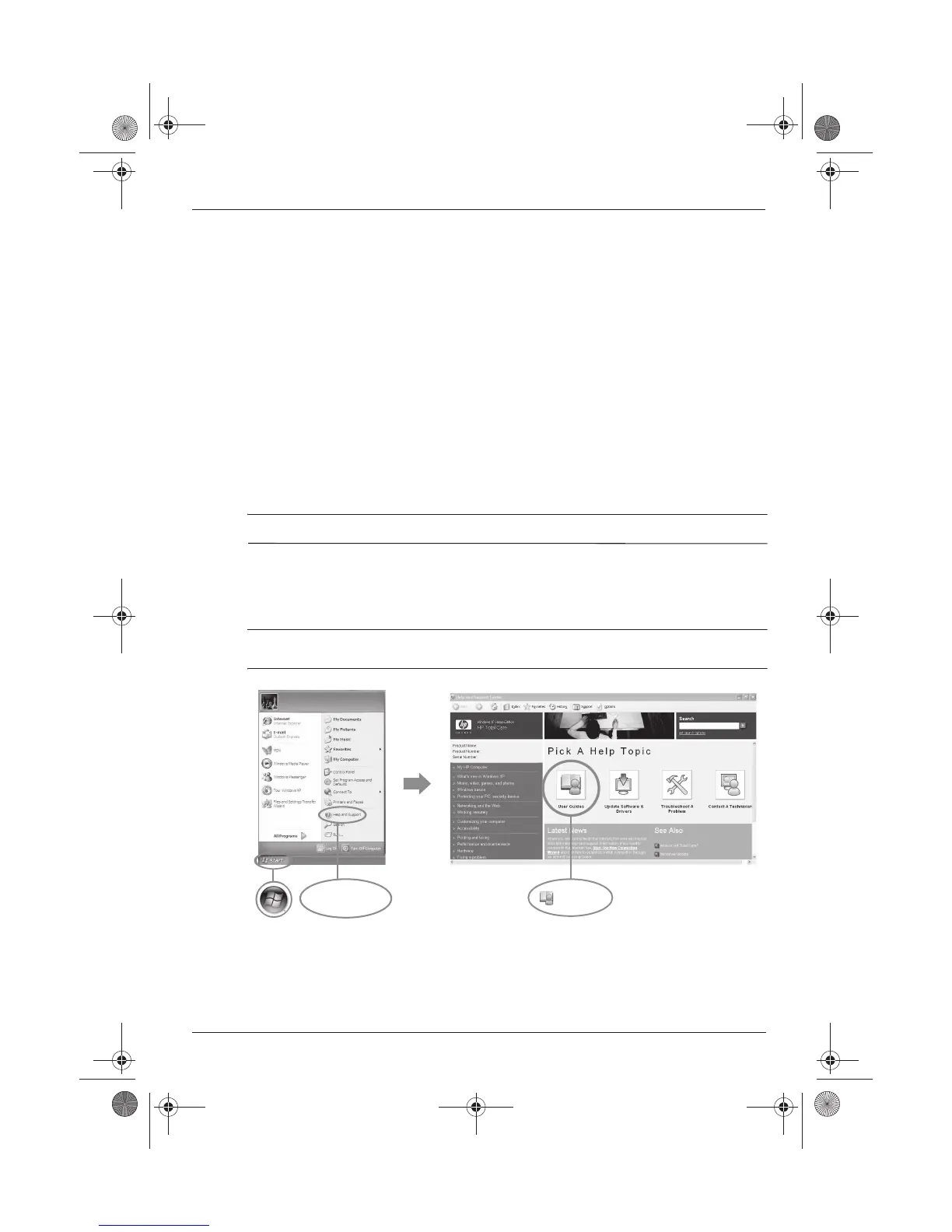
For detailed information about your device, such as power management, drives, memory,
security, and other features, click
Start
, click
Help and Support
, and then click
User
Guides
. You do not need to connect to the Internet to access the user guides in Help and
Support.
✎
The desktop of your device may look slightly different from the illustration in this
section.
Connecting to the Internet
Protecting your device from viruses
Locating the electronic manuals
User Guides
Help and Support
517684-001.book Page 2 Thursday, December 11, 2008 10:02 PM



 To Next Page