Notebook Essentials 7
Chapter 2: Connecting to the Internet
This section describes the steps necessary to set up a typical home or small office wireless
network, which is also called a wireless local network (WLAN), using a wireless device.
To set up a wireless network and to connect to the Internet, you need the following
equipment:
■ A broadband modem (either DSL or cable) and high-speed Internet service purchased
from an ISP
■ A wireless router (purchased separately)
■ Your new wireless computer
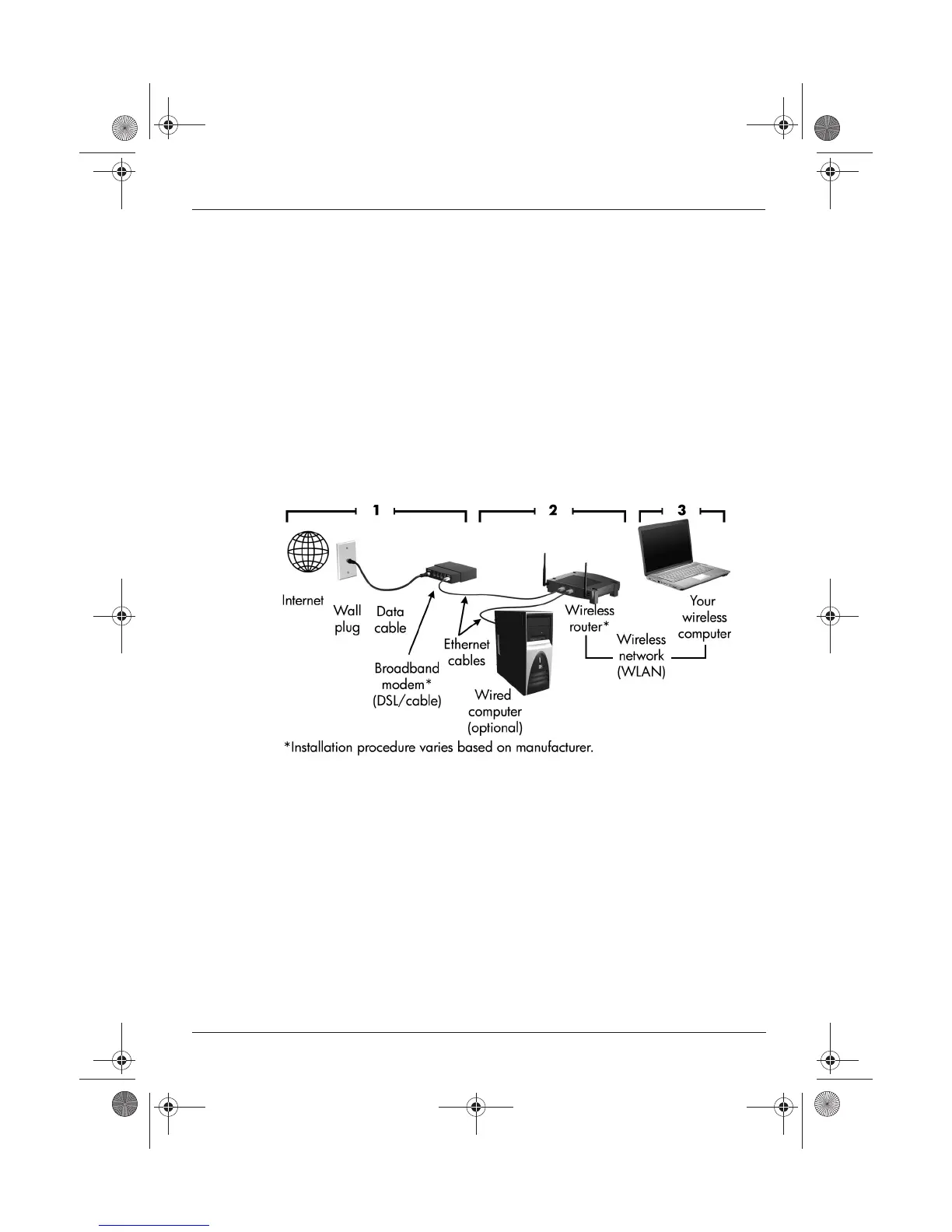
The illustration below shows an example of a wireless network installation that is connected
to the Internet. As this network grows, additional wireless and wired computers can be
connected to the network to access the Internet.
Step 1: Purchase high-speed Internet service
If you already have high-speed Internet service (DSL, cable, or satellite), begin with the
“Step 2: Purchase and install a wireless router” section. If you do not have high-speed
Internet service, follow these steps:
1. Contact a local ISP to purchase high-speed Internet service and a DSL or cable modem.
The ISP will help set up the modem, install a network cable to connect your wireless
device to the modem, and test the Internet service.
2. Your ISP will give you a User ID and password to access the Internet. Record this
information and store it in a safe place.
Setting up a new wireless network
517684-001.book Page 7 Thursday, December 11, 2008 10:02 PM



 To Next Page