EnglishEnglish 25
HP 21” Color Monitor User’s Guide
Troubleshooting
Troubleshooting
Refer to this section, before contacting technical support.
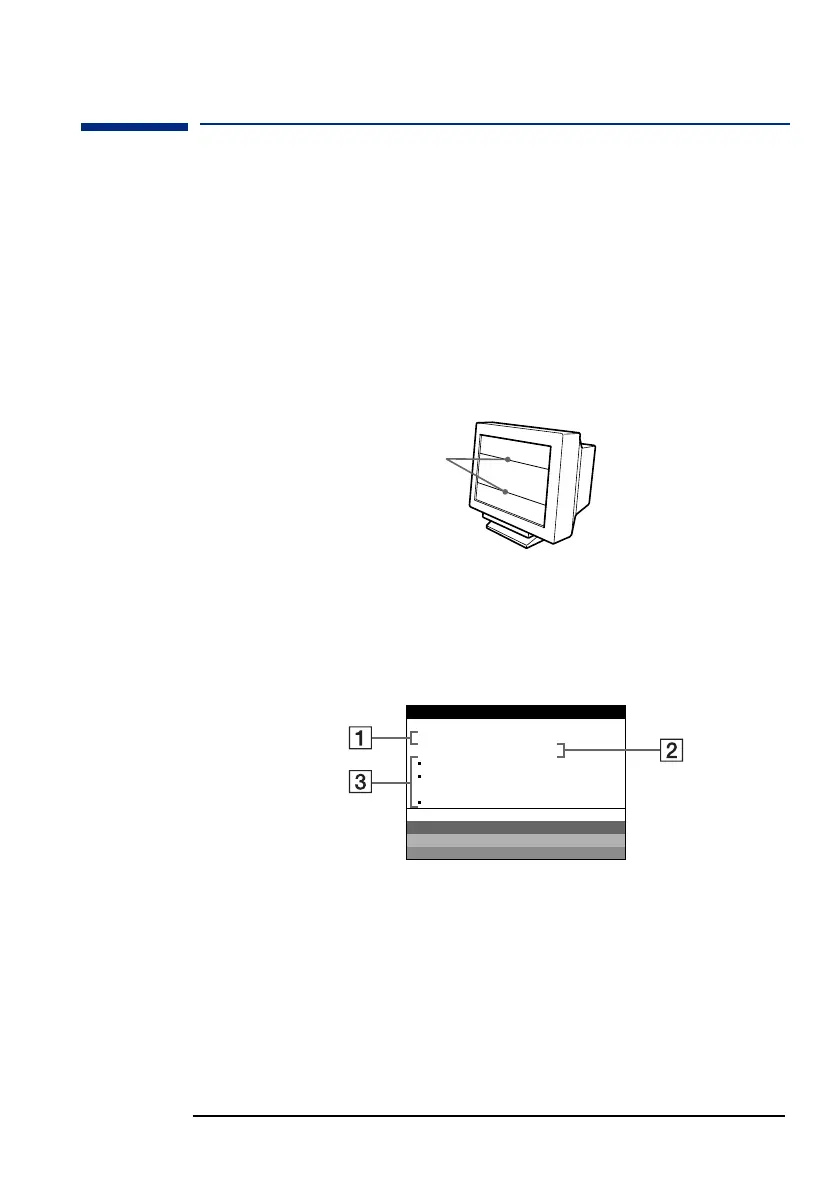
If thin lines appear on your screen (damper wires)
The lines you are experiencing on your screen are normal for the
Trinitron monitor and are not a malfunction. These are shadows from
the damper wires used to stabilize the aperture grille and are most
noticeable when the screen’s background is light (usually white). The
aperture grille is the essential element that makes a Trinitron picture
tube unique by allowing more light to reach the screen, resulting in a
brighter, more detailed picture.
On-screen messages
If there is something wrong with the input signal, one of the following
messages appears on the screen.
If NO INPUT SIGNAL appears on the screen
1
The selected connector.
This message shows the currently selected connector (INPUT 1 or
INPUT 2).
2 The input signal condition
NO INPUT SIGNAL. This indicates that no signal is input, or that
no signal is input from the selected connector.
Damper wires
MON I TOR I S WORK I NG
I NPUT 1 :
NO I NPUT S I GNAL
ACT I VATE US I NG PC
CHECK I NPUT SELECT RO
CHECK S I GNAL CABLE
WH I T E
RED
GREEN
BLUE
INFORMATION



 To Next Page