HP 21” Color Monitor User’s Guide
Using Your Monitor
8 EnglishEnglish
Using the On-Screen Menu
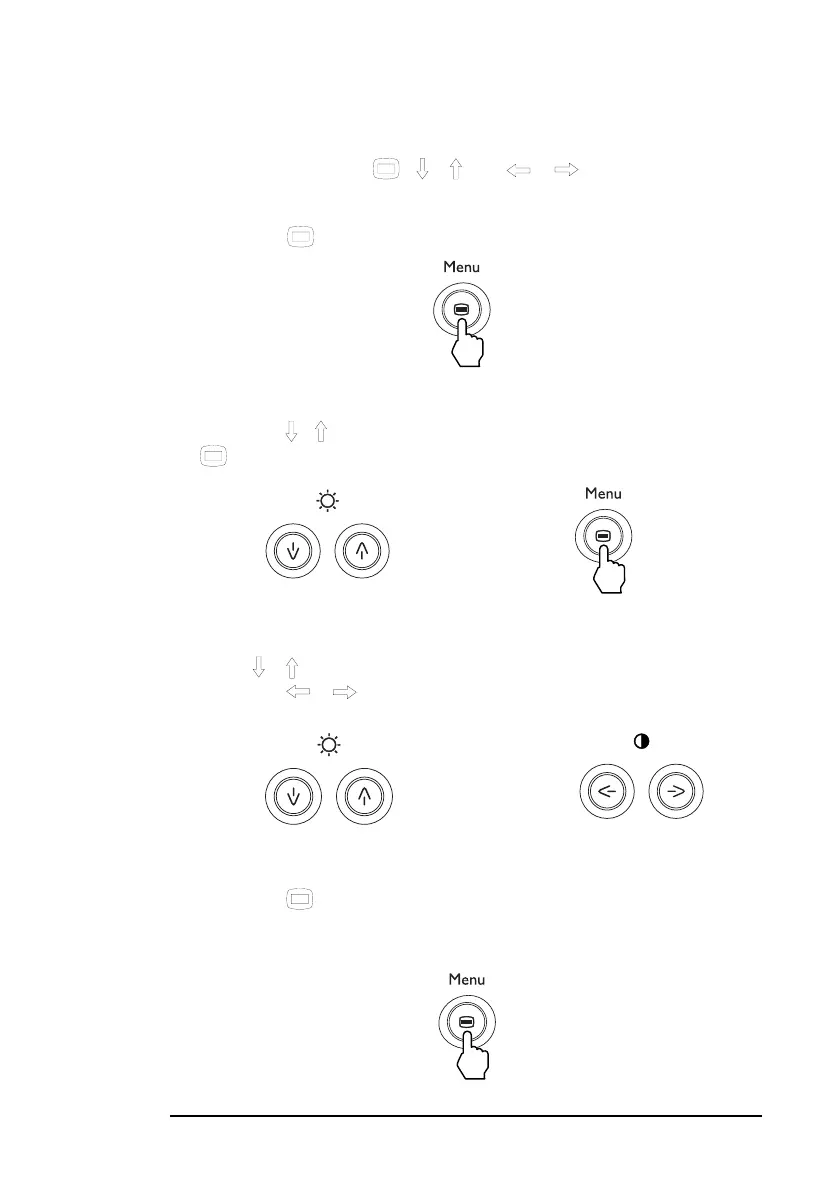
The following is an overview showing how to use the On-Screen
Menu facility using the
, /
and /
buttons.
To display the main MENU.
1 Press the button to display the main MENU on your screen.
To select the menu you want to adjust.
2 Press the / buttons to highlight the desired menu. Press the
button to select the menu item.
To adjust the menu.
3
Press / the buttons to select the item you want to adjust.
4
Press the / buttons to make the adjustment.
To close the menu.
5 Press the button once to return to the main MENU and twice
to return to normal viewing. If no buttons are pressed, the menu
closes automatically after about 30 seconds.
➨
➨



 To Next Page