GaugE Operating Guide
8
Call Us: (800)215-0894
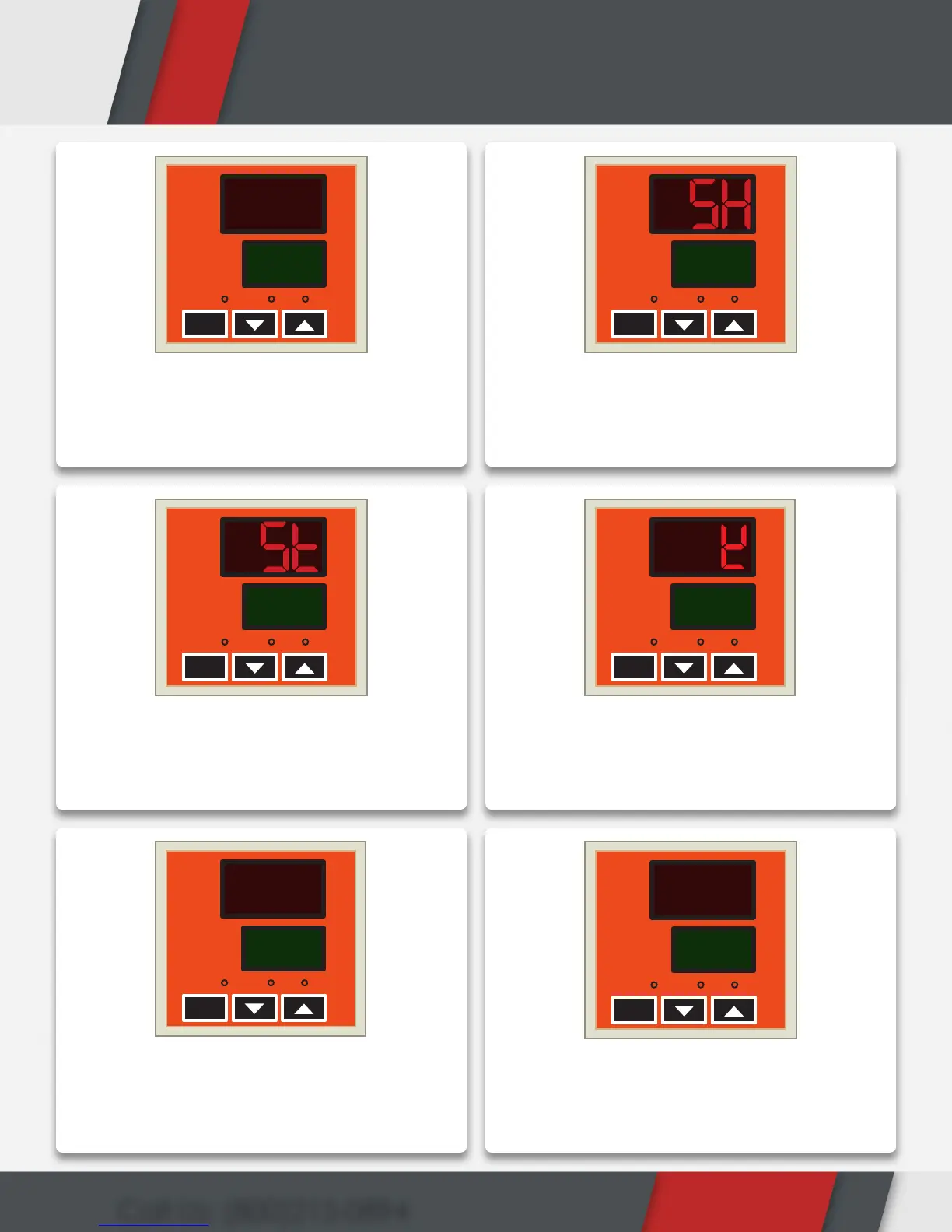
Turn on the red rocker switch and the heat
press gauge display should illuminate
ON to the Main Screen as shown in the
illustration above.
Press “SET” to switch to “SH”. Here you can
set the desired temperature. Use the “▲”
and “▼” buttons to increase or decrease
this value
Press “SET” to switch to “ST”. Here you can
set the timer. Use the “▲” and “▼” buttons
to increase or decrease the seconds.
Press set to return to the Main Screen.
To switch between Fahrenheit and Celsius,
hold “▲” and “▼” together from the Main
Screen. Increase “LY” to 88.
Press “SET” 3 times to go to “CF” screen.
Use “▲” and “▼” to alternate between
your desired temperature scale. Press
“SET” 3 times to return to Main Screen.
From the Main Screen you can start
heat pressing! If you desire to switch
temperature scales again repeat steps 4
& 5.
HEATAT
SV
PV
TIME
SET
350
98
F/C°
HEATAT
SV
PV
TIME
SET
350
F/C°
HEATAT
SV
PV
TIME
SET
3
F/C°
HEATAT
SV
PV
TIME
SET
350
105
F/C°
HEATAT
SV
PV
F/C°
TIME
SET
88
L
HEATAT
SV
PV
TIME
SET
C
CF
F/C°
1
3
5
2
4
6


 To Next Page