238 Programs
12.6 Comm Manager
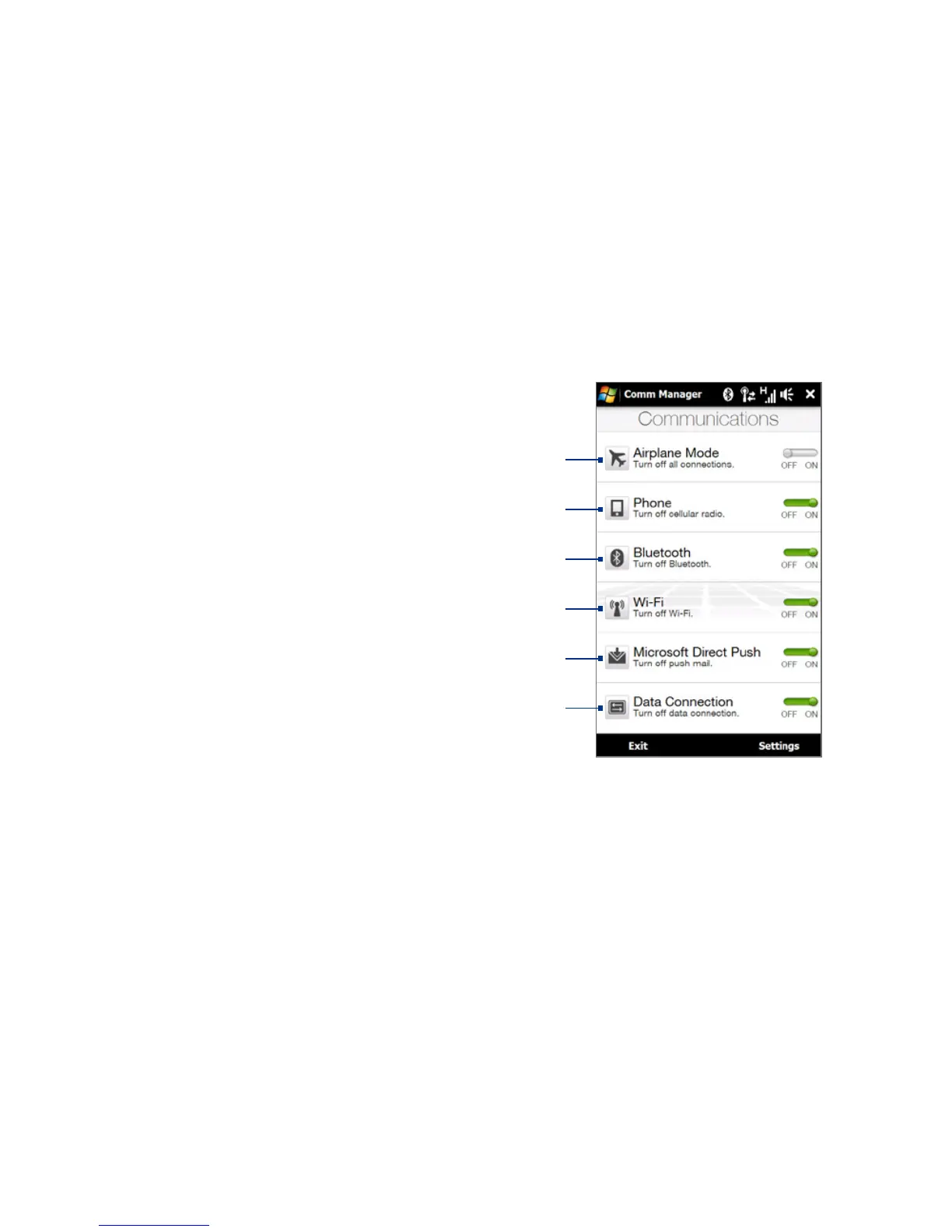
Comm Manager is a central location where you can easily turn on and off the
communication features of your device such as the phone, Bluetooth, Wi-Fi, and
data connection.
To access the Comm Manager
Do one of the following:
On the TouchFLO 3D Home screen,
slide to the Settings tab and then
touch Communications.
Touch Start > Programs >
Comm Manager.
Touch Start > Settings >
Connections tab > Comm Manager.
•
•
•
1
3
2
4
5
6
1 Switch Airplane Mode on or off. Turning on Airplane Mode turns off the phone,
Wi-Fi and Bluetooth functions. For more information, see "To enable or disable
Airplane Mode" in Chapter 2.
2 Switch the phone on or off. Tap Settings > Phone to set the ring tone and other
phone settings. See Chapter 13 for details.
3 Switch Bluetooth on or off. Tap Settings > Bluetooth to configure Bluetooth on
your device. See Chapter 9 for details.
4 Switch Wi-Fi on or off. Tap Settings > Wireless LAN to configure wireless network
connection settings. See Chapter 8 for details.



 To Next Page