Step 4 Turn on the DC switch between the PV string and the SUN2000 if there is any.
Step 5 Turn on the DC switch at the bottom of the SUN2000.
Step 6 Observe the LEDs to check the SUN2000 operating status.
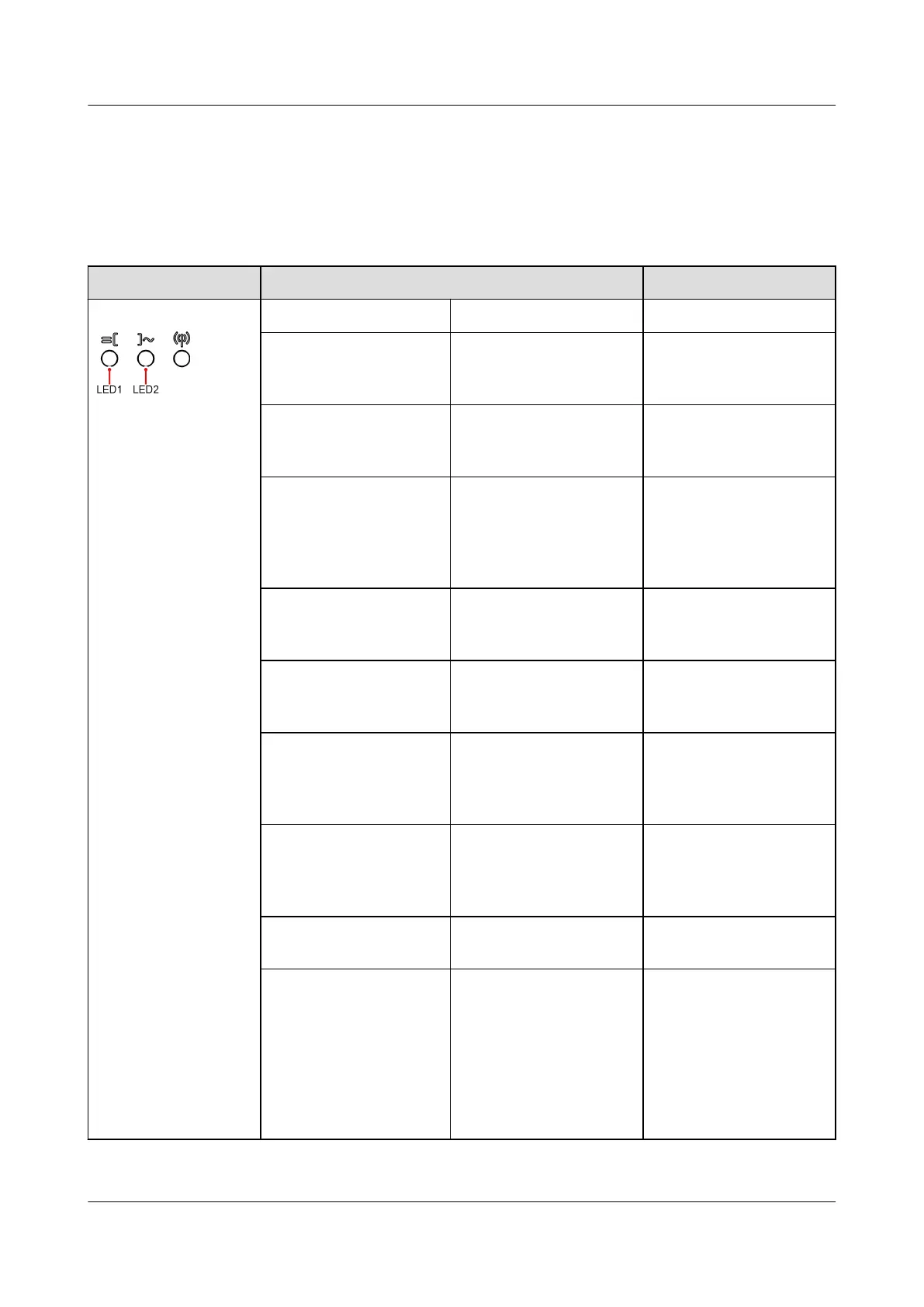
Table 6-2 LED indicators 1
Category Status Description
Running indicator LED1 LED2 –
Steady green Steady green The SUN2000 is
operating in grid-tied
mode.
Blinking green at long
intervals (on for 1s
and then o for 1s)
O The DC is on and the
AC is o.
Blinking green at long
intervals (on for 1s
and then o for 1s)
Blinking green at long
intervals (on for 1s and
then o for 1s)
Both the DC and AC
are on, and the
SUN2000 is not
exporting power to the
power grid.
O Blinking green at long
intervals (on for 1s and
then o for 1s)
The DC is o and the
AC is on.
Steady orange Steady orange The SUN2000 is
operating in the o-
grid mode.
Blinking orange slowly O The DC is on, and the
SUN2000 has no
output in the o-grid
mode.
Blinking orange slowly Blinking orange slowly The SUN2000 is
operating in the
overload in backup
mode.
O O Both the DC and AC
are o.
Blinking red at short
intervals (on for 0.2s
and then o for 0.2s)
– There is a DC
environmental alarm,
such as an alarm
indicating that High
String Input Voltage,
String Reverse
Connection, or Low
Insulation Resistance.
SUN2000-(2KTL-6KTL)-L1
User Manual 6 System Commissioning
Issue 10 (2023-02-13) Copyright © Huawei Technologies Co., Ltd. 67



 To Next Page