EasyManua.ls Logo

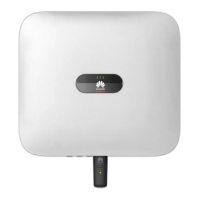
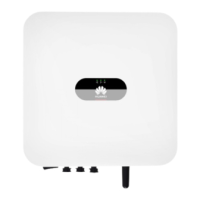
Huawei SUN2000-3KTL-L1 - User Manual

Huawei SUN2000-3KTL-L1
137 pages
Print Icon
To Next Page IconTo Next Page
Loading...
SUN2000-(2KTL-6KTL)-L1
User Manual
Issue 10
Date 2023-02-13
HUAWEI TECHNOLOGIES CO., LTD.

Table of Contents

Questions and Answers

  • P
    popejonathanSep 7, 2025
    What causes a DC Arc Fault in a Huawei SUN2000-3KTL-L1?
    • R
      Rachel StokesSep 7, 2025
      A DC Arc Fault in your Huawei Inverter can be caused by arcing or poor contact in the PV string power cables. Check whether the string cables arc or are in poor contact.
  • E
    Elizabeth WilsonAug 25, 2025
    Why is my Huawei Inverter showing High String Input Voltage?
    • M
      Mike ReevesAug 25, 2025
      If your Huawei Inverter displays a High String Input Voltage error, it's because the PV array is not properly configured. Specifically, too many PV modules are connected in series, causing the open-circuit voltage to exceed the SUN2000's maximum operating voltage. To resolve this, check the serial connection configuration of the PV string and ensure that the PV string open-circuit voltage does not exceed the SUN2000's maximum operating voltage. After correcting the PV array configuration, the alarm should disappear.
  • B
    Brian CarterAug 25, 2025
    What to do if Huawei SUN2000-3KTL-L1 Inverter displays DC Arc Fault?
    • S
      Steven HendersonAug 26, 2025
      If your Huawei Inverter displays a DC Arc Fault, it means the PV string power cables are arcing or have poor contact. You should check whether the string cables arc or are in poor contact.
  • S
    Stacey KeySep 16, 2025
    How to cool down my Huawei SUN2000-3KTL-L1?
    • M
      morrisjuliaSep 16, 2025
      If your Huawei Inverter is overheating, it's likely installed in a poorly ventilated area, the ambient temperature is too high, or the device isn't working correctly. Check the ventilation and ambient temperature around the installation location.
  • P
    Peter GaySep 23, 2025
    How to fix Upgrade Failed on Huawei SUN2000-3KTL-L1 Inverter?
    • R
      Roy JohnsonSep 23, 2025
      If the Huawei Inverter displays 'Upgrade Failed or Version Mismatch', it means the upgrade did not complete normally. Try performing the upgrade again. If it fails multiple times, contact your dealer or Huawei technical support.
  • D
    Dawn EllisonSep 12, 2025
    What to do if my Huawei SUN2000-3KTL-L1 has a Device Fault?
    • T
      Taylor JacksonSep 12, 2025
      If your Huawei SUN2000 Inverter has a Device Fault, turn off the AC output switch and DC input switch, and then turn them on after 5 minutes.
  • M
    Michelle PerkinsSep 2, 2025
    What to do if Huawei Inverter Upgrade Failed or Version Mismatch?
    • W
      Whitney HollandSep 2, 2025
      If your Huawei Inverter displays an Upgrade Failed or Version Mismatch error, perform an upgrade again.
  • D
    Dorothy AliSep 3, 2025
    What to do if Huawei SUN2000-3KTL-L1 Inverter showing Faulty Power Collector?
    • B
      bowmanjamesSep 3, 2025
      If your Huawei Inverter is showing a Faulty Power Collector message: * Check that the configured power meter model is the same as the actual model. * Check that the communications parameters for the smart power sensors are the same as the SUN2000 RS485 configurations. * Check whether the smart power sensor is powered on and whether the RS485 communications cable is connected.
  • H
    Hayley DixonSep 23, 2025
    Why is Huawei SUN2000-3KTL-L1 Inverter showing Off-grid output overload?
    • H
      hopkinskevinSep 23, 2025
      If your Huawei Inverter shows an 'Off-grid output overload' message, the output is either overloaded or short-circuited. Check whether the device output is short-circuited and whether the device load configuration exceeds the rated value.
  • C
    Carolyn BurtonAug 29, 2025
    What to do if my Huawei Inverter shows Low Insulation Resistance?
    • K
      Kiara FosterAug 29, 2025
      If your Huawei Inverter shows a Low Insulation Resistance error, it indicates a short circuit between the PV array and the ground, or that the ambient air of the PV array is damp, causing poor insulation. First, check the output impedance of the PV array to ground. If there is a short circuit or lack of insulation, rectify it. Second, check that the PE cable of the SUN2000 is correctly connected. Third, if the impedance is lower than the specified protection threshold in rainy and cloudy days, set Insulation resistance protection using the mobile app, SmartLogger, or NMS.

Summary

1 Safety Information

1.1 Personal Safety

Safety precautions related to personal injury, electric shock, and fire.

1.2 Electrical Safety

Safety precautions related to electrical hazards and grounding.

4 System Installation

Installation Position Selection

Guidelines for selecting the optimal installation location.

4.5.1 Wall-Mounted Installation

Detailed steps for wall-mounting the SUN2000.

4.5.2 Support-Mounted Installation

Detailed steps for support-mounting the SUN2000.

5 Electrical Connection

Electrical Connection Precautions

Essential safety precautions before making electrical connections.

5.2 Preparing Cables

Instructions for preparing various types of cables for connection.

5.3 Connecting PE Cables

Procedure for connecting PE (ground) cables.

5.6 Connecting an AC Output Power Cable

Steps for connecting the AC output power cable.

5.7 Connecting DC Input Power Cables

Procedure for connecting DC input power cables.

5.8 Connecting Battery Cables

Steps for connecting battery cables.

6 System Commissioning

Pre-Power-On Verification

Checklists for verifying the system before powering on.

6.2 System Power-On

Steps and prerequisites for powering on the SUN2000 system.

7 Man-Machine Interaction

7.1 App Commissioning

Steps for commissioning the system using the FusionSolar App.

7.2 Parameters Settings

Guide to setting various system parameters.

7.2.1 Energy Control

Controls for managing power output and energy flow.

7.2.1.1 Grid-tied Point Power Control

Settings for controlling power output at the grid connection point.

7.2.1.2 Inverter Output Apparent Power Control

Controls for managing apparent power output.

7.2.1.3 Battery Control

Settings for controlling battery charging and discharging.

8 System Maintenance

8.1 System Power-Off

Steps to safely power off the SUN2000 system.

8.2 Routine Maintenance

Schedule and procedures for routine system maintenance.

8.3 Troubleshooting

Common alarms and their troubleshooting measures.

10 Technical Parameters

10.1 SUN2000 Technical Specifications

Detailed technical specifications for the SUN2000 models.

B Device Commissioning

C Resetting Password

D Rapid Shutdown

E Locating Insulation Resistance Faults

Insulation Resistance Fault Location

Procedure to identify and locate insulation resistance faults.

Huawei SUN2000-3KTL-L1 Specifications

General IconGeneral
Max. efficiency98.4%
Max. input voltage600 V
Nominal output power3000 W
Dimensions (W x H x D)365 x 365 x 156 mm
Operating temperature range-25°C to +60°C
Nominal AC voltage220 V / 230 V / 240 V
MPPT voltage range90 V - 560 V
Rated input voltage360 V
Number of MPPTs2
CoolingNatural Convection
Protection degreeIP65
Rated output voltage220 V / 230 V / 240 V
Output frequency50 Hz / 60 Hz
Power factor0.8 leading ... 0.8 lagging
THDi<3%
Efficiency98.4%
Warranty10 years
Max. apparent AC power3300 VA
Max. output power3300 W

Related product manuals