3
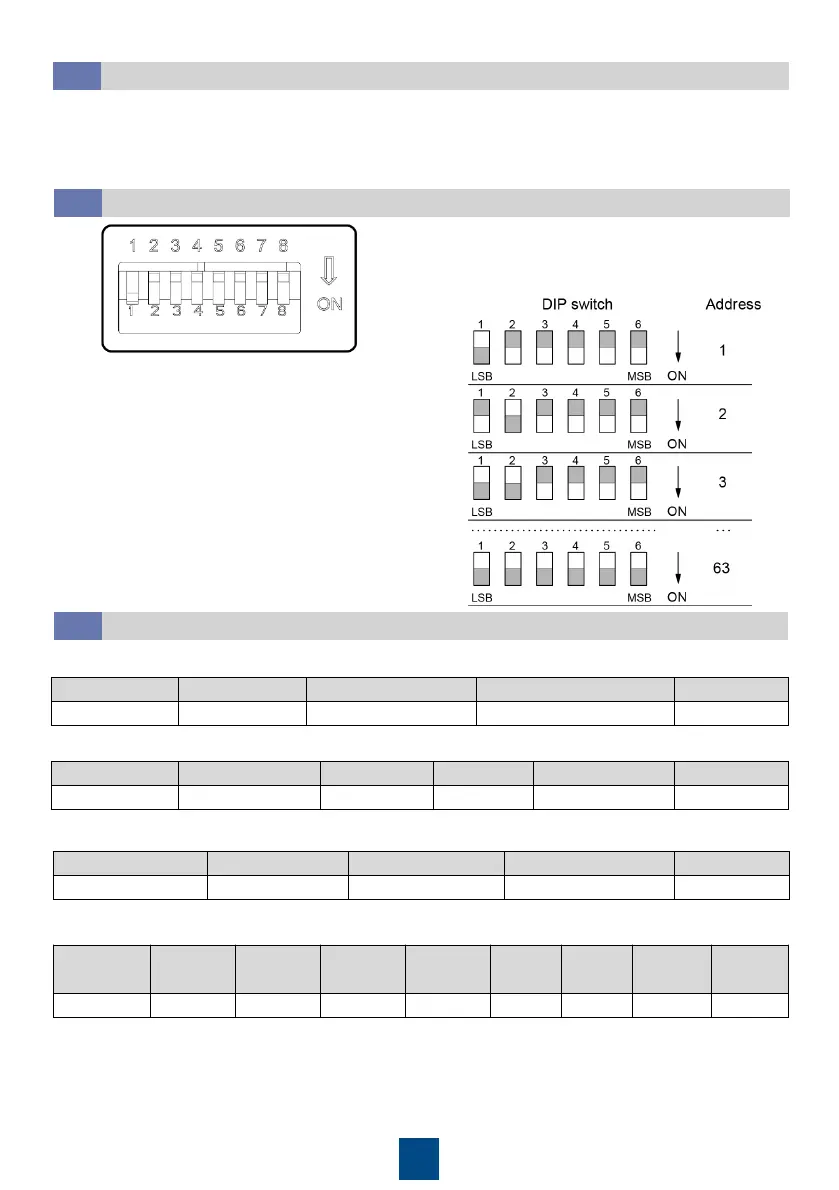
Device Address Setting
4.2
Toggle switches 1–6 are used to set device
addresses, toggle switch 7 is reserved, and toggle
switch 8 is used to switch the temperature unit.
1. Hold down the button when the baud rate is displayed until the baud rate starts blinking.
2. Press the button to switch the baud rate between 9.6, 19.2, 38.4, and 115.2 which respectively
indicate 9600 bps, 19200 bps, 38400 bps, and 115200 bps.
3. Select a baud rate, press and hold the button until all indicators light up.
Baud Rate Setting
4.1
DIP switch
Device addresses are set in binary coding format in
the range of 1–63. The first bit is the least significant
bit, and the sixth bit is the most significant bit. ON
indicates 1 and OFF indicates 0.
Temperature and Humidity Querying Examples
4.3
Temperature and humidity response example:
Device Address Function Code Register Address Quantity of Register CRC16
01 03 00 02 00 02 65 CB
Temperature and humidity query command example:
Device Address Function Code Byte Length Temp. Humidity CRC16
01 03 04 00 F6 01 1F 5A 59
The preceding data is in hexadecimal format. The temperature F6 is 246 after being converted to
decimal format, indicating that the temperature is 24.6°C. The humidity 11F is 287 after being
converted to decimal format, indicating that the humidity is 28.7% RH.
The NTC port is not connected. The NTC value response data is 80 00.
NTC temperature query command example:
Device
Address
Function
Code
Byte
Length
NTC1
Value
NTC2
Value
…… NTC5
Value
NTC6
Value
CRC16
01 03 0C 01 0B 01 0A …… 80 00 80 00 E3 F3
NTC temperature response command example:
Device Address Function Code Register Address Quantity of Register CRC16
01 03 00 21 00 06 95 C2











 To Previous Page