Procedure
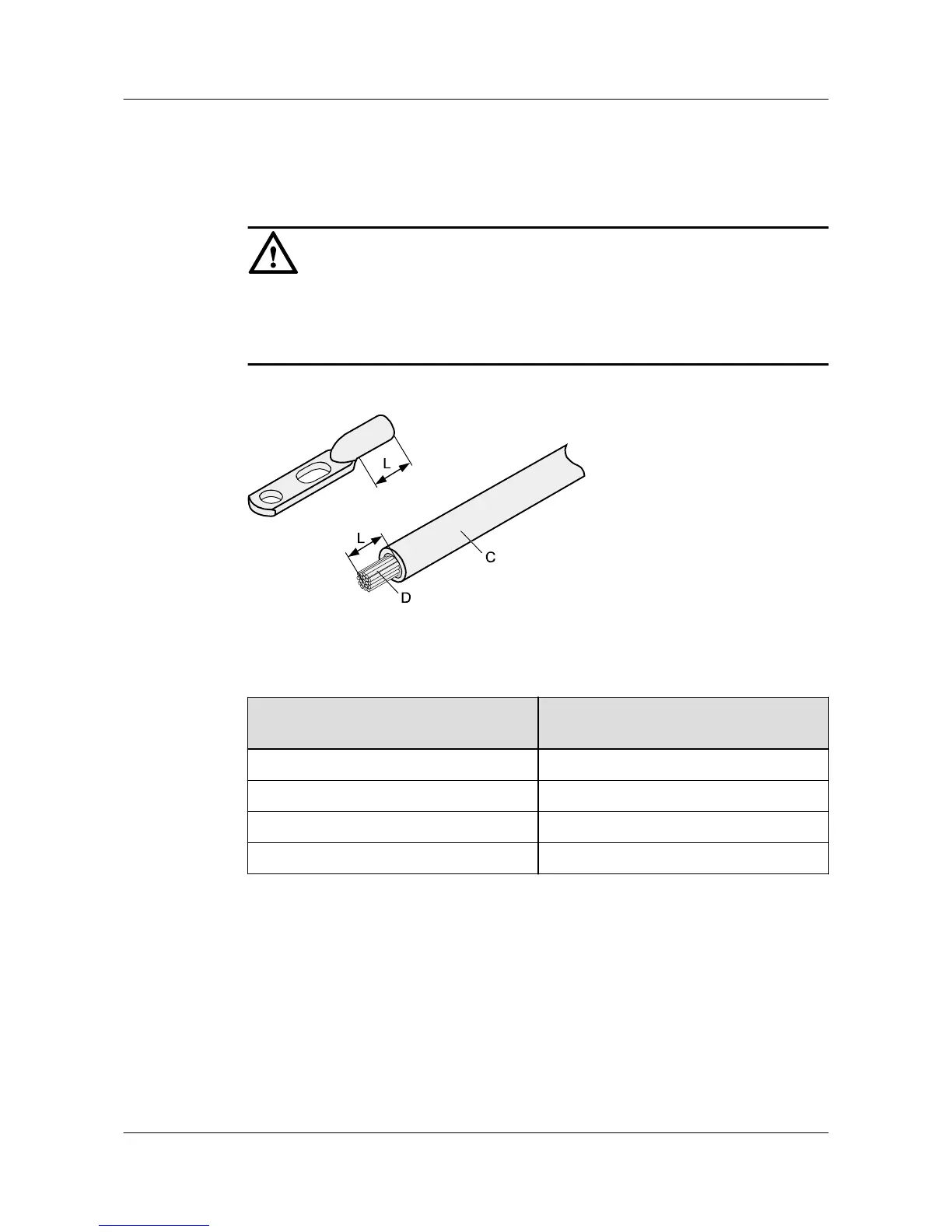
Step 1 Strip a part of the insulation to expose the cable conductor with a length of L, as shown in
Figure 5-7. The recommended values of L are listed in Table 5-2.
NOTICE
l When you strip a power cable, do not damage the conductor of the cable.
l If the bare crimping terminal is not provided by Huawei, you can adjust the value of L as
required.
Figure 5-7 Stripping a power cable (JG terminal)
Table 5-2 Mapping between the cross-sectional area of the conductor and the value of L
Cross-Sectional Area of Conductor
(mm
2
(in.
2
))
Value of L (mm(in.))
16 (0.025) 13 (0.51)
25 (0.039) 14 (0.55)
35 (0.054) 16 (0.63)
50 (0.077) 16 (0.63)
Step 2 Put the heat shrink tubing onto the bare crimping terminal, as shown in Figure 5-8.
AP7050DE
Hardware Installation and Maintenance Guide
5 Appendix
Issue 01 (2016-04-15) Huawei Proprietary and Confidential
Copyright © Huawei Technologies Co., Ltd.
32





 To Next Page