4
Click Basic Settings > Internet Settings,
choose 3.5G Client.
If you are required to enter the PIN code, enter the
correct one. If you fail to enter the correct PIN or
PUK code, the network-related functions are
unavailable.
The SIM card is supplied by the service provider.
For details, contact your service provider.
When the Save PIN Code check box is selected,
the Auto validation is enabled.
If Auto validation is enabled, the PIN code is
recorded and automatically validated after each
restart.
If PPP Connection is Manual, click Connect/
Disconnect to connect to or disconnect from the
network.
If PPP Connection is Auto or On Demand, refresh
the page to view the current network connection
status.
Wait for several minutes. If you are notified that
the connection is successful, you can start the
browser and enter the website address to access
the Internet.
Restoring the Factory Defaults
If you need to reconstruct the network or you forget the
changes of some parameters, you can choose to restore
factory defaults and reconfigure the device.
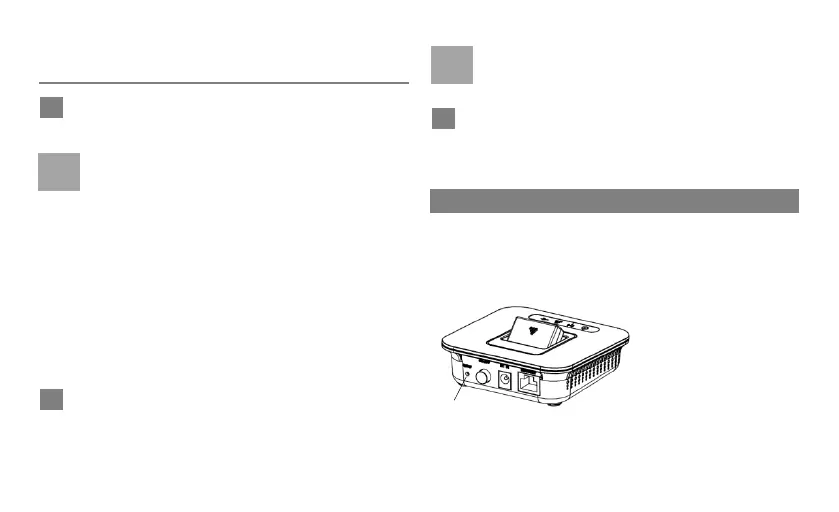
Reset: Press and hold
it for 2 seconds to
restore the factory
defaults.
Note: After this
operation, all
configurations are
restored to the defaults.



 To Next Page