Nu
mbe
r
Name Description
15 Back clip —
16 Battery —
NOTE
Functions of the keys vary depending on the setting on the network side and the software version.
Keypad
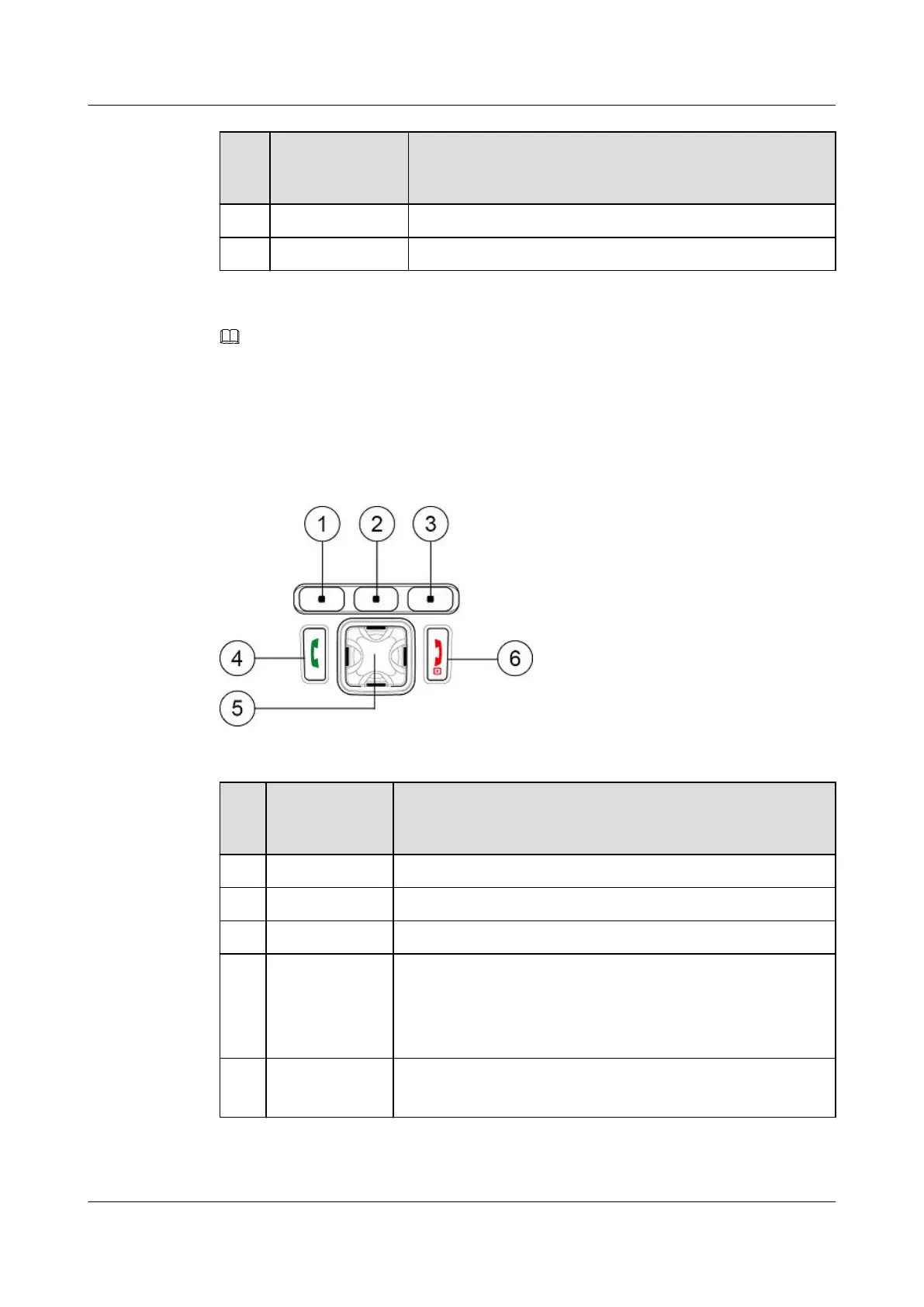
Figure 2-2 shows the keypad of an EP631S.Table 2-2 describes the keys on the keypad.
Figure 2-2 Keypad of an EP631S
Table 2-2 Keys on the keypad
Nu
mb
er
Name Description
1 Left softkey Used for screen display functions.
2 Center softkey Used for screen display functions.
3 Right softkey Used for screen display functions.
4 Call key It is also called the Green key.
l Press to answer a call.
l Press to display the call record. Select a record and press to
make a Point To Point (PTP) voice call.
5 Navigation key
l Press to control up/down, or left/right.
l Set as the hot key to enter the application quickly.
EP631S
Quick Guide
2 Appearance
Issue 02 (2018-05-08) Huawei Proprietary and Confidential
Copyright © Huawei Technologies Co., Ltd.
6









 To Next Page